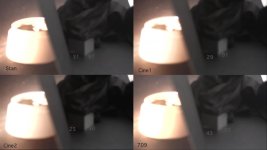
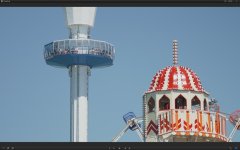
FS100 PICTURE PROFILE RECOMMENDATION for these 3 kind of shots

I think you need do do your own tests

Some flat profiles fall apart when grading
Some shots wont need grading
Some profiles cant blow a highlight without showing strange colour banding
Some shots you will be able to keep exposure inside the DR

My personal profiles use a high shoulder 105, and lift the shadows with black gamma

Profiles built in a lab, may or may not work on your location, with your light management (fill lights - the more you can afford the more punchy profile you can use and the more banding you can avoid and micro detail you can find in terms of micro contrast)

Believe nothing - test

S

S
 
My personal favourite gamma curve is CineTone 2. It has taken me ages to work out how to get the best from it. The trick is to expose to the right to keep as much black info up in the mid tones while not clipping whites. The bottom end of this curve is very contrasty but if you use a knee and slope commensurate with the lighting conditions and fully use the 100-109 ire region you'll get stunning results. You MUST bring these superbrights back into legal territory in post.

Do the same with Cinetone 1 for less bright/contrasty situations. CT1 and CT2 curves grade very nicely. STD gamma curve seems to have a noisy region in the darker tones that can break up when grading. I'd love to know if anyone else has spotted this. It's in the 10-20 ire region.

Don't use REC709 curve unless you want broadcast blown highlights with banding and posterisation. Not a fan of this gamma curve.

Avoid sharpening in camera as much as possible and let your lens choice dictate the sharpness of the image. Just my preference.
 
It is my opinion the Cine One bands less than Cine Two (as the highlights are clipped) meaning that Nirv and I disagree.. probably because we want different things from our profiles, hence my advice to test and find the right profile for you

Cine2 banding more than Cine1.. and IMO the best highlight roller

spaces2.jpg
 
Sam what are you knee and slope settings for Cine 1 and Cine 2.

I am using 85-100 +3 on both my Cine1/2 settings. It depends on the lighting and what I'm shooting. You can see the knee on the Histo and if it is too shallow I bump it up as far as possible to get some more values into the whites.

I'm quite sure others would pickup my camera and be disgusted but it works for me and I get constantly great results now. Well pleased with it. I'm looking forward to sharing some work that isn't covered by NDA.
 
I leave the knee at 105 (from memory)

I think any knee introduces colour shift so would like it off (straight) and 105 is the closest you can get to that AFAIK

S
 
I leave the knee at 105 (from memory)

I think any knee introduces colour shift so would like it off (straight) and 105 is the closest you can get to that AFAIK

S

The reason you are seeing different results between Cine1 and Cine 2 is because Cine2 is 100 iso lower than Cine 1. In all my hours of anal testing Cine2 showed better highlight handling in the very brightest of conditions.

But hey, I think we've finally established that PPs are as much about personal preference as they are maximising the performance of the camera. So I won't try and change your mind about leaving the knee at 105. It's whatever works for you.

This image isn't from an F3 (as I jokingly said in another thread. ;) ) The image is not over exposed it's just the grade I chose. The people were that pasty as the UK a month ago had not had much sun so don't expect leathery US skin tone look. They were also smothered in suncream giving a sheen too. I think the FS100 handles this scene superbly well giving loads of room for grading.
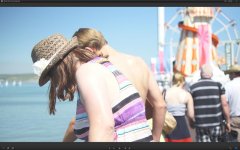
 

Attachments

  • F3.jpg
    F3.jpg
    65.3 KB · Views: 1
The reason you are seeing different results between Cine1 and Cine 2 is because Cine2 is 100 iso lower than Cine 1.

Wrong. One needs to examine my test methodology

I am bracketing vey carefully to equalising exposures between profiles to negate any ISO shift and explore the profile in its purest form

Also my sidelit object you get to see roll off, the curved nature of the object means you get to examine the roll off character even if the is a variance in exposure

the roll-off just happens at a different point on the item

the test image is also shot out of focus, to 'smooth' the test items physical imperfections to create smoother tonality on the test image

Anal enough? :)

S
 
Last edited:
Actually I have failed to equalise exposures on my 'target' dark grey 90/255 grey block' as the image is annotated

The test still functions as a roll off test as the bright item still shows a roll to blown

S
 
But hey, I think we've finally established that PPs are as much about personal preference as they are maximising the performance of the camera. So I won't try and change your mind about leaving the knee at 105. It's whatever works for you.

I think PPs are 'absolute truths' what varies between users is their shooting style, personal aesthetic* and scene DR, also flawed test methodologies being employed by some to develop profiles..
-failure to consider the DR in true daylight not studio scenes (Abel)
-failure to test image collapse under a grade (Frank?) or acceptance of that collapse due to personal aesthetic or image content
-failure to examine tonality and colour shifting by analysis of B+W wedges (Abel)

Which is why our OP should test.

I would summarise thus..

-Flat profiles may fall apart when graded on tonal areas

-Toppy - 105 profiles will not show less colour banding when the highlights roll to white (my choice)

-medium profiles can work well if exposure can be controlled so that the entire scene is within the range of the camera but tend to exhibit worse colour shifts than toppy profiles

controlling an entire scene can require huge amounts of lighting to keep even the most specular point source seen in frame to 255


That is why the op should test a variance for himself

The beach shot is not overexposed its just high key, it also has no specular highlights that are miles above 'key' so is therefore not a challenging exposure situation in the way that my tests with a specular highligh way above key are.. I am however interested in the lightness of the shadow areas, and would love to hear some settings..

To the OP - you have probably drifted off to sleep now!
In summary, I would suggest that, the more contrast in a profile the less artifacts there are, but the challenges of correct exposure is raised and ability to handle wide DR is reduced, one needs to find a personal point of trade off on that scale, typically driven by scene and lighting budget, Articfacts vs DR**

*personal aesthetic in terms of acceptable artifacting; noise, colour shifts, banding, not scene content
.. although subtle tonality in scenes will affect the choices for example PBs boxing video is graded so hard that tonaliy is lost and therefore not an issue in the original profile choice

** a good example of 'scene control' was the zacuto shootout where Den Lennie was able to get a good look from the FS100 by employing a ($4k) Joker HMI 400 for fill - a light not available to all, this enabled him to minimise artifacts by controlling DR - your profile choice will de driven by your lighting budget

S
 
Last edited:
Maybe another way of look at profiles is thus

Toppy 105 profiles - like tranny film, great colours, low DR handling, minimal space to grade (the profile of the true hard case)

Med profiles - negative film - some flex in post moderate colours, some artifacts at the top end (the choice of a sensible person like Nirv)

Flat profiles - Like wallmart/adsa negative film, out of date, with a couple of soft filters on the lens (the choice of arthouse only shooter)

your choice


S
 
Last edited:
Wrong. One needs to examine my test methodology

I am bracketing vey carefully to equalising exposures between profiles to negate any ISO shift and explore the profile in its purest form

Also my sidelit object you get to see roll off, the curved nature of the object means you get to examine the roll off character even if the is a variance in exposure

the roll-off just happens at a different point on the item

the test image is also shot out of focus, to 'smooth' the test items physical imperfections to create smoother tonality on the test image

Anal enough? :)

S

I'd say you were wrong using the term roll-off with a 105 knee.

Your tests aren't comparing roll-off performance of the gamma curves but are a comparison of the gradient of the curves.

Unfortunately the forum software seems to recompress the images and take out the fine graduations in the skin tones. But Can I draw your attention to the rear of that image. None of that white shiny painted gubbins was clipped.

Here is a close up of the gubbins. The preset holds onto whites, clips to white elegantly and preserves black detail in the cab (better than my eyes as I couldn't see the man in the cab at all). This was shot a 1pm in the harshest light possible i.e. zero cloud cover.

This was a pre-production job to show the client that the camera/me was up to the task. The background to this job was that the client (a yacht manufacturer) had used someone to shoot their yachts and had just delivered white blown out floating blobs which kinda defeated the object of the exercise. I had to show we can hold onto fine white detail while not underexposing like crazy and losing black detail. So I took myself down to the coast and shot some test shots in the most challenging lighting the British climate could offer.

I passed the test but the client can't make their mind up what to do and when to do it! Or are looking for someone cheaper to f**k it up again!
 

Attachments

  • DR_Test.jpg
    DR_Test.jpg
    52.1 KB · Views: 1
Nothing about my test, which is designed to show what happens when you clip, takes away from your image which are very interesting, you have protected the whites, by stopping down and are still retiaining excellent shadow detail

If you care to expand on your profile im all ears

S
 
Nothing about my test, which is designed to show what happens when you clip, takes away from your image which are very interesting, you have protected the whites, by stopping down and are still retiaining excellent shadow detail

If you care to expand on your profile im all ears

S

I did explain in a previous post.

The trick is to expose to the right to keep as much black detail while using the knee position to hold as much highlight information in the 100-109 region without baking in an odd look. The Cine2 slope should be as close to +5 as possible for the scene.

Then bring up the blacks and bring down the whites to legal levels in post.

You won't get anywhere with a knee at 105, the knee should be as low as possible for the scene. Only you can judge that but normally 85 is a good starting point with +3 Slope. Then expose as high as possible without clipping any white. The histo is your friend rather than zebras. You can see when you're losing white detail by a peak developing at the far right of the histo.

By making the Cine2 curve less flat at the top end by going to +5 and setting the knee low you get (IMHO) a much more usable curve that holds highlights and doesn't destroy all the black info. The images have a more DSLR look about them.

If you have a very flat knee slope you will bake a look into the super brights that will look like gash.
 
Back
Top