FS-100 Picture Profiles

I like that Frank, looks good. Which PPs did you use for that? I tried out the PPs you posted above and really like them. I just got some quick shots but am going to experiment with them some more. Thanks.
 
I used the outdoor and the "Red" and the "out of the box" PPs., mostly 80% the outdoor though.


I had some accidental epiphany yesterday, while playing with some settings on the bone yard.

I need to do some further testing, but watch this space and prepare for the "Bonyard-Epiphany" PP. hexe.gif

Frank
 
Frank,

GREAT colors there. I love how much detail we get on the FS100. You said image stabilization was causing the jello, is this a post process you are using? OR IS in the lens? Just trying to understand where that is coming from, as I've not seen anything like that yet even hand held.

I am going to have to play with your color profiles on the outdoor stuff as I REALLY like what you are getting. The only thing that scares me about going to a RED type palette is we only have 8-bit to work with, and it seems to make more sense on the RED to shoot so flat, but with these cameras, try to nail as close as you can in camera just to eliminate as much banding as possible in post with the grade.

Rick
 
I stabilized the footage in post, since it was shaky as helll. The original footage shows no jello at all. The RED setting, is just something I played with, cause I wanted something to shoot during the blue hour.
 
AHH okay. Interesting. The only stabilization in post I have used is the track motion in AE, which the results were not stellar, but not jello. I fear people are going to think that is the camera! Haha.

Nevertheless, I just love the colors. I think I am going to notch down the colors a bit as well. I did this on the AF100 for the same reason, and I think the FS100 too has saturation to spare!!!!
 
I shoot some tests outdoors with your PPs Frank. I really like them. They are a very nice starting point to dial them in for my personal preferences. I was very surprised how good the "Out of the box" setting is, but find that the "Outdoor, CC in post" setting gives me much more room to play. That one is my fav. I am going to move indoors this week and start testing PPs for that. Thanks again.
 
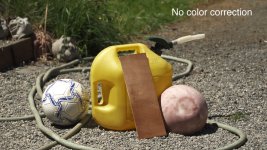
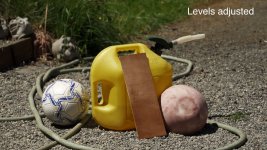
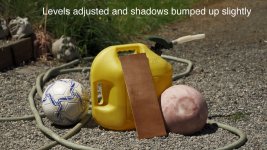
I've come up with some settings I'm very happy with, at least for bright sun. I've attached some frame grabs (let's see who can come up with the best joke about the disembodied heads in the background). I exposed this with the highlight on the soccer ball just starting to clip. It's interesting to note that blacks were not clipped at this setting, even with extreme contrast in the lighting.

PP grab 1.jpgPP grab 2.jpgPP grab 3.jpg

Black level: -2
Gamma: Cinetone 1
Black Gamma: high, level: +7
Knee: Manual, slope: 0
Color mode: Cinetone 2, level: 1
Color Level: -4
Color depth: +5 for all

I started with the settings posted by nyvz and modified them to my own taste. I think he's really on to something with cranking up the color depth. I might even go down to -5 on the color level.

I compared shots with the color depths at 0 and cranked all the way, compensating downward with the color level, vs. color depths at 0. Cranking up the color depths seems to hold detail better in the saturated areas. and seems to give a smoother rolloff in the highlights. The only caveat appears to be that it for some reason it seems to crush the blacks a bit more, and personally I want to avoid this as I'm of the mind that I can always crush the blacks in post if I want. This is why I have scaled back slightly from the color depths all maxed out.

One other note: I'm seeing a slight red shift in the yellow gas can. I'm not sure if I can adjust this with the color depth settings without throwing the other colors out of whack. I'll play around with it and see.

I'd like to add that my intent is to find a profile that gives me the most flexibility in post. I know there are some who feel that 8-bit images can't be graded, but in my experience as long as your exposure is on and color is somewhere in the middle of the range you're after then grading works well.
 
Last edited:
Got the camera today and did a lot of testing the whole day.
Now let me enlighten you with my prefered PP:

Black Level: +1
Gamma: Standard
Black Gamma: Middle +2
Knee: Pont 85%, Slope -2
Colormode: Cinematone 2
Color Level: -4
Color Phase: -1
Color Depth: R-3, G-2, M-1
WB Shift: LB-CC; LB -1, CC -1
Detail: +1

The camera with default settings exagerates a little with reds and greens.

I also tried Cinetone 1 a lot but I see no benefit from it.

EDIT: Latest testing suggests tht those settings I posted need to be optimized a lot. Going minus on color depth is no good idea!
 
Last edited:
I like your color settings. I still prefer the Cinetone 1 gamma curve (knee 105-0) for highlight retention, but your standard settings help with shadow detail. I've modified my color settings to get rid of the red and green issues as follows:

Color level: -5
Color Phase: -1
Color depth: R +3, G +4, B +6, C +6, M +5, Y +6
WB Shift: LB -1, CC -1
 
I like your color settings. I still prefer the Cinetone 1 gamma curve (knee 105-0) for highlight retention, but your standard settings help with shadow detail. I've modified my color settings to get rid of the red and green issues as follows:
Color depth: R +3, G +4, B +6, C +6, M +5, Y +6

Yep, I also tested the color depth setting further the whole night using green, red and blue pillows^^
Color Depth is a weird setting. When going + on red, noise reduces on this particular color, while going the other way adds huge amounts of noise and makes the color brighter. Color depth seems to be almost the same like black gamma, just for colors (red gamma, green gamma etc.)

So going minus seems no good idea. -2 on red feels like doubling the noise for red.
 
I can´t decide between Cinetone 1 or 2 colormode (not gamma).
1 seems warmer, while 2 is a little more contrasty and adds a little magenta. Both are looking good.
 
I can´t decide between Cinetone 1 or 2 colormode (not gamma).
1 seems warmer, while 2 is a little more contrasty and adds a little magenta. Both are looking good.

Look at highlights in any gamma mode with cinematone 2 color and then with any other color mode. Cinematone2 reduces highlight color shifting far more than any other color mode. I'd always go with cinematone 2.
 
Yep, I also tested the color depth setting further the whole night using green, red and blue pillows^^
Color Depth is a weird setting. When going + on red, noise reduces on this particular color, while going the other way adds huge amounts of noise and makes the color brighter. Color depth seems to be almost the same like black gamma, just for colors (red gamma, green gamma etc.)

So going minus seems no good idea. -2 on red feels like doubling the noise for red.

I completely agree that color depth is a weird setting! I tried my earlier settings on a shot with person (R+3, G+4, B+6, C+6, M+5, Y+6), and was surprised at what it did to the skin tones. These values for some reason really accentuate the unevenness of a person's skin (every freckle and blemish is exaggerated) - which could be an interesting look in certain situations. Lowering the values seems to do the opposite (smooth out skin tones) and also seems to increase noise, but I have to say I'm not seeing the drastic increase that you mention. In the end for general purposes, I'm liking R-2, G-1, B0, C0, M-1, Y0. I think this is a nice balance of slightly removing the red cast and smoothing out skin tones at the expense of a touch more noise.

I agree with nyvz that Cinetone2 handles highlight colors better. IMHO this helps maximize the DR of the sensor.

I have also been doing more testing with Standard gamma, knee 85 slope -2, vs. Cinetone1 gamma, knee 105 slope 0. In most cases I can get an identical image from both of these with minor grading (levels, luma curve). But I feel the Cinetone1 gamma does yield slightly better highlight detail and retention. So in most cases I'll stick with this setting.

I have to add that I'm loving having this much control over the image quality. It is really amazing for a camera in this price range.
 
Anyone one experimented with the PPs for available light shooting at night? I am shooting a band live in a small bar this weekend and am open to suggestions. I don't get to see the joint until tomorrow, but from the pictures I have seen of the place looks like the band stand walls are painted black and they like to use lots of red light on the bands. What I want to get a handle on is setting the black levels to maintain shadow detail. I have only done a little bit of night time shooting with available lights, but have not really done much PP comparisons (My project for tonight). Any suggestions for a starting point? Any suggestions on taming red lighting? I hate that sh*t!! Funking with the color depth, for me so far, has really given me some horrible looking reds. Out of the box reds don't impress me on this camera either, and I have not found a setting that really makes it any better. (In all fairness to the FS100, I have never liked reds in dang near anything I have ever shot on video... remember what NTSC stand for...."Never Twice The Same Color"....)
 
Last edited:
Back
Top