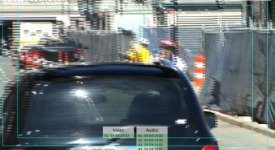
footage all jaggy, in the middle of big shoot!

filmtovideo

Well-known member
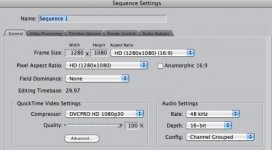
Hi, I'm in the middle of a two day shoot for a big client, shooting 1080i24P (not 24PA) with HVX200. Footage looks fine in camera playback but in FCP 7 viewer and in timeline it looks like this. Capturing through log and transfer, sequence settings, here are sequence settings.
Recorded to a 64GB card, hadn't used one before but tested at rental shop and looked good. Did update in '09 or so to go to bigger cards than original 8GB, have been using 16GB and 32GB plenty of times. Have to shoot more today/tonight, thanks.
 

Attachments

  • Screen shot 2012-03-24 at 10.26.28 AM.jpg
    Screen shot 2012-03-24 at 10.26.28 AM.jpg
    21.4 KB · Views: 0
  • Screen shot 2012-03-24 at 10.30.22 AM.jpg
    Screen shot 2012-03-24 at 10.30.22 AM.jpg
    20.4 KB · Views: 0
looks like a problem with interleaved v progressive formats - Are you sure you recorded p or i? Try importing the footage into a different project type.
 
looks like a problem with interleaved v progressive formats - Are you sure you recorded p or i? Try importing the footage into a different project type.


HVX200 records 1080i 0nly, even with 24P. Just tested with 30P, works okay, tested different card, same problem with 24P, log and transfer settings seem right in FCP.
 
Have you got a short clip? I'll try to load it into premiere and see if I get the same problem?
Paul


Hi, thanks, I just got in from shooting today but I figured it out. Usually FCP figures out certain things, such as when it asks if it should set the sequence settings for the time line. I went into
that and checked field dominance which is usually set to "none" for progressive footage and set it to "lower" which did the trick. It is 24P but in 1080i. I'm used to shooting 720P@24PN 99% of the time.

Strangely though I did a test with 1080i 30P and that didn't exhibit the jagginess; maybe because of the math difference between 24/60 and 30/60?

The jagginess does still appear in the viewer in FCP but in the timeline it looks right when the field dominance has been set.

Thanks for your help.
 
As stated, the jaggedness you are referring to is the difference between progressive and interlaced footage. Since you recorded your clips in 1080i, whenever there is any type of movement, there will be "jaggies". No matter what frame rate you shoot in (24, 30, 60), there will always be horizontal lines breaking up your image as long as you shoot interlaced (1080i - "i" indicating interlaced rather than 1080p - "p" indicating progressive for example). That's why you don't have the same problem when you shoot 720p.

What you need to do is simply deinterlace your footage and this can be done plenty of ways. Most NLE's provided a filter that will deinterlace, however, from personal experience I choose to deinterlace in After Effects. It's all based on personal preference though in terms of how you decide to go about it. Good news is that it's a simple fix; you shouldn't have anything to worry about. I think Andrew Kramer of Videocopilot.net has a old tutorial that shows you how to deinterlace in AE, do a search on his site.

In case your wondering, the reason interlaced footage produces this affect is due to the fact that the interlaced setting is telling your camera to record your video in two separate passes. The image is essentially broken up in a lower field and upper field so it appears as one image but is really two combined sections. That's why you get your jaggies. Hopefully I didn't explain something you already knew and hopefully this info helps. Good luck with your project.
-B
 
Why do you have the compressor set to 1080p30? That's likely your problem right there. 24p footage becomes a big mess when converted to 30p, and it's a bigger mess if it's wrapped in a 60i stream when it's done.
 
What you need to do is simply deinterlace your footage and this can be done plenty of ways.

NEVER deinterlace progressive footage, even if it's wrapped in 60i, as this is. That's probably part of the cause of the mess.

What you want to do in this case is either leave it as 60i, or use Cinema Tools to remove the 2:3 pulldown and make a true 24p file out of it. But you definitely do NOT want to deinterlace it.
 
filmtovideo, your footage is absolutely fine. You need to "remove advanced pulldown" when you import it to FCP. Import into a 24p timeline, not 30p.
 
Back
Top