
Hi there,
Today when editing some footage in Final Cut Pro shot by my C300 Mark II, the image seemed very different than when I shot it. Everything looked way over exposed, but I recalled checking the waveform constantly. After poking around a bit, I found this support article (dated 04/17/17):
https://support.apple.com/kb/PH12685?locale=en_US
It explained how to view change the LUT applied to your log footage. After disabling a Canon Log 3 LUT that had been automatically applied, everything looked as expected! Yay!
Now, I don't want to have to do this for every clip, so how can I disable this auto-log-LUT "feature"? It kills my dynamic range and won't let me pull it back when grading in FCPX!
How long as this been a thing? I haven't been editing much of the stuff I've shot myself because most of the gigs I shoot these days are passed off to another editor. I know I updated FCPX not too long ago and I hope this LUT application wasn't introduced at that point, and if it was, I hope it can be disabled!
Here are some pictures to demonstrate the issue:
http://imgur.com/a/OghZh
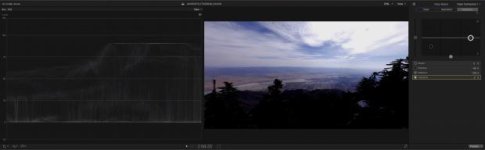
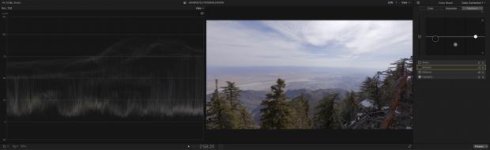
Notice how the corrected Log image looks natural and retains all highlight detail whereas the "corrected" Auto LUT photo clips the highlights no matter how much I bring down the levels.
Today when editing some footage in Final Cut Pro shot by my C300 Mark II, the image seemed very different than when I shot it. Everything looked way over exposed, but I recalled checking the waveform constantly. After poking around a bit, I found this support article (dated 04/17/17):
https://support.apple.com/kb/PH12685?locale=en_US
It explained how to view change the LUT applied to your log footage. After disabling a Canon Log 3 LUT that had been automatically applied, everything looked as expected! Yay!
Now, I don't want to have to do this for every clip, so how can I disable this auto-log-LUT "feature"? It kills my dynamic range and won't let me pull it back when grading in FCPX!
How long as this been a thing? I haven't been editing much of the stuff I've shot myself because most of the gigs I shoot these days are passed off to another editor. I know I updated FCPX not too long ago and I hope this LUT application wasn't introduced at that point, and if it was, I hope it can be disabled!
Here are some pictures to demonstrate the issue:
http://imgur.com/a/OghZh
Notice how the corrected Log image looks natural and retains all highlight detail whereas the "corrected" Auto LUT photo clips the highlights no matter how much I bring down the levels.


