GH4 Filming Corporate/Office Interviews with GH4s

Also, if anyone can recommend some great resource (free or paid) or two-person interview lighting using 3-point LED lighting it would be most appreciated.

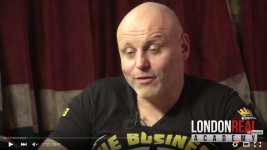
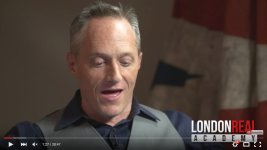
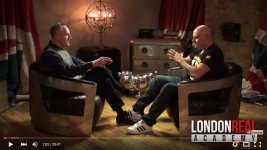
I have reposted the images from another thread I started http://www.dvxuser.com/V6/showthread.php?342912-Wiress-Lav-Recommendation-for-Interviews showing the ideal angles and style I would like to achieve. As you will notice it isn't your typical sterile or cinematic interview filming style, but more discussion and casual focused.


Camera Angle 1
camera-angle-1.jpg


Camera Angle 2
camera-angle-2.jpg


Camera Angle 3
camera-angle-3.jpg


Thanks
 
@andvx, you are on the right track. The images you just posted hold many of clues--if you can learn to read them.

In the wide shot I see two obvious hot spots on the right-side guest and two obvious hotspot on the left-side guest. The bulldog sculpture in the middle tells me that there are two overhead lights, because all the lighting reflections come in what look to be the same pairs. I deduce therefore that there is one overhead light well above and 45 degrees behind the crown of each guest's head, and that each of those lights are aimed so that they hit the face of the opposite-side guest, but not before also hitting the top/back of the same-side guest's head. So each of these two lights is doing double-duty: a rim light for the same-side guest and a fill light for the opposite side guest. Those are two of the the three lighting points. They key light for both guests is hidden in plain sight: it's the groovy globe-cum-candelabra. (Key lights don't have to be in the same location or even the same side as the camera.) So there you have it: 3 point lighting with 3 lights on two guests.

There are thousands of references (beyond the one I just snuck in above) about how to do three point lighting. I recommend reading a few until you think you understand the principle, then flip around the television (or the web equivalent) and just watch some programming. You will instantly recognize the pattern of key-fill-back. Everywhere. All the time.

I also noticed that you commented (again) about how bright your office lighting is. Three point lighting is not about being three times as bright as single-source lighting. Your ultimate three-point lighting setup might be very dark compared to the lights already built into the building. The point of three-point lighting is...big surprise...to make the talent look normal and natural in the room. It's the most counter-intuitive thing, because we never normally experience three-point lighting in our daily lives, so why does it look natural, and why does "natural" lighting look so wrong on camera? Those are the questions answered by the many great tutorials out there. But again: three point lighting is not about pounding out volumes of light, it's about balancing the light in such a way that something as dumb as a video camera can understand what it's supposed to see.

That all said, I have no idea whether the lights you are looking at will have the power and control needed to put the right light where you need it. This is where it pays to have some good friends who can show you their setup and help you understand what to copy, what to scale (up or down), and how to manage it all.
 
@andvx, you are on the right track. The images you just posted hold many of clues--if you can learn to read them.

In the wide shot I see two obvious hot spots on the right-side guest and two obvious hotspot on the left-side guest. The bulldog sculpture in the middle tells me that there are two overhead lights, because all the lighting reflections come in what look to be the same pairs. I deduce therefore that there is one overhead light well above and 45 degrees behind the crown of each guest's head, and that each of those lights are aimed so that they hit the face of the opposite-side guest, but not before also hitting the top/back of the same-side guest's head. So each of these two lights is doing double-duty: a rim light for the same-side guest and a fill light for the opposite side guest. Those are two of the the three lighting points. They key light for both guests is hidden in plain sight: it's the groovy globe-cum-candelabra. (Key lights don't have to be in the same location or even the same side as the camera.) So there you have it: 3 point lighting with 3 lights on two guests.


Hi Michael,
Happy New Year!

Thanks for the information and explanation.


There are thousands of references (beyond the one I just snuck in above) about how to do three point lighting. I recommend reading a few until you think you understand the principle, then flip around the television (or the web equivalent) and just watch some programming. You will instantly recognize the pattern of key-fill-back. Everywhere. All the time.

It's amazing how obvious all of the different lighting becomes once you know what to look for and shift your attention accordingly.


But again: three point lighting is not about pounding out volumes of light, it's about balancing the light in such a way that something as dumb as a video camera can understand what it's supposed to see.

So simple, yet so much impact; thank you!

It's all back to the drawing board for me at the moment with plenty of practice, practice, practice!


That all said, I have no idea whether the lights you are looking at will have the power and control needed to put the right light where you need it. This is where it pays to have some good friends who can show you their setup and help you understand what to copy, what to scale (up or down), and how to manage it all.


Thanks again.
 
I'd suggest wired lavs into a Tascam DR-70D, cheaper and just as good as the H6.

Or if your budget can splurge for it, get a set of RodeLinks. Gives you the freedom of going wireless.

I agree to go with f/1.7 lenses over f/1.2 lenses, at this point in time using f/1.2 would just be wasting your money.
Actually... as you're not going to rely upon autofocus of course, I'd suggest just investing in a set of Nikon AIS or AF-D lenses instead, and using adapters or RJ Lens Turbos with your cameras.

Additionally, go for the cheaper Panasonic G7 over the GH4 instead (as the few key reasons to get a GH4, such as weather proofing, or 96fps, or V-log, are all generally not relevant here. So you could make big $$$ savings here, which can go into any one of many other areas which will need it more).

And yes, please get a few lights! Could be as simple as a few gelled and diffed Redheads, or you could splurge and get kinoflos and dedolights.
 
Though gear is important, experienced crew is more important. I rarely do interviews without an audio guy and a DOP (some times, me). Lighting gear is often rented with the addition of a Gaffer or the DOP provides it. Audio gear is provided by the audio tech. If you are planning on buying cameras, don't. Rent them and use the money saved to get crew. The shoot will go smoother and the client will be happier with the shoot and the final result. I use one camera for the majority of my interviews. Three max, if I need the angles. And crew the cameras. People move around during interviews, which means that the cameras will need to be reframed and focused. You need to focus on the client and the subject. Crew who are good at what they do make your life easier and the end product better.
 
Though gear is important, experienced crew is more important. I rarely do interviews without an audio guy and a DOP (some times, me). Lighting gear is often rented with the addition of a Gaffer or the DOP provides it. Audio gear is provided by the audio tech. If you are planning on buying cameras, don't. Rent them and use the money saved to get crew. The shoot will go smoother and the client will be happier with the shoot and the final result. I use one camera for the majority of my interviews. Three max, if I need the angles. And crew the cameras. People move around during interviews, which means that the cameras will need to be reframed and focused. You need to focus on the client and the subject. Crew who are good at what they do make your life easier and the end product better.

I'll second the crew bit but note that depending on how often you are using gear, should determine whether you buy or rent it. If you're doing interviews every week, then it makes sense to buy cameras, as rental will end up more expensive in that case.

The gear buy/rent question comes down to amortisation - if you can justify it in terms of saving over rental, then buy it.

HTH!

Cheers from Berlin,

Paul :)
 
Back
Top