
Hi all,
I am looking to get feedback on filming (continuous > 30 mins) corporate/office interviews using multiple GH4 cameras.
I have a couple of GH4 bodies but I am yet to purchase any lenses and other equipment (as well as additional GH4s if required). I would really appreciate feedback on what you think is needed, what to look out for, and anything else of importance. From reading these forums there are many of you doing corporate/office interviews with GH4s.
SETUP
The cameras will be used to film uninterrupted interviews for greater than 30 minutes with the intention to use multiple cameras. The quality must be top-notch which is why the GH4s are ideal.
Depending on interview conditions, there will be times when the cameras will be left unattended, so once the cameras start rolling they won’t be monitored or touched until the interview is complete. After their initial placement and setup that’s it!
The reason for multiple cameras is to film both the Host and Subject (they will typically be 1.5-2 metres opposite each other). A mock-up of the “ideal” setup with each camera in order of priority is below. All cameras are GH4s, and the intention is to hit “record” and let the cameras continuously roll and record:
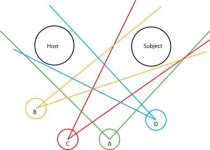
If you view this short 30 second segment of a 3-camera interview this is conceptually the setup and the different angles I am looking to achieve https://youtu.be/izr4s50t1LM?t=60 (1minute to 1 minute 30 seconds). This clip uses three cameras, not four.
LIGHTING
There isn’t an option to bring in stage or film lighting, so lighting will all be bright office lighting with or without a combination of natural light. As office lighting is generally bright, there shouldn’t be any typical limitations or obstacles a low-light environment would introduce that a good lens won’t overcome (Nocticron, etc.).
SOUND & AUDIO
The main recorder is a Zoom H6 with XLR inputs.
FILMING
Given the GH4’s 4K functionality, the intention is to record all cameras in 4K. Even if the final output post-editing is downscaled to HD, the 4K provides the flexibility of cropping the video and cutting unwanted edges out. Also, if there is only one camera on the Subject, while the angle will stay the same, the video can be cropped to give the appearance of a second camera (alternating between the larger and narrower/smaller crop).
I have a few questions all related to the above information and proposed setup:
CAMERA & LENS QUESTIONS
GENERAL QUESTIONS
Thanks very much for your help!
I am looking to get feedback on filming (continuous > 30 mins) corporate/office interviews using multiple GH4 cameras.
I have a couple of GH4 bodies but I am yet to purchase any lenses and other equipment (as well as additional GH4s if required). I would really appreciate feedback on what you think is needed, what to look out for, and anything else of importance. From reading these forums there are many of you doing corporate/office interviews with GH4s.
SETUP
The cameras will be used to film uninterrupted interviews for greater than 30 minutes with the intention to use multiple cameras. The quality must be top-notch which is why the GH4s are ideal.
Depending on interview conditions, there will be times when the cameras will be left unattended, so once the cameras start rolling they won’t be monitored or touched until the interview is complete. After their initial placement and setup that’s it!
The reason for multiple cameras is to film both the Host and Subject (they will typically be 1.5-2 metres opposite each other). A mock-up of the “ideal” setup with each camera in order of priority is below. All cameras are GH4s, and the intention is to hit “record” and let the cameras continuously roll and record:
- Camera A captures the Host’s and Subject’s entire bodies.
- Camera B captures the Subject’s face.
- Camera C captures the Subject’s whole body (or waist up).
- Camera D captures the Host’s face (similar to Camera B with identical or different angle)
If you view this short 30 second segment of a 3-camera interview this is conceptually the setup and the different angles I am looking to achieve https://youtu.be/izr4s50t1LM?t=60 (1minute to 1 minute 30 seconds). This clip uses three cameras, not four.
LIGHTING
There isn’t an option to bring in stage or film lighting, so lighting will all be bright office lighting with or without a combination of natural light. As office lighting is generally bright, there shouldn’t be any typical limitations or obstacles a low-light environment would introduce that a good lens won’t overcome (Nocticron, etc.).
SOUND & AUDIO
The main recorder is a Zoom H6 with XLR inputs.
- Should wires or wired lavalier microphones be used, should 2 x shotgun microphones be used mounted on top of the cameras with one pointing at the Subject and the other at the Host, or alternatively, should 2 x shotgun microphones be mounted on tripods above the Subject’s head and the Host’s head?
FILMING
Given the GH4’s 4K functionality, the intention is to record all cameras in 4K. Even if the final output post-editing is downscaled to HD, the 4K provides the flexibility of cropping the video and cutting unwanted edges out. Also, if there is only one camera on the Subject, while the angle will stay the same, the video can be cropped to give the appearance of a second camera (alternating between the larger and narrower/smaller crop).
I have a few questions all related to the above information and proposed setup:
CAMERA & LENS QUESTIONS
- How many GH4s would do the job?
- Which lenses are ideal for the different cameras? A good DOF to blur out the background is ideal for face angles (Cameras B & D - Nocticron???, Camera A - Lumix G X Vario 12-35mm F2.8???). A wide angle low aperture for Camera A? Are the Panasonic lenses as good as Leica, etc.?
- Which distances and angles would you recommend? The cameras can be at least 2-3 metres away from the Host and Subject.
GENERAL QUESTIONS
- Is it wise to film in 4k given the rationale above (cropping, etc.)?
- Is it easy to pull frames out of the raw 4K footage with the GH4 for still shots?
- Should all cameras be at eye-level or could the macro view be below eye-level looking up?
- Based on the above setup, could two cameras share a single tripod with an adapter? (Due to travel the less number of items such as tripods, etc., the easier it will be).
Thanks very much for your help!


