C100: FCPx help

Curnsie

Well-known member
Hi,
Sorry if this has been posted before, but I am following advice on this forum.

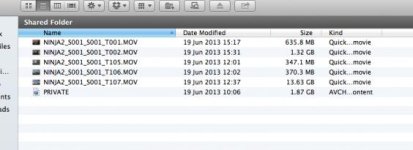
I have a file named Private in the Finder that looks like this:
Private.jpg
FCPx can see inside and import the individual 'clips' but shows them on the timeline and exports them like this from a progressive 25p project. I can find no way of forcing FCPx to interpret them as progressive. They were shot in 25p on the SD card:

C100 interlace2.jpg
My problem is I can't do anything with the 'Private' file in After Effects or 5DtoRGB to convert it to progressive. :huh:

Now I know why I bought the Ninja 2!!

Thanks in advance...
 
Stuff from the Ninja is (assuming correct settings) progressive anyway - if not, please see my earlier post on how to re-progressify your C100 rushes in FCPX.

As for the 'Private' file, hmmmm.

Usually, files called 'Private' are just those little 'notes to self' the computer or device makes about what's going on. However, AVCHD has a 'Private' folder to try and dissuade causal users from poking around in it (sure, like that's going to work). Inside that there are other folders, and you drill down to 'Stream' and there's a bunch of MTS files that are your actual movies.

However, you've got a whole file that's big enough to be the AVCHD folder, but its a single file. The other odd thing is that you're looking at the whole thing as a Shared folder. Are you accessing these files over a network? Have you copied the whole SDHC card to a Mac volume?

There's a sort of Mac 'thing' that presents 'stuff you should not play with' as a single file - a 'package'. You can control-click on it to 'show package contents' which is a way of flashing a metaphorical 'Access All Areas' badge at the finder and seeing what's inside. YOu can do this, apps working on your behalf CANNOT.

I'm guessing that you'll have to Control-click on the Private file, select 'show package contents', drill down to the Stream folder and then copy out all the MTS files into a proper folder on a proper HFS Mac hard drive so ClipWrap or 5DtoRGB or PPro or whatever has a good chance of seeing all the rushes and doing something with them.
 
Thanks Matt,
Yes the Ninja 2 footage is perfectly progressive!

The folder is on an internal raid on my Mac Pro and not a network shared folder. I had to 'Showing Package Contents' 5 files deep and I eventually found the MTS files! I'm not sure how this happened. I copied this from the SD card which has been wiped. They are now converting in 5DtoRGB.

Thanks again.
 
Pulling the MTS files works, but can be problematic if you have clips that span multiple MTS files.

After importing, you need to tell FCPX that the AVCHD clips you import are progressive. Check out the "Settings View" drop-down in the inspector window. Then set the field dominance override to progressive. Take a look at the guide posted here: http://provideocoalition.com/atepper/story/psfs_missing_workflow_part_10_fcp_x/

Also, quick tip: The "private" folder cannot be in the root directory of a drive. If it is, your hard drive mysteriously disappears from FCPX projects/event lists.
 
Last edited:
Thanks Nate,

It was simpler than I thought using your method. Matt also described this process in another post I found after writing this. Good to know I don't have to fiddle with the mts files.
 
Don't know if this was mentioned in another post, but Canon's simple data import utility copies the MTS files from the SD card an automatically takes care of spanning. I use it every time to copy the MTS files off the card.
 
Don't know if this was mentioned in another post, but Canon's simple data import utility copies the MTS files from the SD card an automatically takes care of spanning. I use it every time to copy the MTS files off the card.

I didn't know that. Thanks for the heads up!
 
Back
Top