FCP6 Manual: WHO CARES ABOUT PAL DVCPRO HD?

raptor44

Active member
Thanks to HD4indies I found FCP 6 Manual to download and all of the PDFs including short giude to HD and SD Formats.... GREAT!
http://www.apple.com/support/manuals/finalcutpro/
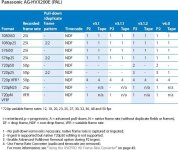
Have look dear Pal users... It really upset me after a whole year of threads and complaints all over the pro video forums, so NO comment...what else should we say to FCP Team?
 

Attachments

  • FCP6_HD_and_Broadcast_Formats.jpg
    FCP6_HD_and_Broadcast_Formats.jpg
    87.9 KB · Views: 0
I don't understand. . .

Why on earth would they do that? It's not as if there aren't many people who use PAL as an acquisition format.

They will have to release an update, wouldn't they?
 
That is weird, maybe they'll put it in the next update? Either way that is weird.
I'm excited about the NTSC ones though.
 
This is a nice touch

Automatically Conforming a Sequence to Clip Settings
Final Cut Pro can automatically conform a sequence’s settings to the settings of the first
clip edited into the sequence. This allows you to make your sequence match your clips
without ever opening the Sequence Settings window. The “Auto conform sequence”
option in the Editing tab of the User Preferences window allows you to control how
conforming is handled.


I wonder how well this works.

SmoothCam Filter
The new SmoothCam filter steadies handheld shots and stabilizes jitter in shots created
with a dolly or jib arm. Using the SmoothCam filter is a two-step process:
Â
First, a clip’s entire media file is analyzed to determine what kind of motion
compensation is required. The new SmoothCam clip property and the Background
Processes window allow you to start and stop motion analysis of clips. Overlays in
the Viewer and Canvas indicate the status of motion analysis.

Second, you adjust the parameters of the SmoothCam filter and the clip In and Out
points to specify how much motion compensation is applied.
 
This is shakes SmoothCam - it's the mutts nuts.
You need to learn how to drive it properly, but very powerfull.
I can't wait to have this inside FCP, rather than having to 'Send to Shake' for this tool.

The auto-conform setting sounds fantastic - save so much time trying to find out which parameter is producing red render lines when sometimes setting up clips - sometime just the audio is the culpret, but you're unable to change the sampling because it's option is greyed out, for example, or aspect ratio wrong. Wonderfull.
 
Last edited:
purplefoot said:
No need to go off the deep end, see below:
So this also is from the FCP6 manual?
Meaning we finally get full PAL support?
If I could finally stream 720p25 it would make live easier...
 
FCP has no 50 support at this time. Apple say this is because the '720p50 format is not a broadcast standard', which is odd since I thought this was one of the official formats put forward by the EBU and subsequently adopted by a number of broadcasters including Sky HD!? Not sure about other PAL regions. I know many are going with 1080i50 but 720p50 is the other option. Anyone able to clear this up?

Perhaps I'm misunderstanding this in terms of what the broadcast standard actually allows or how the NLE feeds this out and hence what Apple are referring to - duplicate frames (2:2 pulldown) or full 50p?

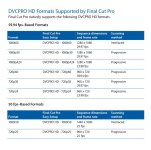
Anyway, this is from the 'FCP 6.0 HD and Broadcast Formats' guide:

720p50 DVCPRO HD
The 720p50 DVCPRO HD format supports 50 and 25 fps recording. When you record at 25 fps, the camera CCD captures images at the slower rate but the recording rate stays fixed at 50 fps. Because the 720p50 format is not a broadcast standard, this format is typically used only for production and then converted to SD PAL video.

I only really work towards film and 1080p delivery and don't deliver 720p for broadcast, so I'm wet behind the ears on this - can someone demystify this for us?
 
Ok, I get it now. I was missing the point of the broadcast standard. 720p25 over 50 is the EBU recommended standard - so 720p25 with 2:2 pulldown to make a 720p50 signal. Straight 720p50 is what is not supported and that's what Apple refer to. Make sense?
 
First, Purplefoot where did you get that table from? And what does it means TAPE ? HD it's only on P2 as far as I know....
Second, we all know that the HVX shoot 720p25 over 50, but also 720pN25 so real 25 f/sec, but then what about 1080p25?
I've red that support 720p50 through Frame Converter but again look at all the Ntsc formats and look at PAL: that's the NATIVE support from FCP 6.
So again: no Comment....
 
raptor44 said:
First, Purplefoot where did you get that table from? And what does it means TAPE ? HD it's only on P2 as far as I know....
Second, we all know that the HVX shoot 720p25 over 50, but also 720pN25 so real 25 f/sec, but then what about 1080p25?
I've red that support 720p50 through Frame Converter but again look at all the Ntsc formats and look at PAL: that's the NATIVE support from FCP 6.
So again: no Comment....
Table is from the HD and Broadcast Formats document, page 100:

http://manuals.info.apple.com/en/FCP6_HD_and_Broadcast_Formats.pdf


Tape means tape.:laugh: The Varicam records DVCPRO HD to tape for example. I suppose it's a bit odd to have this column in the HVX200 table, though.

I read the table this way: you can shoot and edit 1080p25 with no problems.

You can also shoot 720p50 but you will have to use the frame rate converter. Apple's reasoning for this seems to be "well, you can't acutally deliver it to anyone as 720p50 so convert it to something else on ingest."

I was hoping to spend a few days playing with this next week, but I now have another project on so I won't have access to an HVX until September at the earliest.
 
the price u pay for these nle's they should support everything.. cant stand it when they put limitations on their software.
 
Thanks Purplefoot,
I've got FCP 6 installed today and I'll try with some P2 shots I archived as MXF to see what works and how. I'll let you know.
Anyway I thought from other threads that 1080p25 was native on HVX, I'll double check on the manual and I'll try some live capture with the new FCP 6..

rap
 
Back
Top