
Navigation
Install the app
How to install the app on iOS
Follow along with the video below to see how to install our site as a web app on your home screen.
Note: This feature may not be available in some browsers.
More options
You are using an out of date browser. It may not display this or other websites correctly.
You should upgrade or use an alternative browser.
You should upgrade or use an alternative browser.
F35 Codex workflow / required software
- Thread starter rphill100
- Start date
No it requires proprietary software and that software is Mac only. I have actually had to the get software twice. The first time I was able to just download if from Codex and then requested a license through support which was free. The second time they had updated the site with new software and originally wanted $500 for a license for it. I contacted support and go the old software instead and a free license and was able to use that without issue. I am sure I still have my emails from those exchanges should you need to do the same.
The Codex file system is pretty cool and far more complex than you might expect at first. When you record to the codex it records in some proprietary format and when you want to copy the files over to your computer you do so using what they call a virtual file system. It is really interesting the way it works and kind of hard to explain but with the codex software you can create rules for how you want the files to be organized in folders, named and what type of files you want (dpx, mov, etc...). You can also apply luts and burn ins and all kinds of things. These settings can be saved as presets.
You setup how you want the folders to be structured and how you want the files to be named and what format. Clips can be named and organized in folders using meta data from the recordings like shot number, clip name, reel id, etc... So in the software you load your preset with the rules and then you open the Codex VFS folder on the computer and you will see all of your clips in the organization and file type chosen. You can even preview them but the files don't actually exist yet. Yhey are virtual just a representation of how they will be once copied over. Next you just copy the files over to your computer and as they copy the transfer station encodes the files in the process.
It opens up some interesting workflows since you can load up a preset and copy over your dpx files, then load up a preset that has a lut applied and in mov format and copy those over. The codex is like a negative and you can process it however you like.
The Codex file system is pretty cool and far more complex than you might expect at first. When you record to the codex it records in some proprietary format and when you want to copy the files over to your computer you do so using what they call a virtual file system. It is really interesting the way it works and kind of hard to explain but with the codex software you can create rules for how you want the files to be organized in folders, named and what type of files you want (dpx, mov, etc...). You can also apply luts and burn ins and all kinds of things. These settings can be saved as presets.
You setup how you want the folders to be structured and how you want the files to be named and what format. Clips can be named and organized in folders using meta data from the recordings like shot number, clip name, reel id, etc... So in the software you load your preset with the rules and then you open the Codex VFS folder on the computer and you will see all of your clips in the organization and file type chosen. You can even preview them but the files don't actually exist yet. Yhey are virtual just a representation of how they will be once copied over. Next you just copy the files over to your computer and as they copy the transfer station encodes the files in the process.
It opens up some interesting workflows since you can load up a preset and copy over your dpx files, then load up a preset that has a lut applied and in mov format and copy those over. The codex is like a negative and you can process it however you like.
keisersoze
Active member
ok cool now sell it me.
keisersoze
Active member
hey man, could you tell me why? Any problems with it? Do you mind telling how much you sold it for? I'm in the middle of a negotiation right now wondering if I'm paying to much for it. Thx
I mainly sold it because I sold my F35 and went with a SRW 9000PL. I don't recall exactly how much I sold it for but it was around 3K for the codex, data packs and transfer station. Prices for the codex recoder ebay have dropped since then though.
Over all it worked great, I am a Windows guy so I had to run a dual boot hackintosh which was problematic, I had no good good way of setting up a raid drive. External raids didn't work well on the hackintosh and software raid wont work with windows.
I am not sure if the one you are looking at has a dock but make sure its the acrive/wer dock. There is another dock plate out there that doesn't have the gpio cable needed to interface with the F35.
Over all it worked great, I am a Windows guy so I had to run a dual boot hackintosh which was problematic, I had no good good way of setting up a raid drive. External raids didn't work well on the hackintosh and software raid wont work with windows.
I am not sure if the one you are looking at has a dock but make sure its the acrive/wer dock. There is another dock plate out there that doesn't have the gpio cable needed to interface with the F35.
keisersoze
Active member
Hey hhessel, thanks. Look at 5th pic. Can you tell if its the wet dock. Seller calls it hot, active dock...can the pic confirm? Let me know in almost pulling the trigger. I cant find a station anywhere. Some around for $5,000.
https://www.ebay.com/itm/222318454636
https://www.ebay.com/itm/222318454636
Hey hhessel, thanks. Look at 5th pic. Can you tell if its the wet dock. Seller calls it hot, active dock...can the pic confirm? Let me know in almost pulling the trigger. I cant find a station anywhere. Some around for $5,000.
https://www.ebay.com/itm/222318454636
Yes it does. One of the pictures, #4 I believe, shows the rear end of the Codex with the dock on the bottom. There are two wires between the 4 SDI ports on the bottom. That is the GPIO cable.
keisersoze
Active member
I just bought Shannon's Odyssey. Found it cheaper and direct to the point, no need to spend more on a transfer station and making a hackintosh. But damn im so interested on the Codex...hopefully it will come up again cheaper. Odyssey is boring but effective.
I just bought Shannon's Odyssey. Found it cheaper and direct to the point, no need to spend more on a transfer station and making a hackintosh. But damn im so interested on the Codex...hopefully it will come up again cheaper. Odyssey is boring but effective.
The Codex can be found, they turn up every once and a while. The active dock for it is extremely rare. They were custom made so there are only a few in existence. Just a heads up for anyone who looks for one.
keisersoze
Active member
Hey man you had one and you sold it. Can you tell us and give us a verdict. Having used both the codex and Odyssey. Is it worth chasing the codex?
Last edited:
Hey man you had one and you sold it. Can you tell us and give us a verdict. Having used both the codex and Odyssey. Is it worth chasing the codex?
In my opinion, no. The Codex is one of those things which sound great on paper but not so much in reality. I mean it is a great piece of kit. But at this point it is really archaic tech, even in F35 terms. If you are not already Mac based it just adds to the hassle. You already have a 7Q. The most important detail when using the F35 in modern times is to make you are getting 12-bit 444. You get that with the 7Q. The other amenities the Codex offer just don't make up for the weight, power draw and archaic ways in my opinion.
My situation is different than most. I do CG work as my main job and the video suppliments that and is a hobby on the side. One of the reasons why the global shutter is a big deal for me. I often shoot alone and from the shoulder so the Codex was better for me if it wasn't for the hackintosh issues. The Odyssey was great for sure but I always had to move the unit from my shoulder to stop and start recording, I was always paranoid that it wasn't recording since I couldn't see tallys and camera was very front heavy. I was using the sony viewfinder so the camera always had to be forward on my shoulder.
The Codex on the other hand removed most of those issues since it could trigger record, see tallys and the weight of the Codex on the back balanced out the camera better. In some ways I actuallly liked the SRW-1 best, sure it is heavy but it balances out the camera so much better than anything else when shouldering. I have always been using the Sony viewfinder so if I had used a different viewfinder that could be moved further forward then my experience might have been different.
Eventually I moved on to the SRW-9000PL.
The Codex on the other hand removed most of those issues since it could trigger record, see tallys and the weight of the Codex on the back balanced out the camera better. In some ways I actuallly liked the SRW-1 best, sure it is heavy but it balances out the camera so much better than anything else when shouldering. I have always been using the Sony viewfinder so if I had used a different viewfinder that could be moved further forward then my experience might have been different.
Eventually I moved on to the SRW-9000PL.
keisersoze
Active member
Since you went to the srw-9000pl are you suffering any 12bit itching syndrome? Or are you satisfied with 10 bit?
Hello Everyone,
I can chip in on the Codex workflow as I have the whole setup and use it regularly with my F35. First off, for me, it is the best recording system for the camera - it records everything the camera is able to capture: 12bit 444 up to 30PsF, 10bit 444 up to 50p, speed ramps from 1 to 50 fps, it records uncompressed 12bit or up to 8:1 compression in 10bit so you can record for several hours (even without stopping) on a 512GB mag, you can trigger recording from the camera or the Codex and the tally lights work, it supports user uploaded LUTs, can record up to 8 channels of 24bit 48kHz audio, you can even control the recorder remotely by connecting it to the network via Ethernet. I am planning on making a workflow video for anyone interested and will post it here as soon as I have time.
Regarding the original question on downloading the material recorded on the mag to a computer via the Codex Desktop Station, yes, you do need proprietary software from Codex, which only works on a Mac, however it is free to download and you no longer need a license. The new software is called Device Manager 5.1 and all it does is it makes the Mac recognize the drive as if it were a regular hard drive connected to the Mac. When clicking on the drive you will find a folder structure containing the files in regular DPX format (or ARRI or Canon Raw formats, if you use the recorder with an Alexa or a C500). The drive can be loaded, ejected and formatted on the Mac itself and the name of the drive, the folders, sub-folders and files can be all set on the Codex Recorder.
If you do not have the Codex Desktop Station, there is a way to download the files directly from the Codex M Recorder via Ethernet. This works on any PC with Windows 10 or on Macs with older versions of Mac OS (prior to Mavericks, I believe). The software you need is called Codex UI for Onboard from 2013, and is the same piece of software used to control the Codex Onboard Recorder remotely that I mentioned above. The software is free to download from the Codex website, you just need to make a free user account. It is a MUCH slower process to download the files this way - but it is possible. This is also how you upload custom LUTs to the Codex Recorder. When I do the video workflow review/tutorial, I will show this as well.
Cheers,
Igor
I can chip in on the Codex workflow as I have the whole setup and use it regularly with my F35. First off, for me, it is the best recording system for the camera - it records everything the camera is able to capture: 12bit 444 up to 30PsF, 10bit 444 up to 50p, speed ramps from 1 to 50 fps, it records uncompressed 12bit or up to 8:1 compression in 10bit so you can record for several hours (even without stopping) on a 512GB mag, you can trigger recording from the camera or the Codex and the tally lights work, it supports user uploaded LUTs, can record up to 8 channels of 24bit 48kHz audio, you can even control the recorder remotely by connecting it to the network via Ethernet. I am planning on making a workflow video for anyone interested and will post it here as soon as I have time.
Regarding the original question on downloading the material recorded on the mag to a computer via the Codex Desktop Station, yes, you do need proprietary software from Codex, which only works on a Mac, however it is free to download and you no longer need a license. The new software is called Device Manager 5.1 and all it does is it makes the Mac recognize the drive as if it were a regular hard drive connected to the Mac. When clicking on the drive you will find a folder structure containing the files in regular DPX format (or ARRI or Canon Raw formats, if you use the recorder with an Alexa or a C500). The drive can be loaded, ejected and formatted on the Mac itself and the name of the drive, the folders, sub-folders and files can be all set on the Codex Recorder.
If you do not have the Codex Desktop Station, there is a way to download the files directly from the Codex M Recorder via Ethernet. This works on any PC with Windows 10 or on Macs with older versions of Mac OS (prior to Mavericks, I believe). The software you need is called Codex UI for Onboard from 2013, and is the same piece of software used to control the Codex Onboard Recorder remotely that I mentioned above. The software is free to download from the Codex website, you just need to make a free user account. It is a MUCH slower process to download the files this way - but it is possible. This is also how you upload custom LUTs to the Codex Recorder. When I do the video workflow review/tutorial, I will show this as well.
Cheers,
Igor
keisersoze
Active member
Wow, there is a way to download files to the pc without a Transfer station!!! Oh sucks! I was just about to buy an almost complete system missing the transfer station, but i thought I'd be stuck with it not being able to download the footage so I pulled the trigger on another Odyssey and a SRW-1. Only if I knew. Why is it so hard to find information on the F35( Google F35 and you will find a jet plane and every top secret information about it), but its so easy to read up on something dumb as a Blackmagic 4k camera (waste of my money). Well if you can do that video you will be the first one ever, I think, and I will owe you a beer. OK maybe 2 beers.
As I said, I think the Codex is a great piece of kit. It is just that the workflow on set and in post was less streamlined than what I would have liked. And I felt that was in exchange for features I never use, such as the ramping. The huge media bricks, the power draw, the post workflow, all together wasn't what I was looking for.
So after testing monitor recorders, the codex and even considering an OB1 recorder, I went with a custom SR-R1. I got it to give me basically all the Codex would apart from the ramping, which being limited to 50fps wasn't all that much of an effect.
But my SR-R1 directly docks to the back or top, interfacing with the camera. I can start it from my grip, or you can just put the remote anywhere you want. I get 50p. I get 12-bit 444 in different compressions in a ready to use codec. It gives me proper timecode, something monitor recorders struggle. It's lighter than the Codex, smaller, needs less power so I can power it all from a single V-mount brick, including the EVF. The media is small, modern and streamlined. The post workflow with the SR-D1 is easy and straight forward like using a SD card. And the SR-R1 fits the F35 so well.
It's quite a compact set up, considering the class of camera. Having the weight on the back does help a lot for handheld balancing.
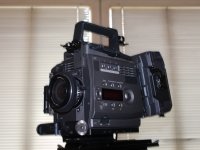
Ultimately it's about having a configuration which works for what you do and how you work. I'm sure for many, the Codex is the ultimate match for the F35.
So after testing monitor recorders, the codex and even considering an OB1 recorder, I went with a custom SR-R1. I got it to give me basically all the Codex would apart from the ramping, which being limited to 50fps wasn't all that much of an effect.
But my SR-R1 directly docks to the back or top, interfacing with the camera. I can start it from my grip, or you can just put the remote anywhere you want. I get 50p. I get 12-bit 444 in different compressions in a ready to use codec. It gives me proper timecode, something monitor recorders struggle. It's lighter than the Codex, smaller, needs less power so I can power it all from a single V-mount brick, including the EVF. The media is small, modern and streamlined. The post workflow with the SR-D1 is easy and straight forward like using a SD card. And the SR-R1 fits the F35 so well.
It's quite a compact set up, considering the class of camera. Having the weight on the back does help a lot for handheld balancing.
Ultimately it's about having a configuration which works for what you do and how you work. I'm sure for many, the Codex is the ultimate match for the F35.
Last edited:
Care to share any info/pics on how the docking works with the SR-R1? Or the story behind it?
I've got one but it's forever tethered via dual link SDI without any trigger options.
As I said, I think the Codex is a great piece of kit. It is just that the workflow on set and in post was less streamlined than what I would have liked. And I felt that was in exchange for features I never use, such as the ramping. The huge media bricks, the power draw, the post workflow, all together wasn't what I was looking for.
So after testing monitor recorders, the codex and even considering an OB1 recorder, I went with a custom SR-R1. I got it to give me basically all the Codex would apart from the ramping, which being limited to 50fps wasn't all that much of an effect.
But my SR-R1 directly docks to the back or top, interfacing with the camera. I can start it from my grip, or you can just put the remote anywhere you want. I get 50p. I get 12-bit 444 in different compressions in a ready to use codec. It gives me proper timecode, something monitor recorders struggle. It's lighter than the Codex, smaller, needs less power so I can power it all from a single V-mount brick, including the EVF. The media is small, modern and streamlined. The post workflow with the SR-D1 is easy and straight forward like using a SD card. And the SR-R1 fits the F35 so well.
It's quite a compact set up, considering the class of camera. Having the weight on the back does help a lot for handheld balancing.
View attachment 139725
Ultimately it's about having a configuration which works for what you do and how you work. I'm sure for many, the Codex is the ultimate match for the F35.
I am also looking for this answer, does anyone know a different way to get in touch with Aaveum.
C
I don't think Aaveum is purposely being misleading, perhaps a little mysterious, but I think what he is saying is being misinterpreted:
"But my SR-R1 directly docks to the back or top, interfacing with the camera." - By interfacing I think he only means it is dry docked using the dock mechanism and pulling Dual-Link from dock SDI connectors.
I can start it from my grip, or you can just put the remote anywhere you want. - Grip meaning he has a Start/Stop grip connected to the SR-R1, not the Sony F35 button. His camera is not "connecting" to the F35 the way a SRW-1 does. He is simply pointing out that SR-R1 can use remote trigger. OR the SR-R1 REMOTE.
HE is not claiming his F35 triggers his SR-R1. He is not claiming his HDVF can see SR-R1 playback. His F35 interfaces with SR-R1 only at Dual Link SDI.
So I understand a need to get more explanation, but he is not going to have some magic circuit board which turns SR-R1 into SRW-1. He has come up with a clever way to connect SR-R1 to the F35 dock. You have all the parts to do this yourself already.
As to how he is getting the dual-link. I think he custom built plate holding the IF box parts and connecting directly to the SR-R1 backplate- I seem to remember something like this. Or he had the very rare PIM-SR IF Box which was designed specifically to connect SR-R1 to F35 in neat way. I saw one in the wild once as part of a package on eBay. I doubt this company would make any more and they have a very high price tag. But if you have codex box, you already have this basically.
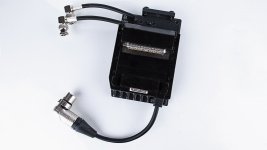
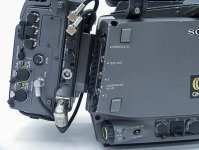
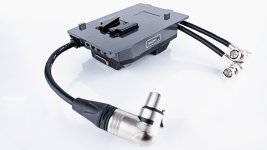
There is no solution to make SR-R1 "Talk" to F35. Aaveum has not claimed this even though he used the misleading term "interfaces"
"But my SR-R1 directly docks to the back or top, interfacing with the camera." - By interfacing I think he only means it is dry docked using the dock mechanism and pulling Dual-Link from dock SDI connectors.
I can start it from my grip, or you can just put the remote anywhere you want. - Grip meaning he has a Start/Stop grip connected to the SR-R1, not the Sony F35 button. His camera is not "connecting" to the F35 the way a SRW-1 does. He is simply pointing out that SR-R1 can use remote trigger. OR the SR-R1 REMOTE.
HE is not claiming his F35 triggers his SR-R1. He is not claiming his HDVF can see SR-R1 playback. His F35 interfaces with SR-R1 only at Dual Link SDI.
So I understand a need to get more explanation, but he is not going to have some magic circuit board which turns SR-R1 into SRW-1. He has come up with a clever way to connect SR-R1 to the F35 dock. You have all the parts to do this yourself already.
As to how he is getting the dual-link. I think he custom built plate holding the IF box parts and connecting directly to the SR-R1 backplate- I seem to remember something like this. Or he had the very rare PIM-SR IF Box which was designed specifically to connect SR-R1 to F35 in neat way. I saw one in the wild once as part of a package on eBay. I doubt this company would make any more and they have a very high price tag. But if you have codex box, you already have this basically.
There is no solution to make SR-R1 "Talk" to F35. Aaveum has not claimed this even though he used the misleading term "interfaces"
Last edited: