so i bought the F23-F35 conversion kit from Samana, after I installed the F35 hardware in the F23 it booted up without any firmware change. The F35 appears to work perfectly on the F23 firmware. Now this is the older version of the firmware, I didn't update the F35 in fear that I couldn't get it back to a F23. It does ask the questions, what happens if I put the F23 into my 2nd F35 with newer firmware.

Navigation
Install the app
How to install the app on iOS
Follow along with the video below to see how to install our site as a web app on your home screen.
Note: This feature may not be available in some browsers.
More options
You are using an out of date browser. It may not display this or other websites correctly.
You should upgrade or use an alternative browser.
You should upgrade or use an alternative browser.
F23: Just Got A New Camera - Sony F23
- Thread starter Viddovation
- Start date
Viddovation
Veteran
s*%t s*%t s*%t! I have 3 red pixels on my monitor connected to the sdi out (IF Box). I switched from SDI 1 to 2 already. No difference. Blackshading done 3 times, Switched a few settings but nothing happens. s*%t i really hope no dead pixels...Anyone any idea?
Try this:
http://members.tripod.com/~camera_dave/pdf/V1.46_RPN_correct_procedures.pdf
Viddo, many thanks!! I tried it out but unfortunately i only have 6 options and the RPN menu is missing. It states in the document that the new firmware brought the new options therefore i guess i have to update. It's weird bc i was under the impression i bought it from mac with the newest firmware. I have 12bit output & Cine-EI mode...
Viddo, many thanks!! I tried it out but unfortunately i only have 6 options and the RPN menu is missing. It states in the document that the new firmware brought the new options therefore i guess i have to update. It's weird bc i was under the impression i bought it from mac with the newest firmware. I have 12bit output & Cine-EI mode...
So after checking back i am running 2.12 main fw and boot fw is 1.20. I still cant see the options 7-10 in "SERVICE. Anyone any idea? Is the 1.47 version stated in the document you referred to the boot fw or main? If its the boot fw then that might be the problem. I searched for 1.47 boot fw on google but couldnt find anything. Any idea? Someone can help out here?
Captain_Douglas
New member
There is a new 2016 credit for the f23 on http://www.panavision.com/TVCredits !

Muttondraw
Well-known member
Big thanks to Steve Phillipps who pointed me in the right direction to find a great condition F23 here in the UK. It’s an awful lot of camera for the money.
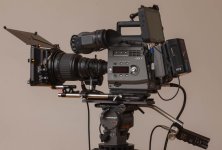
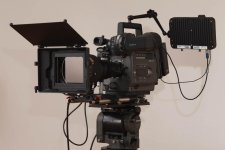
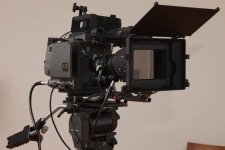
Muttondraw
Well-known member
I am still amazed at the B4 mount bargains to be had out there. I bought a cinestyle HJ21 and a Canon FJ5mm prime at a great price, reminds me of the time shortly before the Red One came out when you could pick up old 35mm lenses really cheaply. Now those old cinema lenses are hugely expensive, valued for their character but back then they were largely unwanted. Cant help wondering if the smaller formats will come back in vogue again. Hmmm maybe I should get in a set of digiprimes to stash away as an investment.
steve phillipps
Veteran
Wow, fantastic! I debated long and hard but just couldn't see this making sense as a field wildlife camera, glad you got it and have it rigged up brilliantly now!
Steve
Steve
steve phillipps
Veteran
I was looking at the Odyssey too, and had the idea of mounting it flat on the top (instead of the top handle) to keep it safe and out of the way (was only going to use as recorder and not monitor). I would then use the wrap-around handle to pick it up. I just hate having things dangling off arms or even brackets in the field.
Steve
Steve
Muttondraw
Well-known member
Interesting idea re the Odyssey. I removed the wrap around handle to shave some weight off, saves 500 grams. I am not totally happy with the Noga it was the straightforward option but it's a bit too easy for the mount to loosen if the monitor gets jogged. I havent thought up a better solution that works for me yet though.
steve phillipps
Veteran
I had the impression I could take the bottom bit off the handle (the part with the holes in it for the bolts) and attach that to the Odyssey and so bolt the Odyssey on top of the camera, sure it would work easy. Then the wrap=around handle would also give it some protection - and hopefully you'd hardly even know it was there.
Steve
Steve
Muttondraw
Well-known member
I am sure you could have got that to work, would just need some simple metal work to adapt the handle mount to the Odyssey. What was the clincher on not going the F23 route in the end?
steve phillipps
Veteran
Size, weight, power, accessory cost, limited to 60fps, add-ons and cables needed plus each needs to be switched on and powered and uncertain if they'd all work well together... For studio / drama / controlled shooting it would be fine but not so much for dragging through the bushes and over the hills!
Steve
Steve
Rick LaLonde
Active member
I just bought a F23 off eBay a couple months ago and finally got the B4 lens I've wanted and went to set it all up. I have my monitor hooked up correctly (same basic hook up as I had with my D-21) but getting no signal or even any sign of power to it. I tried both of the on camera power sources to the monitor but... nothing.
Maybe I need to check the camera's power outputs somehow?
Any help greatly appreciated.
Rick LaLonde
Maybe I need to check the camera's power outputs somehow?
Any help greatly appreciated.
Rick LaLonde
Last edited:
Muttondraw
Well-known member
By "both the on camera power sources" do you mean the 12V 4A outlet and the 24V 5.5A outlet? One thing to be aware is that both these outlets are only active if power is input via the DC in Lemo. And even then the 24V is not derived from 12V it requires a 24V input on pin 4 of the Lemo. If you are using the 4 pin XLR on the interface box as the DC input then you will need to get power to your monitor a different way. I am guessing that may be the issue.
Viddovation
Veteran
As Muttondraw said, you're not going to get power out of the accesory ports on the F23/35 if you're using the IF box XLR power in. You need to be powering 12/24v via the Lemo port to use the accesory ports.
Viddovation
Veteran
By the way, I'm personally now up to owning three Sony F23 cameras, and one F35. Looking to sell the F35, keeping the F23s for multicam.
Lens wise, I have 8x Digiprimes, the two two DigiZooms, and a set of Ultra Primes. Looking to sell the UltraPrimes as well, if I can fetch a good price - otherwise I'll keep them on a rental shelf for ancillary income.
I'm pretty stoked about the multicam possibilities with the F23.
Lens wise, I have 8x Digiprimes, the two two DigiZooms, and a set of Ultra Primes. Looking to sell the UltraPrimes as well, if I can fetch a good price - otherwise I'll keep them on a rental shelf for ancillary income.
I'm pretty stoked about the multicam possibilities with the F23.