FS7: F Stop Dark.

morgan_moore

Major Contributor
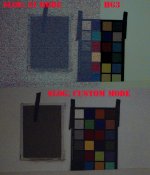
OK what I did here was some under exposure and correction in post - both temp and brightness (no NR) - this is a stress test!

The 'scene is basically dark, just a tungsten lamp in the coridor, studio dark, camera set to 5500 (yes that is the wrong setting on purpose)

All F1.8.
CineEI The Slog was Slog.
Custom HG3 set on 6400 ISO, every other setting untouched
Custom Slog set on 6400ISO, every other setting untouched.

What we see is that Custom is better in the dark. That is useful, Slog Custom seems best (least bad) to my eye.

This opens up the question of.. what ISO do I swap out of CineEI to custom and, in fact, should I ever use cineEI!

I wonder what the camera is doing, NR, or analogue gain I guess.

I offer no conclusion to that.
Original grab .. https://dl.dropboxusercontent.com/u/33167160/FstopDark.jpg
FstopDark.jpg

S
 
Sam have you looked into the other hyper gamma's 7 and 8. From what Dennis Star Central posted a while back they offer the same DR as the F3 in SLOG. It may be worth throwing them into the mix? I may try and test them out myself at some point.

Surinder.
 
Sam have you looked into the other hyper gamma's 7 and 8. From what Dennis Star Central posted a while back they offer the same DR as the F3 in SLOG. It may be worth throwing them into the mix? I may try and test them out myself at some point.

Surinder.

That doesnt add up to me as flat profiles need 'de logging' and there is not a nailed workflow to do that with HG (afaik)

A good image may be there but if I cant find it in one click then it wont work for work..

S
 
That doesnt add up to me as flat profiles need 'de logging' and there is not a nailed workflow to do that with HG (afaik)

A good image may be there but if I cant find it in one click then it wont work for work..

S

Certainty won't be a one click solution. When shooting Cine Gamma on the F3 I start with the fast colour corrector in Premiere then use colorista to tweek further. Sometimes use secondaries for fine tuning skin.
 
BTW I found that for the Custom stuff 'noise suppression' was on mid and ON, that being the default setting.

S

Maybe on the next test, you can turn off noise suppression and then see if the noise levels from custom match CineEi?

I had high hopes for CineEI because of the quick LUT and Preview LUT, so I hope the noise is not that crazy.

Question: Custom S-Log mode is just CineEI, but you can customize it, but LUTs will NOT work with custom, correct?
 
Maybe on the next test, you can turn off noise suppression and then see if the noise levels from custom match CineEi?

I had high hopes for CineEI because of the quick LUT and Preview LUT, so I hope the noise is not that crazy.

Question: Custom S-Log mode is just CineEI, but you can customize it, but LUTs will NOT work with custom, correct?

Gene - it is important to understand the context of this test.. basically a dark room requring about 12000 ISO at least.

There are two considerations of noise IMO

-Is the camera noisy on controlled shots (eg interview with lights)

-What can I see in the really dark.

Im sure CineEi is great for the first but for the second you might need all the tools that Sony can muster - ie onboard Noise Reduction.

The complex thing is for a 'fairly dark place' (as opposed to a very dark place like I tested)- at what point does CineEI lose its edge (edit if it ever actually has one!).

S
 
Last edited:
EI is irrelevant as it does not affect the core file, only how the LUT makes your monitor appear.

Each frame was F1.8 to allow most light to the sensor.

As described the Custom shots were on 8000 with NR MID ON.

S
 
Dont be 'honest' (about your theories). show some tests :)

Simply I felt my shoot last weekend was a bit thin (SLogEI) so I thought Id test what the camera does.

S
 
Too much work on :(

Gutted how little I have shot with it so far. Must try to force something on the weekend.

But a camera that apparently struggles with the processing power to have LUTs and Waveform monitors at the same time will never ever be able to do as good a job in real-time as a decent edit system analysing and rendering noise reduction taking as long as it takes to do it.
 
Not really On this topic but I dont want to start too many threads.

Here is a test of self lit with a kino, CustomSlog3 at three exposure levels2000ISO,AWB, the files 'equalised in post', the important thing is to note the input WForm, the thinner 'negative' is obviously significanly poorer, the two thick exposures are sharp.

Im not seeing a 'trade off' for putting my skin quite high in the first frame.

Workflow.. Dresolve, LC709LUT, whites and black equalised with log wheels.

Its sharp!

https://dl.dropboxusercontent.com/u/33167160/Mugshot-jpg12.jpg

Mugshot.jpg
 
Too much work on :(

Gutted how little I have shot with it so far. Must try to force something on the weekend.

But a camera that apparently struggles with the processing power to have LUTs and Waveform monitors at the same time will never ever be able to do as good a job in real-time as a decent edit system analysing and rendering noise reduction taking as long as it takes to do it.

I take your point regarding in-camera noise reduction vs. post. But the other side of the discussion is that noise reduction in post takes a lot of processing power and significantly increases render times. If you're taking the kinds of jobs where you're not involved in the post-process, there's a real argument to be made for keeping in-camera NR in your back pocket. It's helpful to know that the option is available when Cine-EI just isn't appropriate.
 
Too much work on :(

I actually dont know about how the 'processors' work in camera - but I think NR is kind of part of the package of how high gains are made - ie doing the NR before doing the 12bit to 10bit data compression step is preferred.

Im feeling doing it in camera is good if you are shooting a stress environment ie 6000 ISO

For a 'thickly exposed' 1200-2000 shot NR is best off and maybe a sprinkling added in post.

S
 
I take your point regarding in-camera noise reduction vs. post. But the other side of the discussion is that noise reduction in post takes a lot of processing power and significantly increases render times. If you're taking the kinds of jobs where you're not involved in the post-process, there's a real argument to be made for keeping in-camera NR in your back pocket. It's helpful to know that the option is available when Cine-EI just isn't appropriate.


If I'm handing off footage and not involved in the post-process I'll still speak to the editor beforehand and ask them what they prefer (log or rec709 images) and if they want NR applied or prefer to look after that side of things themselves. Sometimes I can send footage in which case I'll provide a CC LUT.

Truth of the matter is I have never ever in all the years I have worked in production done a paid gig where I have shot something at 6000 ISO and handed it to a client. Even including with the A7s which can be pretty clean at 6000. I'm not saying there is never a requirement for it... Just that I've never worked on anything where there was, that planning beforehand couldn't work around.

But that's another conversation :)
 
Back
Top