External Recorder - Grading

morgan_moore

Major Contributor
Various threads showing the use of external recorders show minimal differences to the image to my eye.

However what happens when your footage is not perfect

Lets say for example you underexpose by a stop, or have the WB a few K out, or light source has a shift (M-G)

Purposful 'under exposure' could protect the highlights a little.

Now in any of these situation you end up with footage that needs correcting

Are there any examples of onboard footage vs recorded footage - After a correction process ?

It would seem that if an external recorder has a visible advantage then this would be the time..

Thanks

SamMM
 
I think that in order to truly get any benefits one will need an 8-bit externar recorder.

ProRes 422 HD and current Avid DNxHD implementations have bit-rates around 175/176 mbps in 24fps. But this is for 10 bit signal. For 8 bit converted to 10 bit this means useful bitrate around 176/4 = 44 mbps. But both ProRes and DNxHD are intraframe codecs. 44 mbps isn't that much for intraframe; moreso for 4:2:2. On the other hand Sony's AVCHD is only 24mbps for 24 fps. But it is an IPB compression. This generally means more quality in less bitrate.

The Ninja 2 is going to support 8-bit DNxND 220 = real 175 mbps for 24fps 8 bit video. This is more likely to show a difference.
 
This is only my opinion but I've seen a bit of difference with ProRes HQ on the ninja vs AVCHD that's been heavily underexposed for highlight protection, raising the gain of the AVCHD and then doing a lot of grading work can bring out artifacts in the compression which normally you wouldn't see, (http://vimeo.com/41174557 01.29 into the video, you might be able to see the problem viewing in HD in the darker areas) the prores footage doesn't have this problem, having said that, that is the only difference I've ever seen.
 
Im more concerned about the files ability not to break under a grade, reduction in graduations banding etc - maybe there is no advantage?

S
 
*Jumps on Morgans back*
I'm all ears as well... all that Nano Flash talk along with all the other options available has gotten me confused. Now I'm looking at the SD Pix, because of the included monitor part, and audio recording if needed.

Frank... which one is your preferred recorder at the moment and why?
 
Honestly I've shot stuff side by side and graded both until they fell apart and I was surprised to see no difference in banding, I thought there would be since they're completely different formats :( One thing to note is if when shooting there is a quick change in exposure you will definitely see a difference as AVCHD turns to artifact gunk for a few frames then. It's beautiful almost all of the time, but quick changes in the image cause nasty artifacts. Hope that's helpful.
 
Sam,

It does make a difference but in the marginal areas of the image.

If you create a colour wheel or coloured gradient and grey scale gradient in your favourite motion graphics application (regularly use these types of tests to shake out a new workflow or new software). Save a second's worth of footage in ProRes/DNxHD and then again in AVCHD you can get a good idea the benefits of intraframe 422 over 420 footage.

You will notice the benefit of greater colour sampling in areas of sky if you put a vignette over it a la Top Gear, cross fades improve too. More colour resolution means less banding in these areas. A better codec also helps these areas too.

It's only 8 bit footage so there's a limit to how crazy you can go with grading before you expose the quantisation but more real information in the image only helps. Even if you don't see a massive improvement you are still keeping more real information through the post workflow and sending more out for final compression keeping SNR has high as possible, which is good.

I was told the FS100 output 10bit over HDMI so I was mighty p1ssed off to find that it was 8 bit. I only asked one of the biggest dealers in the UK before purchase too! Anyhoo, I digress.
 
Last edited:
Im all about getting bright accurate commercial footage - I think its easy to hide stuff in 'looks' especially desaturated ones (PB boxer vid)

For another reason (shooting two copies at once) I was thinking of getting an FMU - but then it occured that a recorder might not be a lot more money and could have a positive quality implication as well as a positive workflow impact..

S
 
Frank... which one is your preferred recorder at the moment and why?

I use the Samurai - best bang for the buck IMHO.
It has a better CPU than the Ninja and can do additional tricks like pulldown, DNXhD (the new Ninja2 can do that also).
The Pix recorders where also on my radar, because of the "free" high end audio recorder you get with them, but my budget did not allow at that moment.

For critical shots (VFX) I prefer the BM Hypershuttle because it´s uncompressed, but otherwise a PITA to work with the media if you don´t have a Mac.

Frank
 
Im more concerned about the files ability not to break under a grade, reduction in graduations banding etc - maybe there is no advantage?

S

Is there a benifit to taking your avchd files and converting to cineform before any grading? On most of my quick turn around stuff I just use avchd, but for the stuff that needs heavy grading work I convert to cineform before doing anything
and I just never seem to have any problems with anything "falling apart". I should say that I don't generally have the time (or the inclination) to do much testing, so if I find it works, I don't try to fix it.
 
ok thanks... When I scour the images around google, often people seem to be using the samurai along with another monitor. Would you say that the samurai is too small for general monitoring or inaccurate in colors?
 
Sam,

There's a thread on here somewhere that i posted some side by side samples with a HyperDeck shuttle, which is really cheap.

In my experience i've found that:

- If there are fast camera movements and scene detail then the differences are night and day, AVCHD falls apart very quickly under that scenario.

- It is slightly better in the shadows however it initially actually looks noisier because you're bypassing the processing that the camera and codec does to the image. Of course you can denoise as part of your workflow if you want. (Look at the Dark Matter AE plug ins, they look very nice, i've not been able to use them yet but demos are very interesting). Post noise reduction is usually better than real time as it can look forward and back through adjacent frames.

- It *is* more detailed on edges but i would like to see how it fairs with a 4:4:4 recorder and i'm not aware of a cost effective portable one. In theory the HDMI is full RGB and 4:4:4: capture would make a difference.

- There's no real benefit in banding, the 8bit quantisation i feel is the limiting factor here. It has occurred to me whether the uncompressed and compressed outputs are identical in colour values or whether there is a benefit in seeing whether they can be merged together to increase colour depth. I suspect they're the same and it's just like adding noise to the image. But one can hope.

Its the same old same old. The built in compression is remarkably good. If you intend to do any serious post work then uncompressed will yield less headaches when qualifying parts of the image. You can flip through the colour channels and see the difference quite clearly. Perhaps imperceptible to the eye but not to the software.


cheers
Paul
 
Paul thanks for commenting

I dont think I saw any comparisons after grading

My theory/hope is that a less blocky image would grade better
Im not really looking to do 'serious post work'
Just correct a cast im getting from my ND and move the skins up a notch as I under expose to protect the highlights
Also I made the error of shooting black level +4 which seem to have had the effect of recording no values below 10
So I need to stretch my black down
All this - breaks the image so - It got me wondering..

Basically on set you are limited by tools - a small histo - an innacturate monitor (onboard and smallHD)
I need to make the leap from my on set image to a decent image

Im not knocking those on set tools BTW - I would not expect perfection on set - just to get close enough to get a file that looks OK

S
 
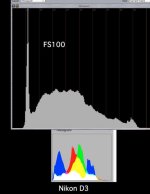
Here are two histos - one from the FS100 and one (from a similar but not identical) D3 (JPG) still shot both are a tad under to protect the highlights..

The nikon has enough meat to produce a professionally presenetable image, the FS100 image breaks - IMO its not a 'bad' exposure on the FS.. but lookin it is not too rich in colour (color level -1)

I think I need to go into my box and produce a profile with the nikon D3 as the reference..

histo.jpg
 
Last edited:
That's an interesting comparison Sam.

With 8 bit footage it is vital (IMHO) to get as much spread between black and white as possible and choose the right gamma curve to give you the best spread of values. Shooting too flat will limit your ability to add contrast back into the image at 8 bits. You can always very easily take out unwanted contrast not so easy the other way round.

I wholeheartedly agree that Sony have really let us down with crappy LCD and histogram, these are more fitting for a camera of 5 years ago not one this good. Maybe it was just a target price consideration but we really could do with better monitoring tools or better ways to set up the current tools.
 
I think I was trying to show that my desire to correct was not based on making really crappy initial exposures, just to cross the final 10%..

It would be nice to see an RGB histo of decen size in the status menu liek we get the nice sound level bars

One could blame this on cost cutting but you get pretty decent RGB histos on most sub £1000 stills cameras..

Its weird - with a flexible file you dont really need a good monitor - the digiback I have has the worst screen ever (and the most flexible file!)

S
 
+1 on the monitoring. Petition SmallHD to add RGB histograms in their firmware, i have, if everyone does then it may happen.

The range you want is obviously dictated by your scene and where you want to place the widest range of values. I'm just waiting for a stouffer wedge from the states (the 41 step one which i couldn't find in the UK) and then i plan on recording the various gamma options and PP settings to understand exactly where the levels lay. Then i feel in a better position to quantify which settings i need for various scenes. There are too many variables shooting live scenes so back to basics to start with.

Sam for what you want i'm not sure the uncompressed will give you that much more than you have to be honest.

Your histograms are different scenes, do you have anything shot side by side? Can you give an example of something that's not working the way you want it to?

I find the way the different packages handle under blacks and over brights vary so much. In AE floating point i can get the source mapped to negative blacks and well over 1.0 on the whites. I just think it's so easy to get a work flow that clips this stuff and not always realise it.

There's also the route of post processing the footage in terms of colour depth, there're some from power retouche that can rebalance and equalise the colours and apparently interpolate from 8 bit upwards. I've been recommended to take a look at them, which i've not been able to just yet. Also the old trick of upsizing, add noise and downsize can help reduce banding too if that's an issue, depends what you want at the end

cheers
paul
 
Annoyingly I cant show this work

As for the D3 side by side with the Fs100 - im going to have to do that.

As for 'the scene dictating' Im not so sure - my approach has thus far to try and elicit the best general performance from the camera and modify the scene (fill the darks with reflection or lighting)

IMO those who try and match the camera to the scene will do down the road of 'super flat' (and super banded) footage..

S
 
Back
Top