Exposure, grading etc

Hey!

As someone who is completely self thought when it comes to shooting, I'm now trying to get better at using various meters etc to set consistent exposure.
So far I've been trusting the display and just going with what looks good. It has generally worked rather well.

However, having been bit by the edge contrast issue of the FS700, I don't know if I'm exposing to dark now...

Here's a scene from a short film I did as part of a film festival. The time constraints were severe so there's a lot of mistakes in camera and lighting work though ;)

I used mLooks to grade in FCPX but that made it too dark so I had to raise it up again. Leading to a rather noisy picture. And even if I'm rather happy with the "vibe" of the image, it's a bit noisier than I would like.

Here's the clip:
https://vimeo.com/102686293

What I'm wondering, I guess, is whether this is the amount of noise that is to be expected using the internal codec and rather heavy grading. Or if this could be improved by better exposure to begin with?

Here's how the original image looks:
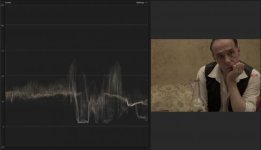
Screen Shot 2014-08-08 at 21.38.19.jpg
Would you say it should have been exposed differently?

Is using gain on the FS700 better than increasing luminence in post? Gain happens before convertion to AVCHD, right? So my guess is that maybe I should be less afraid to use it ;)

Thanks
DZ
 
I'm having a little trouble reading the actual numbers cause I'm on a small screen, but I think you have room for a bit more exposure. In s-log, if done correctly, you want to hit roughly 59% whites. This, however, leads to another question I think. Because there is not really anything wrong with your skin tones as far as I can tell, which is what the 59% is really important in regards to. I'm not too sure it'll do anything in regards to noise per say.

That being said, I think you are spot on in troubleshooting. The internal codec, while def. not bad, does not leave you with too much room for grading without gaining some noise. When we started using the FS700 we had a very hard time getting the images we wanted before we got our hands on the 7Q. Some of it has to do with not exposing correctly, and some has to do with the limited range you get from 4:2:0. In any case, I don't think that its too bad with noise. I've seen much worse.
 
Thanks, for taking time to look!
Should maybe have said it was shot using cine gamma 1 (slightly tweaked).
yeah, the 7Q would be the dream. Unfortunately way out of my price range currently :(
 
Aha, that does change things a little! I'm so used to everyone shooting in s-log 2 that I just think its the default setting for everyone at this point :D

Firstly (and a bit off-topic), you may already have seen it, but if not, this is a very nice page with various cine gamma tests and settings: http://blog.abelcine.com/2012/09/18/sony-fs700-scene-files-from-abelcine/

If shot with cine gamma 1 (or any of the cine gammas) I honestly don't think its noisy at all. It looks pretty good! That being said, since you are not shooting log material, I'm fairly sure you should exposure it more generously than what you are now. Obviously there are a million ways of doing so, you know.. zebras etc, but overall I think you'll want to expose it much more generously than what you typically would read on this forum, as everyone refers to s-log 2 material which is some stops under that of cine gamma 1.
 
If you're using a cinemamma your skin highlights should be at 70% (you can use the zebras to achieve consistency). It's a nice look in the grade but it does feel uncomfortably like you're working in the shadows there (a lot of the shadow detail has the blocky feel you get with the camera working at the bottom of its range). Irrespective of which gamma you're using you really want to avoid having to increase exposure at all in post, it is much safer to over expose and bing down if you have to. For a look like you've got I'd expose naturally then crush the blacks in the grade and bring the mids down a touch.
 
Thanks Jens and Colin!

yeah, I will try to expose a bit brighter. However I'm scared of the edge highlight effect. And I guess I've been reluctant to raise the gain. But I take it, using gain (in moderation) at shooting is better than raise gain in post, in general?

Another thing I see sometimes is ugly magenta cast. I've seen them in live shows I've shot and here you can now see it on their lips! Didn't catch this before the upload though. My humble EA50 doesn't have these magenta casts so it's a new issue to deal with for me. Any clue how to avoid that?
 
I used mLooks to grade in FCPX but that made it too dark so I had to raise it up again. Leading to a rather noisy picture. And even if I'm rather happy with the "vibe" of the image, it's a bit noisier than I would like.

Noise in the shadows comes from starving the sensor. So yes, find a way to increase the amount of light getting to the sensor (that is, increase your exposure. Don't turn up the gain, but do turn up the light). With film, you might make a good argument for getting as close as you can to the look you want, in camera. With digital, that argument is a lot less good. And your predicament is why.

So... give your sensor enough light, and if you need the final image to be darker, push it down in post.
 
Thanks Jens and Colin!

yeah, I will try to expose a bit brighter. However I'm scared of the edge highlight effect. And I guess I've been reluctant to raise the gain. But I take it, using gain (in moderation) at shooting is better than raise gain in post, in general?

Another thing I see sometimes is ugly magenta cast. I've seen them in live shows I've shot and here you can now see it on their lips! Didn't catch this before the upload though. My humble EA50 doesn't have these magenta casts so it's a new issue to deal with for me. Any clue how to avoid that?

You really only seem to get the edge highlight when you're seriously overloading the chip (i.e. you're way above the sensor's white clip) and there is a solid dark area in front of this area of highlight (i.e. if the bright point is surrounded by a slightly less bright point you don't get the edge issue) and I've only started noticing it now that I'm looking for it. In a controlled lighting situation like this you shouldn't be anywhere near white clip.

The magenta cast seems to be a 'feature' of the FS700, it looks familiar to me - it seems to have a few issues dealing with reds. If you dig into the picture profile colour off sets you might deal with it (try the Abel Cine AB-Range profile, see if that eliminates it) or you can grade it away - use a chroma key to adjust just the magenta lips and bring them back to normal.
 
Back
Top