GH4 Exposing V-LOG L

Well, maybe we do not know enough. Maybe it is an Adobe issue, maybe not. At leat I can confirm that I do no see the issue with 10bit ProRes from the Shogun in Vegas with 32bit project settings. Other user have confirmed that they do not see it with Resolve. Also Barry seem to have no idea what is going wrong here. We simply do not know yet.

But since it works with the Shogun I wonder if we can state really that it is unacceptable. Maybe for the internal 8bit recording only?

I have some understanding why they have not developed a brand new vlog-GH4 - even if I would have liked to see that too, instead of cutting the luma at IRE79. But what I see here with my Shogun is that one can work with it - BUT for sure it makes more sense to record to 10bit or even higher, given the reduced luma range.

I am not sure if I like the idea to use CinelikeD instead v-log l. Not after the noise that I have seen here in lowlight situations. With enough light that is no issue at all.

We can most certainly state that it is unacceptable! If it only produces good results in 10 bit recordings then they should have said so in big fat bold print right next to the add to cart button!
 
Joe, I understood from postings here that with Resolve user do not see the color smearing? Do you state that you see it with Resolve and 8bit GH$ footage?
Absolutely, positively, no questions whatsoever. You will see it in Resolve. Promise. Anyone saying otherwise hasn't opened an 8-bit file, is blind, or is smoking crack. The error has nothing to do with Resolve or any other NLE. (There's a different bug in Premiere that is tangentially related.)
 
We can most certainly state that it is unacceptable! If it only produces good results in 10 bit recordings then they should have said so in big fat bold print right next to the add to cart button!

Agreed! That is not accptable at all - and people run into the mess and spend 100$/100Euro and have nothing for 8bit maybe.

Absolutely, positively, no questions whatsoever. You will see it in Resolve. Promise. Anyone saying otherwise hasn't opened an 8-bit file, is blind, or is smoking crack. The error has nothing to do with Resolve or any other NLE. (There's a different bug in Premiere that is tangentially related.)

Well I have also done some tests - and see in 8bit footage also when
a) the ISO figure is higher (maybe 1600). It is less likely to occure if ISO is 400 only
b) when major parts of the scene have lower tonaliy.

Unnacceptable for 8bit - because maybe it works, but maybe not! To see that in the post only does no make sense to me.
 
It's nearly ready, so you won't have to wait long :) Writing the manual now.

I'd be quite interested to see how it performs with external recording actually. Wouldn't that be something, if it turned out to be better than V-Log externally too!
I'm staking my reputation on it being right. I'm naming it LeemingLUT One for a reason. It's because I'm confident that it's the best way to get the highest dynamic range/correct colour footage for internal 8 bit recording.
As a ten year cinematographer, getting it right is my professional business, so it'd be embarrassing if I got it wrong :D
Cheers from Berlin,
Paul :)

I tend to believe you Paul, your early images look good, I have nowhere near ten years as a cinematographer, my background is in mural art (the type you have to paint) and music.
Still I was able to get very close to a guitar I shot in VLog with the VCam LUT...simply by using Color Finesse 3 in AE on portrait and Natural, by desaturating and pushing the master curves while checking the histogram...
and its hard to tell the difference.
It made me think that (at least in 8 bit) VLog is not really cutting it, if I can get close to the look I want with other profiles, I dont need the headache of something that really appears to be problematic in 8 bit.
Anyway when you set up your thread I will be keen to see what you come up with.
Cheers
 
VLog is not really cutting it, if I can get close to the look I want with other profiles,

Agreed. I can get easily close enough, WITHOUT the issues. Heck, I even pushed MASTER PEDESTAL to +15 to sort of match VLOG and THAT was less destroyed than VLOG in 8-bit. Panny SHOULD have told us, "Designed for use with 10 bit external recorders" and ida saved $106
 
Agreed. I can get easily close enough, WITHOUT the issues. Heck, I even pushed MASTER PEDESTAL to +15 to sort of match VLOG and THAT was less destroyed than VLOG in 8-bit. Panny SHOULD have told us, "Designed for use with 10 bit external recorders" and ida saved $106

Yes, Panasonic and the beta testers really took a lot of people for a ride.... not good.
 
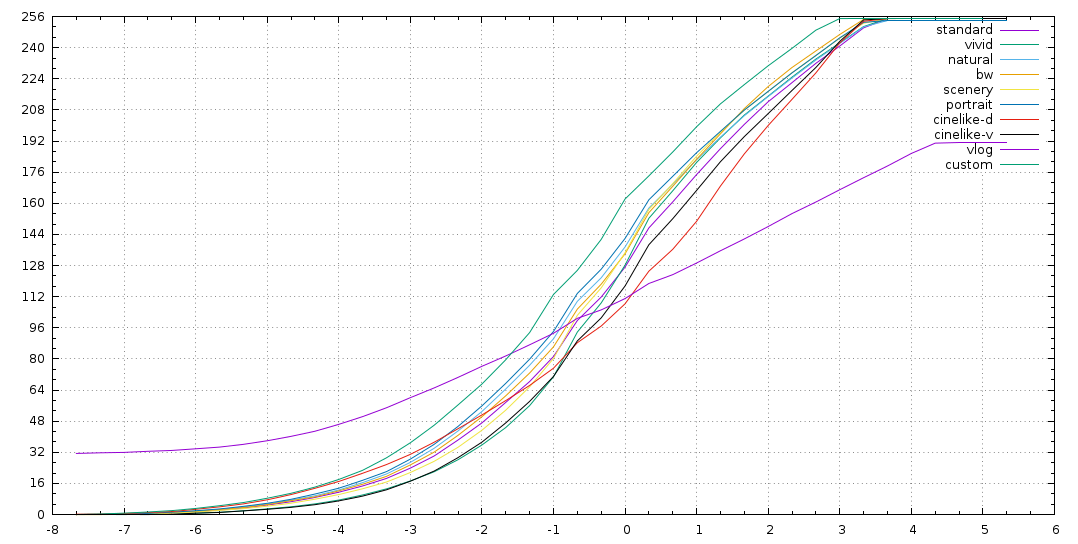
here is a improved version of my gh4 profile comparison. i wrote little application to remote control my camera and make test shots in all 10 available picture profiles in 40 steps between 1/2 to 1/16000 exposure.
the camera was set to ISO400 f16 and all picture profile related settings on zero. the measured values are taken from raw data in the Y-plane straight after compression in ffmpeg. a 100x50px crop area of a 4K frame was analyzed, a homogeneous gray patch on a test chart. you can download the measured data or look at this simple plots:

gammas.png


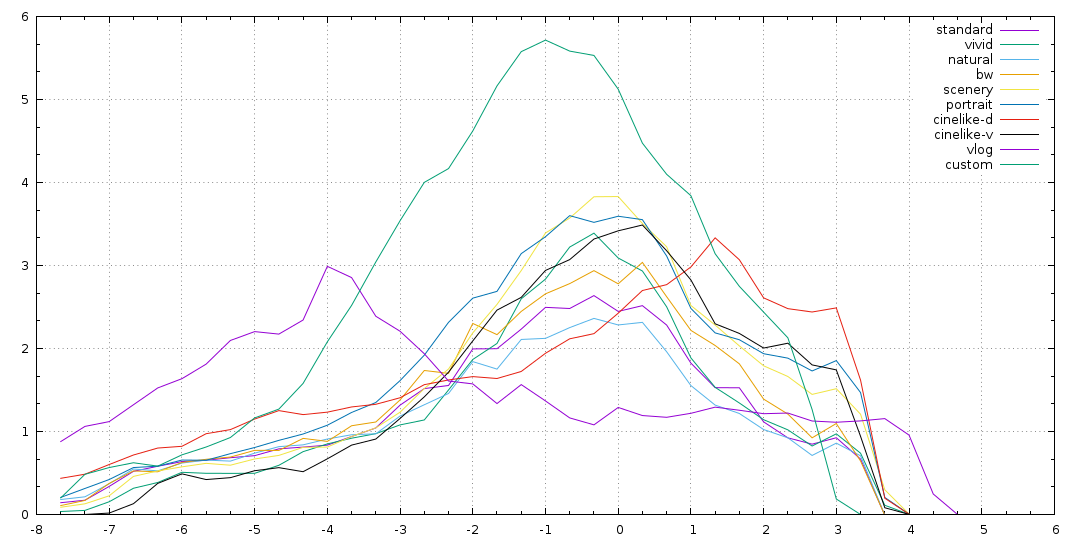
there is also a plot of the related standard deviation of pixel values to get an idea about the noise figure...
but keep in mind that you have to multiply the vlog amplitude to get the same results as from the compared full swing outputs.
i may add, only the Y channel (the luminosity information) is considered here. taking the color side of this given vlog implementation into account the related results would look even worse. :(

std.png
 
My first post! We recently shot a small commercial in Dominican Republic using Vlog and internal codec. Quite happy with the results, skintones seemed nicer to play in colorgrading. It seems to me that dynamic range did also improve but mainly in the shadows. I had no issues wiht magenta blocks or noise.

This is the commercial, the sound is temp...
Password: yoyi
https://vimeo.com/140519658
 
here is a improved version of my gh4 profile comparison...

...the camera was set to ISO400 f16 and all picture profile related settings on zero.
Thank you for your detailed measurements of the GH4's built-in tone curves, plotted along with the new V-Log-L curve. This graph reveals a great deal about how Panasonic chose to scale its V-Log implementation on the GH4. My analysis:

On this graph, 8-bit H.264 encoding levels are plotted vertically and f-stop exposure levels are plotted horizontally. This is a semi-log grid, which makes a logarithmic tone curve appear as a diagonal straight line. Stop-0 is defined at the point where the Standard profile's exposure is encoded at the 8-bit middle point value 128, with gain at ISO 400. This places the white clipping point at Stop +3 1/3, and the black point at Stop -7 1/3, with a master pedestal of 0, for a 10-stop dynamic range.

With the V-Log-L curve, the white clipping point occurs at Stop +4 1/3, encoded at 8-bit level 192, with gain at ISO 400. The logarithmic portion of the curve extends down to Stop -4 1/3, and is rolled off to black with a 3-stop shadow knee down to Stop -7 1/3, with a master pedestal of 32, for an 11-stop dynamic range.

The V-Log-L tone curve appears to provide one stop more highlight lattitude than the built-in curves, but this is an illusion produced by ISO scaling manipulation. The V-Log curve segment from Stop +3 1/3 to +4 1/3 actually corresponds to the built-in curve segments from Stop +2 1/3 to +3 1/3, it's just that Panasonic scaled V-Log-L ISO levels to produce one stop brighter exposure than the built-in profiles (e.g. Standard ISO 400 = V-Log-L ISO 200). The gain of the V-Log-L curve is much lower than the built-in curves in order to fit its 11-stop DR into the 8-bit range of 32-192. These scaling factors explain why V-Log-L shows significantly more noise than the built-in profiles in the shadow exposure range from Stop -7 1/3 to -3 1/3.

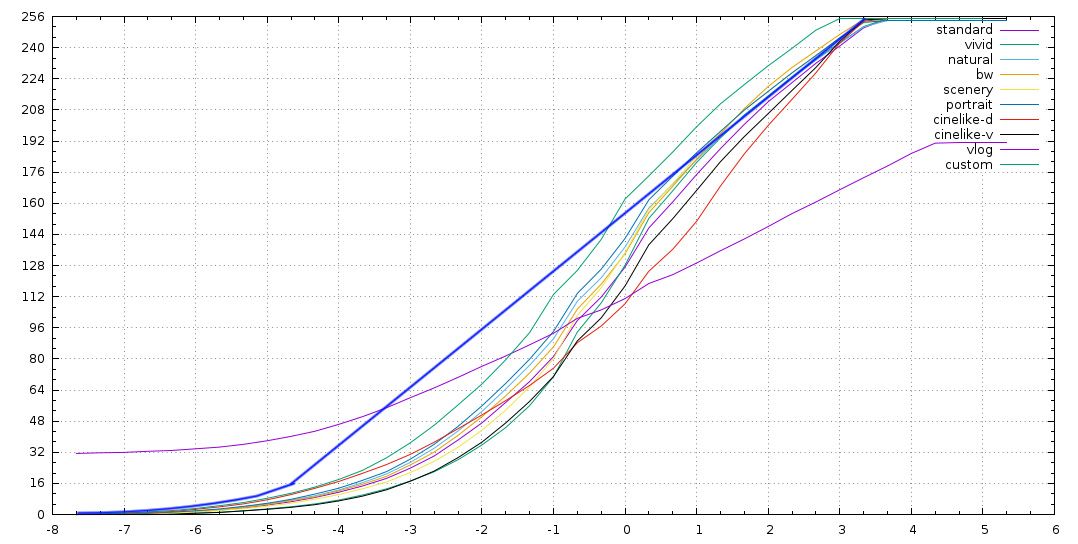
Panasonic's V-Log-L scaling was arbitrarity devised to provide LUT compatibility with the 14-stop Varicam camera. Unfortunately, this restricts the GH4's internal 8-bit H.264 encoder to using only about 7-bit precision to encode the 11-stop V-Log-L dynamic range. Encoded image quality could be improved by scaling the V-Log-L tone curve in a manner more consistent with the built-in profiles, that would still provide an 11-stop V-Log-L dynamic range. In the graph below, I've drawn a thick blue curve to illustrate what a V-Log-L profile optimized for the GH4 would look like:

Modified V-Log gamma.jpg
 
thanks for your interpretation!
i perfectly agree with you -- using the full range of values would have helped a lot!
but i think, the real problems we see in practice are more related to wasted values in the color channels.
using the much larger v-gamut as reference for actual bt709/sRGB color content in this this context of very limited data ranges seems to have quite similar consequence as this wast of possible Y values. it degrades the actual color resolution a lot. this looks like the main source of this horrible color smear issues to me. would you agree on this assumption?
 
but i think, the real problems we see in practice are more related to wasted values in the color channels.
using the much larger v-gamut as reference for actual bt709/sRGB color content in this this context of very limited data ranges seems to have quite similar consequence as this wast of possible Y values. it degrades the actual color resolution a lot. this looks like the main source of this horrible color smear issues to me.
Better 8-bit scaling of V-Log-L would improve the encoded precision of UV chroma channels as well as the Y luma channel, so that alone should reduce chroma smearing artifacts. But I think your point about the broader gamut of V-Log is significant as well. H.264 encoders have built-in psycho-visual compression biases that degrade the quality of the chroma channels far more than the luma channel. That's because H.264 is a consumer-grade codec intended for producing brightly-colored, high-contrast movies rather than finely-detailed real-time video capture. The way that H.264 chroma channels are encoded preserves a broad range of well-saturated hues, but results in coarse discrimination among subtlely tinted shades of gray. When you combine this bias with the encoder's tendency to devote most of its bitrate to high-contrast edges rather than low-contrast gradients, finely detailed hue variations can wind up severely shortchanged.
 
thanks a lot for all this insights.
it's very hared to get this synopsis of all relevant aspects...
this v-log debacle may be a very unsatisfying product but it's a nice motivation to learn a lot more about cameras and their internal secrets. :)
 
I also agree with Lpowell interpretation.
And yes, we are exchanging quality for DR.
That means a corrected V-Log curve will always be worst/less precise than other profiles (+1 Stop, same 256 steps quantification scale = a single step represent a larger interval of captured values), but only barely and then there are other advantages from using log curves.

What could add some more quality would be a corrected V-Log (using full 8bit) + 10-20% bitrate increase (let's say, 120Mbps) to let more bit information to smooth areas.
 
Thank you for your detailed measurements of the GH4's built-in tone curves, plotted along with the new V-Log-L curve. This graph reveals a great deal about how Panasonic chose to scale its V-Log implementation on the GH4. My analysis:

On this graph, 8-bit H.264 encoding levels are plotted vertically and f-stop exposure levels are plotted horizontally. This is a semi-log grid, which makes a logarithmic tone curve appear as a diagonal straight line. Stop-0 is defined at the point where the Standard profile's exposure is encoded at the 8-bit middle point value 128, with gain at ISO 400. This places the white clipping point at Stop +3 1/3, and the black point at Stop -7 1/3, with a master pedestal of 0, for a 10-stop dynamic range.

With the V-Log-L curve, the white clipping point occurs at Stop +4 1/3, encoded at 8-bit level 192, with gain at ISO 400. The logarithmic portion of the curve extends down to Stop -4 1/3, and is rolled off to black with a 3-stop shadow knee down to Stop -7 1/3, with a master pedestal of 32, for an 11-stop dynamic range.

The V-Log-L tone curve appears to provide one stop more highlight lattitude than the built-in curves, but this is an illusion produced by ISO scaling manipulation. The V-Log curve segment from Stop +3 1/3 to +4 1/3 actually corresponds to the built-in curve segments from Stop +2 1/3 to +3 1/3, it's just that Panasonic scaled V-Log-L ISO levels to produce one stop brighter exposure than the built-in profiles (e.g. Standard ISO 400 = V-Log-L ISO 200). The gain of the V-Log-L curve is much lower than the built-in curves in order to fit its 11-stop DR into the 8-bit range of 32-192. These scaling factors explain why V-Log-L shows significantly more noise than the built-in profiles in the shadow exposure range from Stop -7 1/3 to -3 1/3.

Panasonic's V-Log-L scaling was arbitrarity devised to provide LUT compatibility with the 14-stop Varicam camera. Unfortunately, this restricts the GH4's internal 8-bit H.264 encoder to using only about 7-bit precision to encode the 11-stop V-Log-L dynamic range. Encoded image quality could be improved by scaling the V-Log-L tone curve in a manner more consistent with the built-in profiles, that would still provide an 11-stop V-Log-L dynamic range. In the graph below, I've drawn a thick blue curve to illustrate what a V-Log-L profile optimized for the GH4 would look like:

Modified V-Log gamma.jpg

Exactly this. In developing my LUT based on Cinelike D (the profile that gives us the best linear dynamic range in camera), I found that not only am I seeing identical or better dynamic range to VLog L (due to colour noise obscuring meaningful detail at the low end in VLog L compared to Cinelike D), but the colour and tonality of Cinelike D is superior as well thanks to better use of the available 8 bit 4:2:0 encoding space.

But it's a battle to explain this to people, since they, like I used to at first, tend to believe the official Panasonic explanation of "1-2 stops more dynamic range from VLog-L" without doing a proper analysis. It was only when I really dug into the Cinelike D profile and made the corrective LUT for it that I discovered that the dynamic range with the right settings in Cinelike D is identical, basically showing not the profile limitation but the limit of the sensor itself.

Thanks for the explanation!

Cheers from Berlin,

Paul :)
 
Paul, judging by the curves, it seems there would really be two best LUTs: a D-Log (based on CineD, to pick out details in shadows) and an N-Log (based on Natural) to protect highlights. Just like RED have two flavors of OLPF, LLO and STH.
 
Paul, judging by the curves, it seems there would really be two best LUTs: a D-Log (based on CineD, to pick out details in shadows) and an N-Log (based on Natural) to protect highlights. Just like RED have two flavors of OLPF, LLO and STH.
Amen, brother. If Paul doesn't, I'm going to have to, and I'd really rather he do the hard work and pay him $15. ;-)
 
...It was only when I really dug into the Cinelike D profile and made the corrective LUT for it that I discovered that the dynamic range with the right settings in Cinelike D is identical, basically showing not the profile limitation but the limit of the sensor itself.

Paul :)

What would be the right settings?
 
Back
Top