Experience with external recorders?

ustein

Well-known member
I film nature and there is nearly endless detail in nature. So far the AF100 does a nice job but lots of fine detail gets lost. I feel this maybe mainly due to compression.

Who has experience with external recorders (e.g. Ninja) and knows they preserve more fine detail. For me it is less about color depth (would be nice too).

Handling in the field is of course important too. So far the Ninja may look the most attractive.

I asked for practical experience and not specs.
 
In many scenarios an external recorder won't show much of an obvious difference. However, the type of scenario you describe is the exact scene where an external recorder will benefit most. I've used the Nano, and the HPG20, and both of them retain noticeably more detail than the onboard AVCHD. The issue is when there's lots and lots of fine detail, especially in motion -- wind rippling through the trees, grass blowing in the wind, a river, etc... that combination can overtax the codec, which causes it to go soft, and that's when the fine detail gets lost. A higher-bandwidth codec can retain the fine detail in those scenarios.
 
Barry,

thanks for your comment.

> that combination can overtax the codec (you mean the AVCHD internal codec)

I think that is what we are seeing. Did you get some input about the Ninja?
 
No, I haven't bothered with the Ninja, because I don't think it's a good match for the AF100. I think the Samurai will prove to be the far more appealing device. Ninja is HDMI-only, and I don't think HDMI is a good connector and I definitely wouldn't trust my recorder to HDMI (and yes, I know there are others who would, and more power to them, but I certainly wouldn't!) Plus the Ninja can't do 24PsF, and the HDMI port can't transport the record start/stop signal, and there's no timecode over HDMI. Just lots of reasons why I think the Ninja is not the right product for an AF100. And I wouldn't be rushing out to get a PIX 220 either, for the same reasons (although I don't know if the PIX 220 will have the ability to strip out 24P pulldown on the fly or not; the Nano can do it from HDMI, but the Ninja doesn't).

With the Samurai, or a Nano, or a PIX 240, you can plug in through the much more secure SDI port, you can have true native 24p recording without hassling with pulldown removal, you can (or should be able to) start/stop the recorder by pressing just the record button on the camera (instead of trying to start/stop both of them), and you'll have timecode sync if you need it. Plus the Samurai has been said to have a better display, and more processing hardware in it. For the increase in price, any of them just seem like a much better match to the AF100 than the Ninja does.
 
I am also looking at the Samurai. Having no HDMI makes it a bit less versatile for other uses.
 
I gave the Ninja a whirl, and was pretty impressed with the build quality and with the latest firmware 2.0, it was pretty slick. However, the deinterlacing process was driving me nuts. Cinema Tools could not deinterlace it properly. I had to use JES De-interlacer which worked ok but it was such a hassle. I will say, that if you are going to use any HDMI enabled recorder/monitor, the best cables are from Monster:

http://www.monstercable.com/productdisplay.asp?pin=5830

These cables have a slightly fatter connection making it surprisingly snug on the Ninja and Af100. I was not expecting such a good fit. The samurai will be a better unit in my opinion.
 
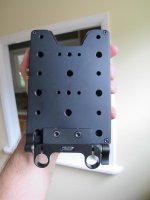
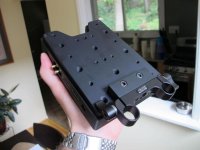
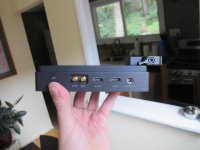
Mounts on the camera with a custom plate by the Connectivity group and a 15mm mount from Berkey systems:

IMG_0010.jpgIMG_0009.jpgIMG_0008.jpg

Uses qualified SSD drives.
 
I don't use rails. How to mount it on the AF100?

>Uses qualified SSD drives.

Means?

The following SSD's are commended for uncompressed video capture:
  1. OCZ 240GB Vertex 3
  2. OCZ 480GB Vertex 3
  3. Crucial 256GB C300
  4. Kingston 64GB SSDNow V+
  5. Kingston 128GB SSDNow V+
 
I've been using a Hyperdeck Shuttle and am very impressed with it. Given that it is uncompressed, the quality of the video is as good as you can get from the camera. It has an onboard battery and sports HDMI and SDI, both with pass-through. It is also very inexpensive.

On the downside, the size of the files created ( > 8 Gbytes/minute) may be a deal breaker for those that need a long record time. Not an issue for me as I shoot narrative films with a laptop nearby but could be a problem for a nature shooter.

Other minor negatives include the lack of mounting holes (I use velcro), short battery life (I use IDX bricks) and the use of micro SDI connectors (Red cables work)
 
Do you then transcode for editing? Storing these uncompressed files longterm can be a problem I think. Do you use it with an AF100? I don't shoot much footage per day so that might not be a problem.

Does the BM recorder pass through to HDMI (e.g. the Zacuto EVF)?
 
Last edited:
Yes, I use it with an AF100. Some projects I've left uncompressed, others I've transcoded to ProRes or Cineform. I used to worry about storage, but of late I've been using raw SATA drives and a dock. 1- 2 Tbyte drives are pretty cheap these days and Hudzee cases are handy for storing them.
 
Any chance to get a very short clip (1 sec) with AVCHD and the BM? Send me a PM if this would be possible.
 
Yes, I use it with an AF100. Some projects I've left uncompressed, others I've transcoded to ProRes or Cineform. I used to worry about storage, but of late I've been using raw SATA drives and a dock. 1- 2 Tbyte drives are pretty cheap these days and Hudzee cases are handy for storing them.

I too am enjoying the blackmagic Hyperdeck recorder. (or hyperdrive as it's been nick named on our set) The uncompressed files are great for fine detail. I was having a lot of issues when shooting low light and it seems to have helped reduce the apparent noise as well. They are a bit clumsy to use because of their powering options and mounting, but there's a few workarounds (as already mentioned).

I love their simplicity.
 
Back
Top