
Colinelves
Well-known member
To be honest - this thread has made me think a bit more about my methodology and I think, perhaps ETTR isn't quite the right term.
Generally it is a pretty good description as I do, generally ETTR - as in, I generally protect my highlights: meaning zero clipping. I check this with the zebras, not the histogram. As I don't really see the point in histograms, they don't seem to tell you half as much useful information as a waveform - though I do understand how they work, so when using them (e.g. on a Red) I'll tend to balance out high DR images (being conscious of what I am clipping at both ends) but more often than not avoid having anything hitting the far right as that means clipping.
Anyway, I'd say, actually, a better description of what I do is: Protect the shadows. I'm very aware, and wary of, the noisy shadows in the FS700 slog2 so I tend to try and avoid putting anything important in the 'natural' shadow areas and for high DR scenes I balance excessive clipping with a desire to avoid noise which, often enough, is more through feel than science: i.e. I make a judgement call as to how blown out I can make that window without it looking too video-y.
In situations where DR is less of a problem I'll tend to expose up a bit - making sure I've got milky shadows.
In order to try and keep exposure consistent I'll use the False Colour option - putting skin tones highlights in the yellow range (70 IRE I think) works for me - although this is very very wrong (about 2 stops higher than they 'should' be). Or I just look at the (non-LUT) image and go with what looks right to me.
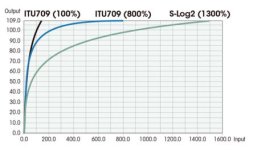
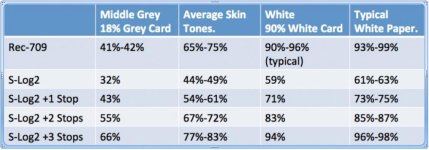
BTW - Gene, If you haven't seen this images before it should, hopefully, make a bit more sense to you as to how slog2 varies from Rec 709 standard images - and where 'mid-grey', skin tones and 'matte white' should be placed.
Generally it is a pretty good description as I do, generally ETTR - as in, I generally protect my highlights: meaning zero clipping. I check this with the zebras, not the histogram. As I don't really see the point in histograms, they don't seem to tell you half as much useful information as a waveform - though I do understand how they work, so when using them (e.g. on a Red) I'll tend to balance out high DR images (being conscious of what I am clipping at both ends) but more often than not avoid having anything hitting the far right as that means clipping.
Anyway, I'd say, actually, a better description of what I do is: Protect the shadows. I'm very aware, and wary of, the noisy shadows in the FS700 slog2 so I tend to try and avoid putting anything important in the 'natural' shadow areas and for high DR scenes I balance excessive clipping with a desire to avoid noise which, often enough, is more through feel than science: i.e. I make a judgement call as to how blown out I can make that window without it looking too video-y.
In situations where DR is less of a problem I'll tend to expose up a bit - making sure I've got milky shadows.
In order to try and keep exposure consistent I'll use the False Colour option - putting skin tones highlights in the yellow range (70 IRE I think) works for me - although this is very very wrong (about 2 stops higher than they 'should' be). Or I just look at the (non-LUT) image and go with what looks right to me.
BTW - Gene, If you haven't seen this images before it should, hopefully, make a bit more sense to you as to how slog2 varies from Rec 709 standard images - and where 'mid-grey', skin tones and 'matte white' should be placed.

