Example of BAD Noise in 4K2HD ISO 2500

To be honest - this thread has made me think a bit more about my methodology and I think, perhaps ETTR isn't quite the right term.

Generally it is a pretty good description as I do, generally ETTR - as in, I generally protect my highlights: meaning zero clipping. I check this with the zebras, not the histogram. As I don't really see the point in histograms, they don't seem to tell you half as much useful information as a waveform - though I do understand how they work, so when using them (e.g. on a Red) I'll tend to balance out high DR images (being conscious of what I am clipping at both ends) but more often than not avoid having anything hitting the far right as that means clipping.

Anyway, I'd say, actually, a better description of what I do is: Protect the shadows. I'm very aware, and wary of, the noisy shadows in the FS700 slog2 so I tend to try and avoid putting anything important in the 'natural' shadow areas and for high DR scenes I balance excessive clipping with a desire to avoid noise which, often enough, is more through feel than science: i.e. I make a judgement call as to how blown out I can make that window without it looking too video-y.

In situations where DR is less of a problem I'll tend to expose up a bit - making sure I've got milky shadows.

In order to try and keep exposure consistent I'll use the False Colour option - putting skin tones highlights in the yellow range (70 IRE I think) works for me - although this is very very wrong (about 2 stops higher than they 'should' be). Or I just look at the (non-LUT) image and go with what looks right to me.

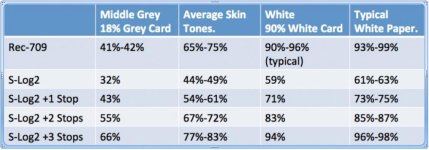
BTW - Gene, If you haven't seen this images before it should, hopefully, make a bit more sense to you as to how slog2 varies from Rec 709 standard images - and where 'mid-grey', skin tones and 'matte white' should be placed.
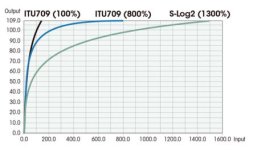
FS700-tab1-blade5.0-2.jpgA7s-exposure-levels-1024x358.jpg
 
Thanks guys, this is a great thread and now I understand ETTR much better. And thanks Colin, I'm going to try and digest the graphs you posted.

Quick question. What do you guys set your Zebras to for S-Log 2? I've been at 100. Is that about right?
 
Thanks guys, this is a great thread and now I understand ETTR much better. And thanks Colin, I'm going to try and digest the graphs you posted.

Quick question. What do you guys set your Zebras to for S-Log 2? I've been at 100. Is that about right?

In camera I use 100+, but mostly judge using the histogram since actual clip is around 106%, so looking at 100+ a lot of things will look clipped that aren't actually. On the 7Q, I set zebras at 106% and just avoid letting anything hit 106%.
 
Thanks guys, this is a great thread and now I understand ETTR much better. And thanks Colin, I'm going to try and digest the graphs you posted.

Quick question. What do you guys set your Zebras to for S-Log 2? I've been at 100. Is that about right?

106% on the O7Q - for some reason it never reaches 107%, but 106% is white clip.
 
I like safety in post, so setting the zebras to 100+ and considering it clipping is the best, it means I expose to the right but not quite to clipping.
 
Sony locks S-Log2 at 2000ISO as it allows the most dynamic range from the sensor, sticking middle grey right in the middle. But that also means a lot of noise comes up off the floor.

We are going to add a "virtual ISO" set of LUTs to the Odyssey7Q which will allow you to take the S-Log2 material and see it transformed to a different ISO level in REC709. This will allow you to set exposure properly for pulling levels in post, which will bury the noise floor.

I personally don't like ETTR, as I find it erratic and poorly matching shot-to-shot. Instead I like to choose a standard exposure level offset and stick to it, usually by judging with the waveform or false color modes. I like the FS700 at around 800 ISO, or 1.3 stops overexposed.

This sounds very interesting. So theoretically in the future, we could set a LUT on the 7Q to a "virtual 800 ISO" which would affect both Waveform and Monitor (just as the onboard LUT does now) and essentially trick the operator into overexposing by around 1.5 stops the image that is truly set at 2000 ISO (or whatever camera is set to).

Can you expand on how this might work?
 
This sounds very interesting. So theoretically in the future, we could set a LUT on the 7Q to a "virtual 800 ISO" which would affect both Waveform and Monitor (just as the onboard LUT does now) and essentially trick the operator into overexposing by around 1.5 stops the image that is truly set at 2000 ISO (or whatever camera is set to).

Can you expand on how this might work?

Hopefully it will also automatically work with all custom recording LUTs, just like the way RED and Arri do ISO and Sony does Cine-EI. Worst case one could also build a set of LUTs each with different "ISO"s, which might be easier to provide continuity in post for people who are only using monitoring LUTs, not recording with the LUT baked in. Otherwise telling your colorist what you saw on set was CD's "virtual ISO 800" might end up giving you something pretty different in post since the colorist might not push the exposure up 1.3-stops the same way that CD did...
 
The thought is to implement this as either a baked-in option or with a corresponding post LUT so that the look could be matched later. I stress that this is the PLAN... we still have to work out the execution.
 
Can you write the title of the lut used at the moment of recording to the meta data?

in stills I tend to expose in three mmanners

washy - ettr but looks a bit washy on camera - creates the cleanest file - controlled lighting
normal - looking after the highlights in camera
digger - we are running out if light and can only get up to 70% in the histo - recoverable on post with some noise - but got the shot!
 
Now in which edition of American Cinematographer can I find this "exposure jargon" gone over in detail. :2vrolijk_08:

Well you probably cant. Most Mostly because those people usually have enough lights/filtration to control DR and light level.. and should have a DIT build them a LUT.

So any American Cinematographer should be exposing washy - which gives the cleanest most noise free file - but never see it on their monitor as their DIT will have normalised their view with a LUT.

Back in the real world my experience is..

Controllable DR scene? Overexpose mid grey by a stop.

Less controllable DR? Keep mid grey at mid to protect the highlights.

Dark? - open up as much as you can and know you can pull a bit more in post.

S
 
In order to try and keep exposure consistent I'll use the False Colour option - putting skin tones highlights in the yellow range (70 IRE I think) works for me - although this is very very wrong (about 2 stops higher than they 'should' be). Or I just look at the (non-LUT) image and go with what looks right to me.

On a very controlled shoot yesterday with fashion models on a sound stage yesterday, I tried the False color putting skin tones highlights in the yellow range, and it seemed to work really well. Thanks.
 
Back
Top