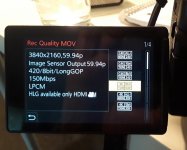
GH5 Evaluating GH5 4K 10bit clips recorded at both 150Mbps and 400Mbps.

Hi

Thank you for the examples, they seem close enough to be the same really, I couldn't say one was better than the other. I'm sure the 400Mbit/sec record rate was arrived at as this equalled IPB for quality, rather than exceeding it. The only advantage is going to be in the editing.

Regards

Phil
 
Hey regarding the 150Mbts codec:
Technical question:
Both XF400 and Gh5 have 150 mbts 4K. But the Canon has 8bit 420 and the Panasonic has 10bit 422.
How can Pana squeeze in so much more info in the same 150Mbts?

(I’m Looking for a B-cam to Canon C300m2 / small cam to give to less experienced users.
I have the XC10 - it’s good for not experienced users but it would be even better with DPAF. Therefor Canon XF400 / GX10 looked interesting, but it’s only 8bit 420... XC10 422 and higher Bitrate Codec is superior on paper. So I guess I stay with XC.
No one is perfect...
I have used Gh5 too and hope to match the colors,but haven’t graded yet...)
 
Both XF400 and GH5 have 150 Mbts 4K. But the Canon has 8-bit 420 and the Panasonic has 10-bit 422.
How can Pana squeeze in so much more info in the same 150 Mbts ?

...Never assume that compression performance is the same for all cameras. I remember when I first got my GH2 camera and how surprised I was that the GH2 1080p image was significantly better than my Canon 60D camera at essentially the same data rates. ( the Canon was far better for still photos ) Then later on the hacks were released and GH2 image quality went to a whole other level.

Panasonic has a history of producing cameras with state-of-the-art h.264 compression, so I would be curious to see how the XF400 image compares to the GH5.
 
Hey regarding the 150Mbts codec:
Technical question:
Both XF400 and Gh5 have 150 mbts 4K. But the Canon has 8bit 420 and the Panasonic has 10bit 422.
How can Pana squeeze in so much more info in the same 150Mbts?

(I’m Looking for a B-cam to Canon C300m2 / small cam to give to less experienced users.
I have the XC10 - it’s good for not experienced users but it would be even better with DPAF. Therefor Canon XF400 / GX10 looked interesting, but it’s only 8bit 420... XC10 422 and higher Bitrate Codec is superior on paper. So I guess I stay with XC.
No one is perfect...
I have used Gh5 too and hope to match the colors,but haven’t graded yet...)

For the same reason that ten different DVDs at 9mbps can all vary greatly in their look. Encoding is a complex process and using bitrate to judge the quality alone is about as useful as judging a politician by their shoe size. The only time bitrate can be used to judge quality is when the same encoder is encoding at different rates. For example a GH4 recording at 24mbps or 50mbps. Even then encoders can be used differently. Look at how much the GH2 encoder could be hacked to yield different results. Software encoders have oodles of settings for a reason and sometimes 50mbps is not always what one would expect 50mbps to look like. Lots of things can be tweaked, adjusted, massaged to make a bitrate yield very different results.
 
Yes codecs are different. The visible video quality result is what counts. For example GH5 150 Mbs 4k 60P has less macro blocking than GH5 100Mbs 4k 30P. 4k 60P uses h.264 high profile 5.2 and 4k 30P uses h.264 high profile 5.1.
 
Hi

The levels don't mean the codec or compression is any different, the levels are for the decoder. Level 5.2 indicates you need a decoder that supports decoding 4K at 60fps, that same decoder will do all levels at and below 5.2. A decoder that can only do upto level 5.1 can't decode 4K @ 60fps, but can decode 30fps, hence the 30P footage gets level 5.1, it could be label 5.2 and would look exactly the same but that would be pointless as then a decoder at level 5.1 would not play it as it sees 5.2 being outside it's capability and would reject it.

The reason 60P often looks better (all other things equal) is IBP tends to compress easier the more samples per second it has to work with. Because it only records the changes between most frames, then it's easier to find and track these changes having a sample that represents only 1/60th of second of time compared to samples 1/30th second apart in time where more movement will have happened.

The levels can be found in the Wiki article https://en.wikipedia.org/wiki/H.264/MPEG-4_AVC, it's useful if buying some form of hardware decoder (i.e. multimedia player) to see what decoding they support, although not all manufacturers publish the level of support.

Regards

Phil
 
It was a pleasant surprise to find GH5 4k 60P having better IQ than 4k 30P (8bit). 2x video data and 1.5 x bitrate = better IQ and less macro blocking. The coced may be different in details or parameters.

Panasonic h.264 is usually better than Sony h.264 even when the profile level is the same.
 
Yes codecs are different. The visible video quality result is what counts. For example GH5 150 Mbs 4k 60P has less macro blocking than GH5 100Mbs 4k 30P. 4k 60P uses h.264 high profile 5.2 and 4k 30P uses h.264 high profile 5.1.

I have got to agree. The 150 Mbps 4k 60fps is much better than I thought it would be. It handles motion very well. I think I will stick with it instead of the ALL-I.
 
Last edited:
Here is a little crop of both moving frames. Sharpened and saturation added.

View attachment 127471

To be fair that isn't enough random motion to make the IPB fall apart. The difference between the two very well will look the same until the frame is made up of a lot of vey random motion. Random meaning movement in every possible direction including rotating and moving closer/farther from the camera. Random also meaning not always in the same predictable direction but one frame going left then the next frame going right and up. It is the random unpredictable motion that can make IPB fall apart. Shoot ocean waves on a beach or a bunch of fast blowing tree limbs in a storm and the IPB could fall apart more.


we use all-I so things like a car exploding will look just as good in the frame of the car in the parking lot and the next couple of frames with metal and flames moving in thousands of different directions every frame. Thats an extreme example of course since most of us will not be shooting that kind of stuff but even in nature we can run into situations where IPB can macro block in certain frames. Shooting all-I means all frames will be equal no matter the complexity.

It is very difficult to test for the difference between the two because you really have to feed the camera some jacked up random motion. Not an easy thing to reproduce in a studio. You need to go outside and shoot something in both modes that is insanely complex like beach waves, strong winds blowing tree branches, dirt bikes kicking up mud or stuff like that. If you don't shoot stuff like that then IPB is likely perfectly fine.
 
To be fair that isn't enough random motion to make the IPB fall apart.
And motion isn't the only thing that can cause a long-GoP codec to fail. The question isn't what "moves" from one frame to the next, the question is what *changes* from one frame to the next. Linear motion is only one small component of what can change. Another is rotation. Another is zoom level. Another is color. Another is brightness.

When I was testing long-GoP and learning to hate it, I discovered several instances that would break HDV all to hell and gone. Fireworks, confetti, splashing water, zooming, color or lighting changes in a stage production or live show or concert... any of those would destroy the old (and woefully underpowered) 25mbps MPEG-2.

In more recent torture testing on the AVCHD implementations by Sony and Panasonic, I found that they were much, much more robust than HDV ever was. You can still get them to break, but it takes a lot more effort. And that's at 21 mbps.

I have not found a scenario that causes notable degradation in the 100mbps H.264 4K/24p of the DVX200, or the 150mbps H.264 UHD/60p of the DVX200. There may be some scenarios, but -- these codecs are infinitely more robust than the original long-GoP offerings. Then again, I haven't actively torture tested it to find its very limits, as I haven't shot a concert or stage show in many years.

If you want to really torture test to see how the IPB fares against the ALL-I, you'd have to do as Thomas said and include something like an explosion, including dirt and dust flying up in the air, and ideally you'd include lateral motion and vibration at the same time. Mount two GH5's on a dirt bike's handlebars, one in IPB and one in ALL-I, and go riding through the rough stuff as explosions go off in the frame, and then you'll find the limits.
 
I wonder why no one who wants to use 400 Mbs shows an example where the 150 Mbs ipb fails. I have studied my 4k 60P ipb videos of moving water, waves and waterfalls and it is very difficult to see any faults.
 
Maybe in 50 years, there'll be plugins to add macroblocking as a vintage look like film grain today!
 
Seriously, just use a noise effect in your NLE and crank it all the way up and render it out as uncompressed video, point your camera at your monitor and play it. You will find out right away how quickly Long GOP falls apart. This particular test showed me right away how much worse Sony's 100Mbps UHD encoder is than its 50Mbps or even 24Mbps HD one...

Or download an uncompressed grain scan or video "snow" noise recording and use that and loop it.
 
If you cant see it is it really there? IPB @ 150MBps vs. All-I @ 400Mbps, I’m beginning to think that were worrying about a difference that isn’t important enough to matter.
 
If you cant see it is it really there?
Here's an example of what to look for (a turbulent stream of water in sunlight). These images were shot in 1080p24 with a GH2, but the same factors apply to the GH5 at 4K. Both images are magnified 200% and cropped without additional post-processing. The upper image was shot with the stock H.264 firmware, a long-GOP IPB encoder with a maximum bitrate of 24Mbps. In addition to smeared details, you can see patterns of horizontal and vertical straight-line artifacts (AKA "macroblocking"). It is very difficult to filter out these digitizing artifacts once they contaminate an image. The lower image was shot with my Flow Motion v2 short-GOP IB patch, with a maximum bitrate of 100Mbps. Its lack of artifacts and increase in detail show what makes high bitrates essential for critical work. For an in-depth analysis, check out the Flow Motion link below in my signature.

attachment.php
 
Last edited:
You shouldn't be looking at individual frames when comparing the motion rendering between all-i and ipb. That's just comparing static PQ. You have to watch *moving* images to see the (rare) times the motion is wonky with ipb. The most common artifact is a sort of judder when slow panning that occurs when the codec incorrectly guesses the next frame(s). Both the GH4 and GH5 were susceptible, but the all-i codec on the GH5 eliminates the chance of it happening.
 
I have some few videos (GH4 4k 30P) where a little part of image behaves oddly when panning slowly. It is very rare, normally the motion is OK. GH5 150Mbs is even better.

When I watch Sony XAVC-S 50Mbs fullhd ipb there are odd motion and macro blocking almost all the time.
 
Back
Top