AC160 Error message ac160 stop recording (DATA ERROR)

dhardjono

Active member
I was shooting last night wedding using sandisk 32 gig class 10 with simul rec when all of a sudden the message saying error please turn of the camera and turn back on lucky it was just dancing scene so i try to turn of but it will not turn of i was going to pull the battery out but i push the rec button and manage to turn of camera it works.So than i turn on and it say an error in slot 1 and need to be repair yes or no the message say so i just repair 1 card the other i did not do it and i change to a diferent cards for the rest of the night. I check the 2 cards i lost the footage on the one with out doing the repair. The simul rec does not go on recording if there's an error it effect both cards and shut down. Now i am scared to use the camera if this happen in important part of a wedding there is no way to change cards in time.
I bought ac 160 for the simu rec so i don't have to worry about cards errors now i am scared to use the ac 160 and very dispointed.
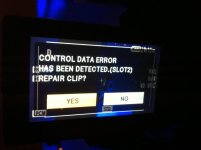
Picture 2228.jpg
 
Ouch, not fun. Were these new cards? Have you used them before? (There have been a lot of fake Sandisk cards on Ebay)
How long were the clips you were recording? Were the cards nearly full?
Were they both formatted in the camera? The only card issue I've ever had was on my HMC150 when the card was formatted in a different camera.

I guess the only good thing was you still had one good card. So the simul recording did save you from losing everything.

But I agree, having the camera stop all of a sudden doesn't inspire confidence.
 
Hi jchritie
the card are used maybe 10 times, they are formated in the camera, i bought them at b&h a good store for non fake cards, both card have every thing that i capture but only 1 lost the last clip that i did not restore.
But it supose to be safe with the simu rec that was my purpose in buying this ac 160.
 
Yeah, that's one of the reason's I bought the camera as well. At least you did all the right things with your cards. Once you've had a card failure, it's hard to trust the idea of SD recording.

Have you tried any recovery software on the card that you couldn't read?
 
Dhardjono... Can you clarify… did you have the choice to repair both cards, and decide just to repair one, or did you not have a chance to repair both?
 
Yes i did have a chance to repair both but did not want to take a chance so i only repair 1 card and it work. I put the two cards back in the camera put it on playback one card was missing the last clip that one was not repair the rest of the clips was all there on both cards i test record it work. I was so happy they have simu rec on ac 160 thinking no wories about card malfuntion error's but now if there an error it will stop recording and effect both cards maybe i should use only panasonic cards only ? jchristie I did not need to try a recovery software since i have all the clips just lost that one clip that was not repair.
 
Last edited:
I have to say if "simul rec" is going to stop recording and choke out if there is an error on one card-- doesn't that defeat the purpose of simul rec????Sounds like a design flaw.
Seems strange that both cards get errors at the same time.
Funny how your camera never stopped when we used tape.

side note since we are on this topic:
I get a pop up message when I have activated 'simul rec' it said "use low capacity slot1".
anyone else seen this???
I have no idea what it meant, but it recorded without telling me I had an error.
I use 32GB cards, but nothing in the owner's manual says you need to use no more than xxGB while in Simul rec mode.
 
Yes eln614 it does defeat the purpose of simu rec. I also get that use (low capacity slot 1) it annoying but Jan say it's normal.
 
Sound like a camera problem, how the camera writes to the cards. As stated in the manual, while in "simul record", the camera will write to one card if the other card fails.

So it sound like to me the problem is with the camera, not the cards. I would have a chat with Panny about it.

Best of luck.
 
My DVX100 goes dead and i have to take it to a repair shop if i forget and leave the tape to run to the very end during recording.
My HMC151 showed the card error when it was less than a year old.
The same card which the HMC151 had problem with, played and recorded well in my GH1 and GH2, when i placed the card back to the HMC, it could now see all the files it had recorded except the last one, conclusion HMC151 the culprit.
So far my AC130 is yet to show the errors.
I'm still a panasonic fan despite all the problems i have had with their cameras, a change to me is like death and a new learning curve is just not for me.

i used to work for a bus company with a fleet of just over 60 buses, whenever one of the buses had an accident, my manager would ring the local news media manager who was his classmate at the university,they'd have a drink together that evening, the next day paper would have a very tiny artical of the accident placed on a page where only few could see with no picture at all.
 
I get a pop up message when I have activated 'simul rec' it said "use low capacity slot1".
anyone else seen this???

This is just an informative message that means: "The card in slot 1 has capacity lower than or equal to that of the card ion slot 2, and Simul Rec will only record that amount".
 
Card failure terrifies me, that's why I bought P2. I shot HDV on CF cards for a few years and never had a failure. SDHC cards just look so small and flimsy to me. I'm sure they work well for the most part, it's just that one in a hunderd I'm afraid of getting.
 
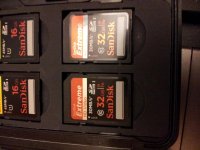
CLAS 10 SD CARDS Sandisk 32 gig use it about 10 time or more20120306_210020.jpg

This is bad i was happy with the double slot simu rec surprise ha i have so many job this year that why i bought the new camera instead of using my old hmc 150 work horse .In the 3 years i use the hmc 150 evan thought it was drop 5 time 2 time real hard frim the top of my car i never lost a footage, now ac 160 with this and auto focus thing it disappointing.
 
dhardjono, no need to get disappointed, in terms of clean footage, none of the other cameras come anywhere near the 130/160 maybe a trade-off. My 151 has NEVER produced such a clean video to what comes out of my 130, not even the GH2 i have with all the propaganda quantum-nebula supernova associated with it comes anywhere near the 130/160 in clean footage.
As an amature panasonic camera enthusiast, for the first time i'm able to produce clean footage, what has eluded me all along since the DVX100. I have always believed the famous comment here "these cameras are not for amatures, you have to learn how to shot with them" until the 130/160 came.
 
Last edited:
dhardjono, no need to get disappointed, in terms of clean footage, none of the other cameras come anywhere near the 130/160 maybe a trade-off. My 151 has NEVER produced such a clean video to what comes out of my 130, not even the GH2 i have with all the propaganda quantum-nebula supernova associated with it comes anywhere near the 130/160 in clean footage.
As an amature panasonic camera enthusiast, for the first time i'm able to produce clean footage, what has eluded me all along since the DVX100. I have always believed the famous comment here "these cameras are not for amatures, you have to learn how to shot with them" until the 130/160 came.


That's nice.


No one is questioning the camera's image quality.
 
Those seem like decent cards. That being said, there's always a chance that you got a bad batch.

I know you're already "all in" with those cards but for future reference (and for anyone swinging by this post later) I can personally vouch for the Panasonic media. We've logged hundreds and hundreds of hours on over a dozen different 16 GB Panasonic cards (the older "gold" ones as well as the newer UHS-I cards) and we've yet to have a single failure of any kind on the HMC150 and the AC130 and AC160.

Those cards cost more, but it's really a very small percentage (like 1% at most) of our overall cost of production. Sorry your cards (or your camera) gave you this trouble, wish I could provide more help!
 
If I were shooting with the 130 or 160 I think that's what I would do ... use the Panasonic cards, they designed the cards to work with the camera at the highest level. Maybe it's the P2 of SD cards.
 
Maybe it's the P2 of SD cards.

The UHS-I cards really are great. Plus, combined with the USB3.0 reader, they are an extremely fast workflow.

They are as robust of a card as you can get from SDHC/SDXC. Panasonic P2 cards or Sony SxS cards are the only thing better.

Again, not blaming the OP's cards for the problem at hand, just suggesting that it MIGHT not have happened with a more robust card.
 
Back
Top