GH4 EOSHD Pro color for GH4

With all due respect to Andrew Reid, this seems to be another of his "experiments" that are long on hyperbole and short on reason. This is a stylistic LUT that you may or may not like - but it is no "better" than any other.

He implies it does things it can't, and he recommends settings that are clearly silly (auto wb.)

EDIT: I just watched his video. He literally claims that a post LUT somehow increases the dynamic range of a camera. I'm tempted to buy it just so I can post charts what BS that is.

The dynamic range thing is kind of BS. Yes it does but the starting profile is Standard which is pretty contrasty to begin with so yes in terms of the standard profile it pulls back a bit more range but not much more so than what you can get with cineD or V-log. It is a bit misleading because the examples do show a rather good increase but you have to look at the context of what he is starting with.

I'm sure 50% of the color advantage he is getting comes solely from the fact that he is using standard. Standard may not be sexy for film makers but it is likely the most neutral profile in the camera for well balanced color. He is taking that slightly more accurate color as a starting point and then stretching our the range to make his own profile. To some it may work but to me it is a lot of unscientific fartring around just to match a certain color look.

Personally I'm tired of the Panasonic color bashing. It isn't bad, just different. To some people it actually preprints a more realistic color that mimics real life vs the hyper reality color of Canon. To each their own. If one is obsessed with Canon color then this lut may be nice. I would really question how much he is hurting the 8bit format to get to that color however.

Personally I still prefer V-log external and dial in the color of my own choice but thats just me.
 
The dynamic range thing is kind of BS. Yes it does but the starting profile is Standard which is pretty contrasty to begin with so yes in terms of the standard profile it pulls back a bit more range but not much more so than what you can get with cineD or V-log.

It's not just kind of BS, it's BS. No LUT can magically create DR in post that the camera didn't record.

I went ahead and purchased his LUT. It does push down the highlights significantly, but it (of course) doesn't create any info that wasn't there in the first place. Based on his misunderstanding of levels (recommending 16-235) my guess is that he saw clipping because of how Premiere interprets "safe" levels -- which happens to a lot of people with cameras that record 0-254.

Standard is not the most technically color accurate profile. None of them hit on all marks, but after extensive testing I determined that Natural is the closest. In terms of dynamic range, V-LOG L is the best, with Cine-D only very slightly behind. (About 1 true usable stop.) Since Cine-D has some weird color errors that are damn difficult to grade away (Leeming LUT does about as good as you can do) I tend to shoot Natural.
 
Yes!

But there is some excitement for V-Log.

It may be more practical on the GH5, but I found it to be a bag of un-monitorable 8-bit hurt on the GH4. With an external monitor/recorder that can display LUT's and record 10 bit it's more practical, but even then the improvement is not so great as to be worth the hassle for me (at best a stop of extra DR into the very noisy shadows.) And I really wanted it to work, and was an early champion of it...but the way it was implemented just missed the mark.
 
It may be more practical on the GH5, but I found it to be a bag of un-monitorable 8-bit hurt on the GH4. With an external monitor/recorder that can display LUT's and record 10 bit it's more practical, but even then the improvement is not so great as to be worth the hassle for me (at best a stop of extra DR into the very noisy shadows.) And I really wanted it to work, and was an early champion of it...but the way it was implemented just missed the mark.

I disagree with that. If you just slap on the Panasonic lut then yes V-log may not seem to have a big advantage for the extra effort but for me the true power of V-log is in manual grading. V-log is very flat even for a log format and that gives it a huge amount of range to work with for grading. V-log was implemented very well if you want more to work with in post. I use a Ninja Blade which is HD only but that still offers extremely good looking material from the GH4 when using the GH4 as a 4k camera. Hard for me to look back after using external V-log. Its about as raw as you can get with these cameras. Even Charles Poynton has stated that 10bit log gets you about 99% of the useful information of 12bit raw. Using V-log in a raw like way has huge advantages over other camera profiles.
 
If you just slap on the Panasonic lut then yes V-log may not seem to have a big advantage for the extra effort but for me the true power of V-log is in manual grading.
Manually grading a log profile is even worse than attempting to eyeball white balance in mixed lighting. When you attempt to use esthetic judgment to solve a technical problem you may get subjectively pleasing results most of the time, but consistency will be erratic and at best elusive.

The purpose of a correction LUT is to convert camera-specific footage into a standardized, calibrated color space. For the vast majority of video editors, this is Rec 709, because that's what consumer HD monitors are by default configured to display. Before the advent of RAW and log gamma profiles, H.264 video cameras were designed to record directly in Rec 709 color space, with a handful of esthetic color and dynamics profiles. No matter which variant you chose, LUT's were unnecessary because you were working in Rec 709 from start to finish.

With a log profile, you are starting with camera-specific footage that does not match your monitor's gamma profile. What's needed to correct this mismatch is a 3D LUT calibrated to the exposure level of your footage. If the white balance is off as well, that should be adjusted before applying the 3D LUT (since WB cannot properly be corrected in Rec 709 color space). Good luck trying to eyeball both WB and Rec 709 corrections at the same time, typically using uncalibrated tone curves and color wheels.

While esthetic satisfaction is always paramount in the end, consistent results require a calibrated workflow to eliminate the pitfalls. Camera-specific LUT's should be regarded the same way as monitor color calibration - a technical precaution that insures your equipment is producing its highest quality results.
 
^^^ What he said. :-)

Seriously, though, V-LOG L was significantly crippled in an effort to be "compatible" with V-LOG, yet still the official Panny V-LOG LUT is quite obviously inaccurate. At the end of the day, after all the effort I spent to make an accurate input LUT, there was only a small useful gain over other profiles that are easier to monitor, and don't require an external recorder.
 
^^^ What he said. :-)

Seriously, though, V-LOG L was significantly crippled in an effort to be "compatible" with V-LOG, yet still the official Panny V-LOG LUT is quite obviously inaccurate. At the end of the day, after all the effort I spent to make an accurate input LUT, there was only a small useful gain over other profiles that are easier to monitor, and don't require an external recorder.

It was not crippled. Just because it didn't work for your simplified workflow doesn't mean it was crippled.
 
Manually grading a log profile is even worse than attempting to eyeball white balance in mixed lighting. When you attempt to use esthetic judgment to solve a technical problem you may get subjectively pleasing results most of the time, but consistency will be erratic and at best elusive.

The purpose of a correction LUT is to convert camera-specific footage into a standardized, calibrated color space. For the vast majority of video editors, this is Rec 709, because that's what consumer HD monitors are by default configured to display. Before the advent of RAW and log gamma profiles, H.264 video cameras were designed to record directly in Rec 709 color space, with a handful of esthetic color and dynamics profiles. No matter which variant you chose, LUT's were unnecessary because you were working in Rec 709 from start to finish.

With a log profile, you are starting with camera-specific footage that does not match your monitor's gamma profile. What's needed to correct this mismatch is a 3D LUT calibrated to the exposure level of your footage. If the white balance is off as well, that should be adjusted before applying the 3D LUT (since WB cannot properly be corrected in Rec 709 color space). Good luck trying to eyeball both WB and Rec 709 corrections at the same time, typically using uncalibrated tone curves and color wheels.

While esthetic satisfaction is always paramount in the end, consistent results require a calibrated workflow to eliminate the pitfalls. Camera-specific LUT's should be regarded the same way as monitor color calibration - a technical precaution that insures your equipment is producing its highest quality results.

That is ridiculous. Log formats are not designed to only work with a specific lut. Thats like saying raw is only designed to work with a lut. A skilled grader will know how to grade material. There is no rule that a V-log user has to use a lut just to get good color. That is an excuse and provided as an easy route.
 
It was not crippled. Just because it didn't work for your simplified workflow doesn't mean it was crippled.
The technical aspect that was crippled in GH4 V-log L was clipping the max recorded level to 89 IRE, discarding H.264's 90-108 IRE range. This degraded the camera's H.264 video to something close to 7-bit precision, for the sole purpose of insuring LUT interchangeablility with Panasonic's Varicam line of pro camcorders. Panasonic could have instead chosen to tailor their GH4 log profile to make best use of the camera's 8-bit firmware, similar to how JVC implemented their full-range J-log1 profile on the LS300:

http://pro.jvc.com/pro/attributes/4k/manual/151113_Reference_Manual_of_D-LUT.pdf
 
Manually grading a log profile is even worse than attempting to eyeball white balance in mixed lighting. When you attempt to use esthetic judgment to solve a technical problem you may get subjectively pleasing results most of the time, but consistency will be erratic and at best elusive.

The purpose of a correction LUT is to convert camera-specific footage into a standardized, calibrated color space. For the vast majority of video editors, this is Rec 709, because that's what consumer HD monitors are by default configured to display. Before the advent of RAW and log gamma profiles, H.264 video cameras were designed to record directly in Rec 709 color space, with a handful of esthetic color and dynamics profiles. No matter which variant you chose, LUT's were unnecessary because you were working in Rec 709 from start to finish.

With a log profile, you are starting with camera-specific footage that does not match your monitor's gamma profile. What's needed to correct this mismatch is a 3D LUT calibrated to the exposure level of your footage. If the white balance is off as well, that should be adjusted before applying the 3D LUT (since WB cannot properly be corrected in Rec 709 color space). Good luck trying to eyeball both WB and Rec 709 corrections at the same time, typically using uncalibrated tone curves and color wheels.

While esthetic satisfaction is always paramount in the end, consistent results require a calibrated workflow to eliminate the pitfalls. Camera-specific LUT's should be regarded the same way as monitor color calibration - a technical precaution that insures your equipment is producing its highest quality results.
That is ridiculous. Log formats are not designed to only work with a specific lut.
You are conflating calibrated color correction LUT's with esthetic grading LUT's, which work similarly, but are used for different purposes. Each practical log profile has non-logarthmic properties that require a calibrated camera-specific LUT to correctly convert into Rec 709 color space. The mathematics are unaffected by whether you think it's "ridiculous" or not.
 
Last edited:
We're beating this dead horse again.....:huh: ?

Either way, I say what ever works for someone, works. There are no musts about any of it. Recommend perhaps. Besides which, the LUT in question isn't a log converter. It's a color changer, one that I don't care for particularly.
 
The technical aspect that was crippled in GH4 V-log L was clipping the max recorded level to 89 IRE, discarding H.264's 90-108 IRE range. This degraded the camera's H.264 video to something close to 7-bit precision, for the sole purpose of insuring LUT interchangeablility with Panasonic's Varicam line of pro camcorders. Panasonic could have instead chosen to tailor their GH4 log profile to make best use of the camera's 8-bit firmware, similar to how JVC implemented their full-range J-log1 profile on the LS300:

http://pro.jvc.com/pro/attributes/4k/manual/151113_Reference_Manual_of_D-LUT.pdf

I don't disagree that perhaps there should have been two forms of V-log but I still say it isn't crippled. It works extremely well with 10bit external recording which the GH4 is fully capable of doing so no it wasn't only optimized for Varicam. When recording externally at 10bits V-log L works very well. Dumbing it down for the internal encoder would have meant the 10bit users would not have had as nice of a log format. Panasonic had to pick one direction and they picked to support the market more likely to actually use a log format in their workflow. Besides even external 8bit looks 100x better with V-log L vs the internal encoder. I keep hearing people blame V-log but it is the encoder that is at fault here not the way V-log was implemented. 7bit or not even an external 8bit recording looks fine. Convert 10bit V-log to 8bit in post and it looks fine. Take internal V-log and strip away the chroma channels and the luma channel looks fine.

Even if Panasonic would have optimized V-log for the internal encoder the ugly color blotch artifacts would have still been there because the encoder always has them. Using that extra 1bit would not have changed that and then both groups would have hated V-log. Might as well make the pro users happy who enjoy using 10bit external.
 
It works extremely well with 10bit external recording which the GH4 is fully capable of doing so no it wasn't only optimized for Varicam.
This statement is wrong. The reason the curve was designed the way the curve was designed has nothing to do with 8-bit or 10-bit...the reason the curve is what it is is to match Varicam cameras. Ask Pananasonic.

Dumbing it down for the internal encoder would have meant the 10bit users would not have had as nice of a log format.
Optimizing the curve for the GH4's dynamic range would not have "dumbed down" anything, it would have actually allowed for more information in BOTH 8bit and 10bit recordings. The extra information in a 10bit recording simply mitigates the weakness.

Using that extra 1bit would not have changed that and then both groups would have hated V-log. Might as well make the pro users happy who enjoy using 10bit external.
Again, you fundamentally misunderstand how and why V-LOG L was designed the way that it was.

By the way, implying that to be a "pro" user you must use an external recorder is disingenuous.
 
This statement is wrong. The reason the curve was designed the way the curve was designed has nothing to do with 8-bit or 10-bit...the reason the curve is what it is is to match Varicam cameras. Ask Pananasonic.


Optimizing the curve for the GH4's dynamic range would not have "dumbed down" anything, it would have actually allowed for more information in BOTH 8bit and 10bit recordings. The extra information in a 10bit recording simply mitigates the weakness.


Again, you fundamentally misunderstand how and why V-LOG L was designed the way that it was.

By the way, implying that to be a "pro" user you must use an external recorder is disingenuous.

And yet you are trying to imply that matching Varicam in some way is what crippled V-log L. If you would bother to test it outside of your limited scope of internal only you would realize that has much less impact on the quality vs other factors.

Of course it has limited range. Of course it doesn't work well internally on the GH4. I'm not arguing that at all. I'm arguing against you flat all calling it garbage or that it was crippled. There are plenty of professionals who use V-log and enjoy using it so calling it crippled is just plain wrong. If you don't like it that is your right but you don't get to flat out call it crippled just because it doesn't work for your workflow. Say it doesn't work for you and move on without having to take a cheap shot at it every chance you get. It is getting a bit old now.

The reality is people keep looking for simple reasons to explain why V-log L is bad. The Varicam range thing is a poor excuse because if you record V-log L in 8bit with anything other than the GH4 encoder a lot of the problems go away. Add external 8bit recording to your tests and while the Varicam range may have an impact it isn't the smoking gun you are making it out to be. I can also tell you many of the artifacts we see with V-log L on the GH4 would have still been there even if the full range would have been used. They may have been reduced a little bit but they would still be there and would still be noticeable to many.

I don't deny the purpose of V-log L was to match the Varicam. What I deny is that it actually matters to the quality in a large impactful way.
 
Thomas,
Maybe you're making too much of the word "crippled." Does "hobbled" sound better? Capability was sacrificed for flexibility/compatibility. 30-40% (depending on how safe you shoot) of the total bandwidth (whether 8 or 10 bit) is wasted for a gain of about one usable stop of DR. It's a more brittle image than Cine-D or Natural, with little potential benefit.

Does it look better in 4:2:2 10bit with a high bandwidth codec...certainly...but so does every other profile. In any scenario except one that demands the absolute max DR, I'd pick Cine-D with the Leeming LUT. It grades easier and better, even with an external recorder. (And yes, I used a PIX-E 5 to record both ways.)
 
To get this thread back on track :-)

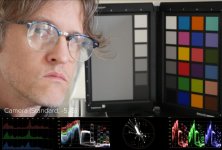
Scopes make it pretty easy to see what ProColor LUT is and is not doing.

It's a warm, saturated look that rolls-off the highlights and lifts the shadows. TaDa! It's just a "look". Should you apply it to everything you shoot before grading? Heck no!

Raising blacks and lowering highlights does not create more dynamic range. Pumping red saturation and moving orange towards red and green towards yellow doesn't make the color better, just different (and technically less accurate.)

Is it worth $15 to you? Maybe, but you should first look at all of the great look packages that already exist.

camera.jpg
corrected.jpg
procolor.jpg
 
To be honest I never bought into the whole "Canon color science is the bomb" argument. It doesn't match reality for me and looks more like hyper reality.
 
To be honest I never bought into the whole "Canon color science is the bomb" argument. It doesn't match reality for me and looks more like hyper reality.

I wish I had a 5D in front of me to compare, but I'm not even convinced this LUT matches the Canon look all the well. I used to borrow a friend's when I had a job that required three cameras, and matching that sucker to a GHx was incredibly difficult ... definitely not just a global red shift.
 
Back
Top