Eos Utility and remote live view

Wow, this feature sounds like a game changer for DSLR cinematography. I have a couple of questions about this EOS utility.

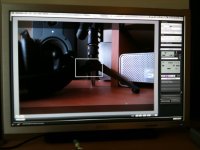
1. Can anyone take a picture of what the display looks like on a laptop?
2. What is the resolution of the image when the camera is recording?
3. How large is the image on the screen?
4. People have been mentioning the ability to focus remotely, can this be done when the camera is recording? Is this a possible replacement for a follow focus?


1. picture attached. Shown filling a 27" 1080p screen
2. Based on the image I would say it is 720x480, but I don't know for sure
3. You can make the image as large or small as you want.
4. Yes. This can be used as a follow focus. Completely. There is no way to make marks but the focus function in liveview is controllable enough to be used for that purpose. I would rather use a follow focus, but those are expensive. I will be using it to execute incredibly slow racks for stuff like macro footage.
 

Attachments

  • liveview.jpg
    liveview.jpg
    94.1 KB · Views: 0
I know that follow focus works during live view but I just want to be sure that it is not disabled when you press record. Second. How does that focus function work? Do you just click on the portion of the image that you want in focus after you have hit record?
 
I have read the utility manual but it is a little confusing. In the manual, they have you focus your image and then press record but they say nothing about being able to re-focus once you have begun to record. If it is possible, how do you change focus points once the camera is recording? can you achieve a smooth focus pull in the middle of your recording?

If this is possible, it could eliminate the need for a follow focus and an expensive monitor like a marshall. Hell in a very controlled studio or set environment, this could even eliminate the need for the grossly expensive Zfinder.
 
Yes. The focus functionality works while recording. There are buttons you press that represent three speeds to move the focus motors at. If you hold one of these down it will do a perfectly smooth rack. The lens I tested this with is the tamron 17-50 2.8.
 
Yes. The focus functionality works while recording. There are buttons you press that represent three speeds to move the focus motors at. If you hold one of these down it will do a perfectly smooth rack. The lens I tested this with is the tamron 17-50 2.8.
Crazy!

If there's one thing that puts the 7D way over the GH1, it's the remote live view... Not to start anything, just sayin'...
 
1. picture attached. Shown filling a 27" 1080p screen
2. Based on the image I would say it is 720x480, but I don't know for sure

If the live view stream is the same as live view hdmi then its 480p which is 853x480.
I have a small screen laptop but from my first impressions eos utility live view seemed higher res than 480p
 
Has anybody tried it with a netbook yet? I'm wondering if the processor can handle it. Also, does anyone plan to attach the laptop to a shoulder rig? I would love to see some pics of that.

I think the ability to remote focus with the eos utility holds a lot of potential for us later on down the road. It probably wouldn't be that hard to decode the usb signals that affect the focusing and write a little app that would give you a more full featured electronic follow focus - something that would let you put multiple focus marks like cue points and be able to jump to them with a key press.


-Joe
 
the Canon utility manual shows the program operating on a windows computer but does it work with Mac OSX? the utility manual shows system requirements for PC but not mac. anyone?
 
wow, I cant believe I missed that I was looking at the size of the image but did not bother to look at what OS you were using, no biggie, I answered my own question
 
So now we just need to find dependable wireless USB adapters with a good range, and we are set. : )
 
This sort of reminds me of the excitement of the massive Edwierdo DIY DOF thread...
 
What about the WFT-E5A? The wireless file transmitter add-on for this camera? Seems like wireless focus pulling would be an option with it. While not as cheap as a wireless USB set up, at $700 still much more affordable than a traditional WLFF.

When this device comes out (projected release in November) hopefully a few people get them and can run some tests.
 
Yea. I was already putting that down on my list of purchases. It is possible that the WFT-E5A plus the on one software dslr remote would create for incredible wireless focus pulling from an iphone.

I haven't found evidence either way as to whether the on one software supports this feature, but I want to hand an AC an iphone to pull focus while we steadicam.
 
I'll have video of that soon. I have a UMPC R2H tablet with EOS utility. The 15fps makes it not particularly useful, but it does work.
 
It does work, here's an image to show relative size. Works just as well on the UMPC as it does on other machines.
1001574m.jpg
 
Back
Top