Editing Question (Is This Possible?)

vision_filmz

Carbonite Member
_MG_1715.JPG


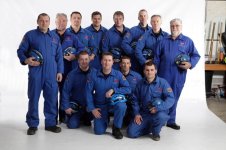
Lets say I am filming these people on this white seamless backdrop. Is there a way to cut out the sides ( where you can see the gear) and make the background look entirely all the same color?


I tried just cropping it and using mattes, but due to uneven lighting this just doesn't seems like it works. Any ideas on how to make it look better?

27xp21c.png
 
You might consider pulling the whole thing down in size, cropping out the edges, then floating it out over some appropriate background...
 
What if you create a matte and create a background with photoshop clone to drop in behind... like this on left side.
_MG_1715x.jpg
 
What if you create a matte and create a background with photoshop clone to drop in behind... like this on left side.
View attachment 34940


Looks great! Now I just have to remember photoshop :( This picture is not mines and was only used as a reference/ test. I have an up and coming project where my background will not be big enough so I'm thinking of ways that I could crop the corners in software and appear as just one large background exactly like you did with photoshop.

Any quick tips on photoshop how to achieve this and Im more than sure it would work with video? With people dancing and singing though I would imagine the shadows would constantly change? So would I have to create several different mattes?

Thank you
 
Quicker, easier. Chroma Key out the white background. Put a Shape generator on track below, make it white and filling the full frame.
 
Listen to BenB, easiest way to do this is shoot on a key green/blue background and replace the key with whatever you want.
 
Quicker, easier. Chroma Key out the white background. Put a Shape generator on track below, make it white and filling the full frame.

Unless Im doing something wrong when I ket out the white it takes out of one of the persons hair? Really trying to learn how to do this :(
 
This seems like it would be easier to do in After Effects. That would be my goto. Just mask the area you want to keep, feather the edges, and put the people on a white solid.

Pretty simple.
 
Exact same thing in Motion, you could do a quick & dirty bezier matte, feather, round it out, that may be the way to go if a key is not working. But a key would be faster and easier if it were a different color background. Didn't notice the gray haired dude.

I'd play with the key a bit, there's various controls that would avoid the gray haried dudes. A luma key as mentioned could help with that. Would still be faster and easier than drawing a matte. And I'm actually thinking about the keying tools in Motion, not in FCP.

Is this video, do the guys move, or is this a still image?
 
Listen to BenB, easiest way to do this is shoot on a key green/blue background and replace the key with whatever you want.

If your intent is to have an entire white background and you have a white seemless to work with, then you should always shoot on white. Why would you go through the trouble of shooting against green/blue just to add the step of keying and possibly degrading your image? Just light properly against your target color (in this case white) and you're good to go.


Vision - what kind of footage are you working with? The lighting in your sample screen isn't terrible. The main trouble spots are towards the ground. The best approach to me looks to be simply feathered masks in either Motion or AE. You may have to do some roto work on the subject on the far left if his arm moves off the background much.

I would use keying as a last resort.
 
Listen to BenB, easiest way to do this is shoot on a key green/blue background and replace the key with whatever you want.

I never said to shoot it on a green screen, as it's obviously already shot. I simply said the quickest and easiest way to deal with this is with a chroma or luma key. I do these types of shots a lot, photographers thinking we can do magic with video. Well, we can, but it's not always easy.

A key would take next to no time. Drawing a matte would take longer. Either method would work. Really depends on how good you are and your experience with pulling keys. I'd pull a key, take all of 30 seconds, in Motion, not FCP. But I also use Phyx keyer (formerly a Shake plugin), which makes quick work of this type of thing.

Or I'd whip it into Pixelmator and take a full 3 minutes with it, not counting round trip time.

But I never said to "shoot it" with a green screen, it's already been done on white, we need to deal with what we have now.
 
Back
Top