Editing 7Q footage

About 6 hours of attempting to use FCP X today. Maybe I shouldn't have started with a multi cam project, but that's what I needed to work on... still have been unable to cut to a different angle or make a simple edit. 5 crashes, nearly one per hour (machine is a brand new IMac with Mavericks) . On another note, I notice that FCP 7 Studio retail version still sells for about $550 on Ebay.....
 
That is very odd. I've been working smoothly with multicam on projects even using obsolete hardware - your iMac should be more than adequate. And, the application hasn't crashed on me in months.

Any more information about the issue you're experiencing? Multicam is one of my favorite features in FCP X and it sucks that you're having issues.
 
You need to practice before jumping straight in. It's like a horse with a bad rider.Do things with an FCP7 mindset and it will crash all over the place. Then suddenly like everything, there's a moment of clarity and everything clicks into place. That's how it was for me anyhow.
 
sorry to hear about your trouble. As I wrote already go trough a tutorial and take some time in learning. There is not too much in common to FCP 7. What I really like esp. in 10.1.x is media management.

[As I mostly don't work with AVCHD I don't have to convert to optimized media. I organize my jobs in a finder folder an within this folder is my original media, sound files, layouts scripts, photos... everything I need for this job. I don't transcode my media to optimized as it is already ProRes and I don't copy them into the library. FCP X creates an alias and that works perfect to me beacuse I dont have to get into the library to have acces to my footage with other applications.. ]
 
The closed folder structure is a tad annoying though. Especially if you want to send that h.264 copy of a project you know you made when uploading to vimeo, direct to a client (without vimeo!).

Also, sound post is a ****ing ball-ache: £40 on a programme just to convert the FCPX XML to an AAF file for sending to a sound editor! Something you could very easily on it's own with FCP 7

The most annoying thing about FCPX is that, after spending £200 on the programme (okay, cheap I know), you keep having to buy additional apps to get the damn thing to work with other software suites - ones that used to work just fine with FCP 7.

That's what bugs me so much about it. All the additional work arounds you suddenly have to do.
 
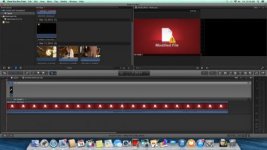
Screen Shot 2014-03-14 at 11.26.09 AM.jpg

This is what I'm dealing with - I had actually started editing these clips, then watched as it turned red and into a "modified file" which is unusable .It's a good thing I waited until I was between serious projects before getting a new computer and software. I'm thinking about re loading FCP 7 and dealing with this later.
 
You need to practice before jumping straight in. It's like a horse with a bad rider.Do things with an FCP7 mindset and it will crash all over the place. Then suddenly like everything, there's a moment of clarity and everything clicks into place. That's how it was for me anyhow.

I realize plenty of editors are using this successfully, but it's hard to imagine at this moment. Not sure why I'm having such a hard time as I'm running the latest version on the latest OS on a brand new iMac. I thought the problem was related to P2 footage until I dropped in an MP4 clip and it did the same "modified file" trick. According to a lengthy thread on Apple Support Forums, this issue has been around since 2011 but seems to be cropping up a lot more since Mavericks. You can go into the area where FCP stores high quality files, delete the proxy file that has been made and the red goes away, for a while at least.

View attachment 83693
 
Last edited:
I realize plenty of editors are using this successfully, but it's hard to imagine at this moment. Not sure why I'm having such a hard time as I'm running the latest version on the latest OS on a brand new iMac. I thought the problem was related to P2 footage until I dropped in an MP4 clip and it did the same "modified file" trick. According to a lengthy thread on Apple Support Forums, this issue has been around since 2011 but seems to be cropping up a lot more since Mavericks. You can go into the area where FCP stores high quality files, delete the proxy file that has been made and the red goes away, for a while at least.
View attachment 83693

Have you tried just telling it to get bent with the optimised media? It generally seems happy enough editing most things natively anyway.
 
There are different tools to do the same job, but some tools may be better at that certain task you are doing.

You may also prefer one tool over another just based off how it works.

The good news is that Premiere Pro and Media composer have trials you can check out. I would hold off on an AVID purchase though untill they get their financial house back in order (http://www.sonicscoop.com/2014/03/0...aq-delisting-really-means-to-pro-tools-users/). Who knows how well the company will support their products.

FCP X is different, but seems to be better for solo editors who need to be very flexible in the entire pipeline.
 
When importing the DNG files into after effects, do you do any amount of sharpening? I think it defaults to 20 on the CAMERA RAW importer.
 
There are different tools to do the same job, but some tools may be better at that certain task you are doing.

You may also prefer one tool over another just based off how it works.

The good news is that Premiere Pro and Media composer have trials you can check out. I would hold off on an AVID purchase though untill they get their financial house back in order (http://www.sonicscoop.com/2014/03/0...aq-delisting-really-means-to-pro-tools-users/). Who knows how well the company will support their products.

FCP X is different, but seems to be better for solo editors who need to be very flexible in the entire pipeline.


At this point it's still possible to buy Premiere CS6 without the "cloud" for about $800. Anyone know if it supports Sony 2K Raw, or 4K in any form? I'm going to be investing in a 7Q at some point and need to be able to edit the footage. I think 2K Raw alone would be enough that I would forsake the cloud and just buy the last version. I don't tend to update every year anyway, maybe on average every 3-4 years.
 
Just yesterday I was editing multicam clips in fcpx of varrying origin and resolution. 4k from 7q and HD from 5d3 raw. Had some issues with syncing all the footage at first, but that's an issue with the lack of proper and corresponding timecode support from both magic lantern and odyssey. But my system appears to be the same as yours (2013 imac, mavericks), so hopefully you were able to sort the issue out.

One thing I noticed throughout all these comments is the general negativity to CC. If you literally only over use one app, ya then I can see it not being worth it... But do you really not have ANY need for photoshop? Or AE here and there? My uses are similar to Olofs, so I use AE, ILS and PS, ID quite a bit. And they are always up to date. Don't have to wait few years and skip a generation of product. And it's always nice to have the extra apps there in case you need them. Since I've had CC, I've had no use for acrobat pro until recently where it was absolutely indispensable but for a very short time and one instance. Also, the updates are pretty frequent, definitely more than fcpx for premiere. Just look at dng support, which I wish fcpx had.

Tho to be fair I edit 90% on fcpx because the new way of editing has made me far more efficient than I ever was on premiere or fcp7. Even picked up an editing award for a 48hour challenge which I simply would not have been able to finish in anything but fcpx.
 
Back
Top