edge enhancement

Thomas Smet

Veteran
I will soon be in the market for a new camera as I need to upgrade some older gear. I usually shoot with sharpness or edge enhancement turned off or set really low to get rid of fake looking edges to my video. I don't care about sharpness at all in my video and am more concerned about natural looking clean edges. Of course it is hard to find samples of how a certain camera can look when shot in this way. I understand the HMC150 uses pixel shifting and how all of it works. I used to use a Canon XL1 which was one of the original pixel shifters.. I am not so much concerned about lower native resolution as I am with Panasonic over compensating with edge enhancement.

Does anybody have any sample frame grabs or images with the edge enhancement turned off or any info on how well the camera does when shot in this way? I already know the strengths of the camera but I must follow certain strict image look parameters when choosing our next camera.
 
hey thomas,
you don't have to worry with the hmc150.
the settings you're describing are within each scene file and are called 'detail' and 'vdetail'.
if you leave those at '0' or even reduce them towards the minimum value of '-7' you'll have nice natural soft edges.

i find that '0' is good enough with this camera's naturally softer image.
i think that coming from a Canon and not being happy with unnaturally sharpened edges you'll be totally satisfied with the hmc150.

the hmc150, hpx170 and hvx200/a all give you an awesome amount of control over the image, letting you adjust edge sharpness independently of all other effects and parameters.
 
Thomas, this was shot with sharpness cranked up a bit (the scene settings are on the page... I've since turned it down a bit), and I don't think this looks overly sharp... you can definitely get a softer looking image out of the camera. I know it's hard to get a good idea from highly compressed web video, but it's actually pretty close to how the raw footage looked

http://www.vimeo.com/7823536
 
I believe Barry G. had stated before that the Cine Gammas are half as sharp as the other gammas at the zero setting. So cranking the Cine gamas up a few shouldnt be too much of an issue. I usually shoot @ +2 on Cine V but have also been shooting with everything cranked down to -7 detail wise which yields an even softer look.
 
just a note:
there are 2 different ways to affect 'sharpness', apart from different contrast levels of each gamma curve....
1. detail or vdetail - these affect mostly just the edges/outlines of objects which is what Thomas had mentioned specifically
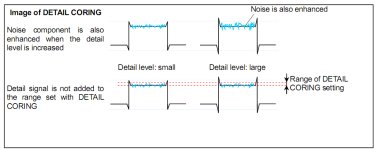
2. coring - this affects the general level of noise and is the same as applying a 'sharpen' filter in post.

you can boost coring to get a sharper image while lowering detail and/or vdetail to reduce that false edge enhancement.

after lots of experimenting, i really suggest leaving the detail and vdetail mostly alone and using coring to affect perceived sharpness so that you still get the natural high quality panny look, a sharp-enough image without the false outlines around every object. this is especially true when shooting greenscreen.

even so, mike's shots look pretty durn nice! =)

i did a quick test using my cineV scene file to show how the image is affected by adjusting detail and coring independently. vdetail is set to 0 in all of them. i hope this pixel-peeping demo is helpful to you in making your decision.

1261593848.jpg

1261593872.jpg

1261593892.jpg
 
I believe Barry G. had stated before that the Cine Gammas are half as sharp as the other gammas at the zero setting. So cranking the Cine gamas up a few shouldnt be too much of an issue. I usually shoot @ +2 on Cine V but have also been shooting with everything cranked down to -7 detail wise which yields an even softer look.

gtk! thanks matt.
 
Panasonic prosumer cameras are about the closest in pro features to a shoulder mount cam as you can get.
 
Averan, Coring reduces the noise brought on by detail. See photo.


By stating it has the same effect as adding a sharpen filter in post it sounds like you are saying t hat it increases sharpness.

Also, for the OP. If detail is reduced to -7, coring will have little effect.

Here's a link to the Panasonic Scene file handbook for the HMC150. http://www.mediafire.com/file/jhygcyg2hwn/HMC150 Scene Settings Handbook.pdf
 

Attachments

  • coring2.jpg
    coring2.jpg
    157.3 KB · Views: 0
  • coring.jpg
    coring.jpg
    191 KB · Views: 0
Last edited:
sharpen filters are basically just increasing contrast between pixels.
the example i posted showing coring at -7 is nearly equal to what you'd see if you applied a sharpen filter in post. try it, you'll see.
that's how our eyes work....it's the sum of all those extra contrasted pixels that creates the sharp effect.

if the contrast between neighboring pixels is low, the result is a softer edge or detail.
the greater the contrast, the 'sharper' that area looks.

if you don't want to exaggerate just the edges, but still want a sharper image, you can boost coring or apply a sharpen filter in post. either way, you'll get more noise which results in a sharper looking image.

i'd rather shoot with lower noise, some edge enhancement and then apply a sharpen filter in post.

think about it and test it. i should probably define 'noise' here, but in practice the definition can be a moving target.

it doesn't have to be technically or theoretically correct to still be useful practically. =)
 
Back
Top