By economical i mean less than $1600 usd. This is for use with PC and Nvidia card and Resolve davinci. Output targets for hdr monitors and hdr Tvs. Candidates so far are: 1) LG 32UD99-W http://www.lg.com/us/monitors/lg-32UD99-W-4k-uhd-led-monitor and 2) Dell Ultrasharp 27" (UP2718Q) https://www.amazon.com/Dell-Ultrash...e=UTF8&qid=1507662905&sr=8-2&keywords=UP2718Q . Thoughts?

Navigation
Install the app
How to install the app on iOS
Follow along with the video below to see how to install our site as a web app on your home screen.
Note: This feature may not be available in some browsers.
More options
You are using an out of date browser. It may not display this or other websites correctly.
You should upgrade or use an alternative browser.
You should upgrade or use an alternative browser.
GH5 Economical Editing/grading Monitor for 4k HDR (HLG) and output to hdr tvs?
- Thread starter radtex
- Start date
Get this one
https://www.amazon.com/Sony-XBR43X8...8&qid=1510331402&sr=1-1&keywords=sony+43x800d
4K HDR 10bit 4.4.4 true 60hz
"computer monitors" as we know it are a thing of the past.
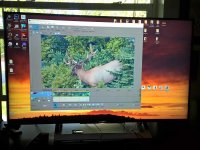
I'm running it from a pc with a GTX1050ti card and it is simply stunning as both a display and monitor for editing. People are going to bag on this as not being a monitor, but only because they don't know what it is of they speak
Take your 4K laptop and plug it in and try some of these new 4K displays. It's amazing times we live in !!!
Cheers,
Pete
https://www.amazon.com/Sony-XBR43X8...8&qid=1510331402&sr=1-1&keywords=sony+43x800d
4K HDR 10bit 4.4.4 true 60hz
"computer monitors" as we know it are a thing of the past.
I'm running it from a pc with a GTX1050ti card and it is simply stunning as both a display and monitor for editing. People are going to bag on this as not being a monitor, but only because they don't know what it is of they speak
Take your 4K laptop and plug it in and try some of these new 4K displays. It's amazing times we live in !!!
Cheers,
Pete
Attachments
The Dell can reach 1000 nits brightness, where the LG monitor is 350 nits. ( 550 nits peak )
If you are judging the exposure and gamma of an HDR image, don't you need a monitor that can reach 1000 nits ?
yeh i wondered about this too but one reviewer Joshua Cantin wrote this: "After all, the UD99 "only" generates 550 cd/m2 brightness, which, many people argue, simply isn’t enough to make HDR "pop." Well, to be blunt, they're wrong. I own a JS8500 Samsung LED SUHD TV and it "only" generates around 530 cd/m2 brightness, but I find it more than adequate for HDR purposes. Hell, even LG's 2016 OLED TV's topped out around 600 cd/m2, and you’d be hard pressed to find anyone disappointed with their HDR performance. . Simply put, the LG UD99 produces a very bright, very rich - and for an IPS panel - decently contrasted image. " so not sure what to think...
Get this one
https://www.amazon.com/Sony-XBR43X8...8&qid=1510331402&sr=1-1&keywords=sony+43x800d
4K HDR 10bit 4.4.4 true 60hz
"computer monitors" as we know it are a thing of the past.
I'm running it from a pc with a GTX1050ti card and it is simply stunning as both a display and monitor for editing. People are going to bag on this as not being a monitor, but only because they don't know what it is of they speak
Take your 4K laptop and plug it in and try some of these new 4K displays. It's amazing times we live in !!!
Cheers,
Pete
TALK to me, Pete! How are you connected to this screen? And is there ANY lag moving your mouse? Could I do gaming on it also? Looks like a great solution
I actually looked at this TV (newer X800E) as an option, a review site gave it 7/10 but said there were some shortcomings: "Poor color volume. The TV has a wide color gamut when showing bright colors, but its gamut narrows significantly when showing very dark colors. It also can't make dark colors dark enough due to its low contrast ratio. The TV performs frame dimming when shown our black-with-border slide, but even this doesn't make the black point very dim." "This TV can only display 24p movies without judder from 24p sources (not 60p)" "HDR Real Scene Peak Brightness: 395 cd/m2" "The contrast ratio and black uniformity are disappointing " <shrug> I get the whole tv idea though. BTW For the gaming question its lag is 80% Response Time: 8.3 ms, 100% Response Time: 13.9 ms
The one I picked up was used as a large monitor at TV Specialists here in Salt Lake to show the image from higher end RED, Canon and Sony cinema cams. It basically was only ever used when they were showing the type of image one of these cams outputs via HDMI 2. I asked Geoff to hook up his higher end MacBook pro to it and it was stunning to say the least. I bought it and an hdmi cable and I was good to go.
I have it in my office and it gets no back lighting, so the slightly lower contrast ratio and narrow view angle are not an issue for me in any way. On a side note I think the older 43X800D I have is better than the new 43X800E. Particularly with regards to black levels, but I didn't do a side by side comparison. The older one I have is a VA panel and the newer E model is IPS. The IPS is faster response and a much wider view angle, but not as good in the blacks.
All I can tell you is it's way finer detail, way higher color saturation and consistency than my older Apple 27" 2.5k cinema display I run through an adaptor on my PC. I also believe it has a faster response time. I use it primarily for CAD/CAM work and there is nothing more irritating than the display or mouse having a lag. I run a high end Ventus wired mouse specifically for this reason, because I can't stand not hitting my clicks on the lines in detailed models when and where I'm seeing it.
Not sure about any of this for gaming. Not my cup of tea
I have it in my office and it gets no back lighting, so the slightly lower contrast ratio and narrow view angle are not an issue for me in any way. On a side note I think the older 43X800D I have is better than the new 43X800E. Particularly with regards to black levels, but I didn't do a side by side comparison. The older one I have is a VA panel and the newer E model is IPS. The IPS is faster response and a much wider view angle, but not as good in the blacks.
All I can tell you is it's way finer detail, way higher color saturation and consistency than my older Apple 27" 2.5k cinema display I run through an adaptor on my PC. I also believe it has a faster response time. I use it primarily for CAD/CAM work and there is nothing more irritating than the display or mouse having a lag. I run a high end Ventus wired mouse specifically for this reason, because I can't stand not hitting my clicks on the lines in detailed models when and where I'm seeing it.
Not sure about any of this for gaming. Not my cup of tea

buggz
Active member
How do you calibrate "TV monitors"?
I like to calibrate my displays as I also perform stills, and print work.
I currently enjoy and use a NEC PA272W and Xrite iPhoto Pro 2.
I like to calibrate my displays as I also perform stills, and print work.
I currently enjoy and use a NEC PA272W and Xrite iPhoto Pro 2.
Get this one
https://www.amazon.com/Sony-XBR43X8...8&qid=1510331402&sr=1-1&keywords=sony+43x800d
4K HDR 10bit 4.4.4 true 60hz
"computer monitors" as we know it are a thing of the past.
I'm running it from a pc with a GTX1050ti card and it is simply stunning as both a display and monitor for editing. People are going to bag on this as not being a monitor, but only because they don't know what it is of they speak
Take your 4K laptop and plug it in and try some of these new 4K displays. It's amazing times we live in !!!
Cheers,
Pete
How do you calibrate "TV monitors"?
I like to calibrate my displays as I also perform stills, and print work.
I currently enjoy and use a NEC PA272W and Xrite iPhoto Pro 2.
LG HDR TV's have full expert mode calibration menus for use with hardware calibrators. They can save two user calbrations, so one for RGB photo /graphics and one for YUV video is possible.
buggz
Active member
Wow, good to know. Thanks!
LG HDR TV's have full expert mode calibration menus for use with hardware calibrators. They can save two user calbrations, so one for RGB photo /graphics and one for YUV video is possible.

Elvis Deane
Active member
Beyond a monitor, wouldn't one need a video card that can also display HLG? I'm close to pulling the trigger on a HDR TV or monitor, but while my video card chipset is capable of HDR, it's really tough finding out if it supports HLG or if that is even something I need to worry about.
LG HDR TV's have full expert mode calibration menus for use with hardware calibrators.
What type of hardware calibrators ? Is this affordable calibration gear or something only a dedicated home theatre installer would pay to own ?

Cary Knoop
Veteran
HDMI (2.0a and 2.0b) does not currently support 4K@60 10bit 4:4:4.Get this one
https://www.amazon.com/Sony-XBR43X8...8&qid=1510331402&sr=1-1&keywords=sony+43x800d
4K HDR 10bit 4.4.4 true 60hz
"computer monitors" as we know it are a thing of the past.
I'm running it from a pc with a GTX1050ti card and it is simply stunning as both a display and monitor for editing. People are going to bag on this as not being a monitor, but only because they don't know what it is of they speak
To display 4K@60 HDR 4:4:4 you would either need HDMI 2.1 or DisplayPort 1.3 (or higher) or a 24G SDI connection.
Last edited: