Echo in interview audio?? xf300

JerryCentral

New member
I am recording interviews with a single mic, I am running the audio to both channels. On several clips, the two tracks are slightly off and the audio is echo sounding. I can fix this by deleting one track and duplicating the other........But is there a camera setting I am missing??? Or other issue that may be causing this problem??
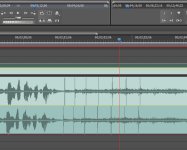
 
Did the audio & video tracks become unlinked? Can you watch the "echo-y" parts of the raw MXF files and see if it's present there?
 
How are you duplicating the sound from the mic? Could be that the hardware you are using to connect the mic into the camera has a different signal path from one end to the other and it could be introducing a different delay for one side than the other. You could get a delay device to stick in between and play with it until you figure out where it needs to be set...

Personally, I wouldn't bother recording to both channels in the first place -- just plug the mic into one then copy over the empty track in post. Or set the camera/recorder to mono if it has that option.
 
Thanks for your responses!! I spend yesterday on the phone to Canon and later all afternoon to Adobe. Canon had me listen to the entire clip through the camera and there was no echo. So I called Adobe and after spending all afternoon with a rep I was convinced that it was an issue of how I was bringing the files into Premiere cs5. I remade a video using the Media Browser and dragging the files to the timeline. I had been dragging CONTENT folders into the project?? Anyway, I think the echo is gone.
Here is the echo vid you can hear it at the end of the video!!
I am a still shooter with a video camera!!
 
Back
Top