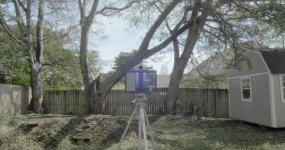
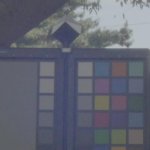
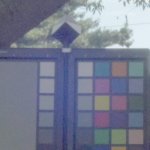
GH4 Dynamic range comparison between V-LOG L and Cine-D

joe12south

Veteran
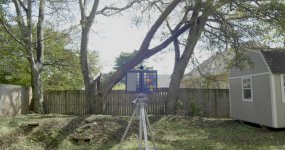
V-LOG L

sky_vlog.jpg

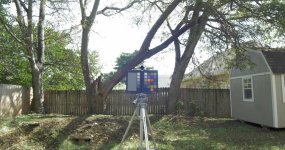
Cine-D (matched exposure)
sky_cined_over.jpg

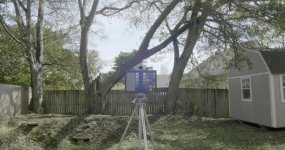
Cine-D (ETTR)
sky_cined_ettr.jpg

Here's what I did. First, I exposed for V-LOG L to protect the sky. Second, I recorded Cine-D at the same exposure. Third, I exposed for Cine-D to protect the sky.

If I hadn't adjusted exposure and only posted the first two images, it would be easy to assume that V-LOG L has more usable dynamic range. Just look at the sky! You might assume that if you adjust the exposure down in Cine-D to protect the sky that the shadows would be crush. But, when you actually compare images #1 and #3, you see that both profiles hold approximately the same amount of information in both the shadows and highlights.

 

Attachments

  • sky_cined_ettr.jpg
    sky_cined_ettr.jpg
    20.4 KB · Views: 0
Hi Joe,

This is certainly in line with what I have been seeing. Indeed, when the highlights are not blown out in Cine-D, I seem to find more useful, pleasing and natural detail in the highlights than in VLOG. At the same time, I have found that when exposing for highlights in a shot with a lot of dynamic range, the shadows are significantly noisier in V-LOG than Cine-D with similar retention of highlights and shadow detail.
 
This is what I have been saying: it is still the same sensor, same max DR possible

I like how we are all scrambling for max dynamic range, when really, all we have to do is alter the way we are filming a scene slightly to make it work. :)
This will never be an Alexa, yet still an amazing camera!!!
 
This is what I have been saying: it is still the same sensor, same max DR possible

I like how we are all scrambling for max dynamic range, when really, all we have to do is alter the way we are filming a scene slightly to make it work. :)
This will never be an Alexa, yet still an amazing camera!!!

"Same sensor, Same Max DR possible" is true, but what is really great is that people are finally making useful headway extracting the best mix of dynamic range and accurate color with this camera. We got over the ultra-flat CineD with highlight and shadows flattened to the Max, the raised pedestal, etc. After holding our collective breath for a magical VLOG solution, we are finally closing in on settings and LUTS we can trust to give us the most of this camera.
 
The more I test, the more it sinks home how unforgiving this camera is in regards to exposure. It just doesn't have much latitude, period. I wanted two things out of V-LOG L ... a little bit more exposure forgiveness and better color. With the right LUT you can get fantastic color, but you still have to nail exposure.
 
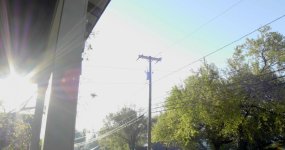
This is what V-LOG L captured from the sky just to the left. I wouldn't consider the banding and color errors usable.
sky_flare_vlog.jpg
The big disclaimer to all of this is that I don't have a 10-bit recorder. A shot like this might be salvageable with a Shogun or Pix-E, etc.
 
Here's a test in midday sun with chart. The chart was placed in modest shade (as would be typical if shooting a model in full daylight.)

First, I exposed the grey card for 50%:

V-LOG L
vlog_50.jpg

Cine-D
cined_50.jpg

As is expected neither profile can hold the sky, but V-LOG L does reach a bit more into the highlights.

Then, I exposed to the right, to just barely protect the sky. (Right the very edge of white.)

V-LOG L
vlog_ettr.jpg

Cine-D
cined_ettr.jpg

Arguably, Cine-D does a better job retaining highlight information when not overexposed. But what do the shadows look like?

V-LOG L (detail)
vlog_ettr_detail.jpg

Cine-D
cined_ettr_detail.jpg

Neither of them look good. V-LOG L has less noticeable luma noise, as it is less contrasty. Cine-D has less chroma noise, as it is more saturated. But by in large, the sensor is returning the same thing...a lot of noise.
 
Please note that no LUT's were used on any of these shots. V-LOG L's color must be transformed to be accurate, and Cine-D's color can be made more accurate with a LUT. Since this test was purely concerned with recorded dynamic range, I didn't want to introduce the variable of different LUT's. I simply normalized the shadows, highlights and gamma to match. This is to say, don't use these shots to judge how the different profiles render hue and saturation, because I simply let them fall where they may.

PS. No cracks about the s*%tty tripod...that's why it's holding a chart and not a camera. :happy:
 
Joe, I would suggest you take some raw photos along with tests in the same vain as you op. Then take the raw into Lightroom, trial available if you don't have it. I believe you will be amazed when when you see how much more is there to be recovered in the highlights, even compared to cine d. If Sony can give it to us in 8 bit, Panasonic would be a game changer again if they would just pull there heads out of there corporate ass and extend the right of the v log l curve to what the camera sensor can give us.

These see raw tests are better coming from someone like you, than me.
 
I still say expecting a ton of range from an 8 bit format is kind of pointless. I think we are all creating a placebo effect here sort of like the hacking days of the GH2. We all wanted so desperately to push the camera to new levels that we convinced ourselves every little trick was the holy grail of capturing images the camera was never designed to do. In the end all the GH2 hacks were very subtle changes beyond a certain point.

I'm not saying there are not certain subtle advantages but no matter how people try to fudge the color its still an 8 bit format and will never be RAW. Trying to pull a magical 10 bit or RAW workflow out of an 8 bit format will always leave a bit to be desired. If you really want the best dynamic range from the GH4 get an external recorder. Even then 10 bit is not magic and will never be the same as RAW. If you want a RAW workflow it really is best to get a RAW camera.
 
Joe, any chance you adjusted the HIGHLIGHTS -1 or -2 in CINE-D to attempt to get better upper end recovery?
 
I still say expecting a ton of range from an 8 bit format is kind of pointless. I think we are all creating a placebo effect here sort of like the hacking days of the GH2. We all wanted so desperately to push the camera to new levels that we convinced ourselves every little trick was the holy grail of capturing images the camera was never designed to do. In the end all the GH2 hacks were very subtle changes beyond a certain point.

I'm not saying there are not certain subtle advantages but no matter how people try to fudge the color its still an 8 bit format and will never be RAW. Trying to pull a magical 10 bit or RAW workflow out of an 8 bit format will always leave a bit to be desired. If you really want the best dynamic range from the GH4 get an external recorder. Even then 10 bit is not magic and will never be the same as RAW. If you want a RAW workflow it really is best to get a RAW camera.

+1
+1
+1
+1
+1
+1
+1
+1
+1

pretty much +1 each sentance here. :)
 
Joe, I would suggest you take some raw photos along with tests in the same vain as you op. Then take the raw into Lightroom, trial available if you don't have it. I believe you will be amazed when when you see how much more is there to be recovered in the highlights, even compared to cine d. If Sony can give it to us in 8 bit, Panasonic would be a game changer again if they would just pull there heads out of there corporate ass and extend the right of the v log l curve to what the camera sensor can give us.

These see raw tests are better coming from someone like you, than me.
No doubt, the GH4's RAW still images have significantly more latitude. At least a full stop I would say. But, the video imaging pipeline doesn't give us access to that data...it's gone before there is anything we can do.
 
I still say expecting a ton of range from an 8 bit format is kind of pointless. I think we are all creating a placebo effect here sort of like the hacking days of the GH2. We all wanted so desperately to push the camera to new levels that we convinced ourselves every little trick was the holy grail of capturing images the camera was never designed to do. In the end all the GH2 hacks were very subtle changes beyond a certain point.

I'm not saying there are not certain subtle advantages but no matter how people try to fudge the color its still an 8 bit format and will never be RAW. Trying to pull a magical 10 bit or RAW workflow out of an 8 bit format will always leave a bit to be desired. If you really want the best dynamic range from the GH4 get an external recorder. Even then 10 bit is not magic and will never be the same as RAW. If you want a RAW workflow it really is best to get a RAW camera.
The 10-bit image from the GH4 doesn't have any extra dynamic range...just more steps between the extremes.
 
I am using an external recorder, and the sensor is capable of putting more Dr into v log l than Panasonic is giving us. Now if someone like joe would demonstrate it then we would be seen as asking Panasonic for something that is technically possible, based on a factual demonstation And it is better coming from a respected voice on the forum than from me.
 
Joe, do you have an external recorder available, to compare 8 bit to 10 bit? Anyone you can borrow one from?

Also, can we buy you a coffee/ beer/ car as a reward for your time? Post your PayPal address some where for small gifts. ;)

+++

As a Nikon-Canon-Sony shooter, I had never used Panasonic before August. I just bought 2 Panasonic to do 4K video for events where I also do stills. I am running 4 cameras at the same time- 2 Nikon and 2 Panasonic. No way I could afford Sony with 2 external recorders for 4k too.

I really appreciate your sharing, it is helping me get up the learning curve much more quickly with the GH4.

Now, can someone show me how to turn the camera on? Do I need a "card" or something like that? I've been told I do. Also a "lens." This stuff is complicated! :)

Cheers!
 
when you actually compare images #1 and #3, you see that both profiles hold approximately the same amount of information in both the shadows and highlights.

I would even say image 3 has more dynamic range, looking at the highlights in the sky and the dark fence along the left. There seems to be more highlight detail in the Cine-D and more shadow detail as well.
 
Back
Top