Does Darkness Add Noise?

SplitFieldDiopter

Active member
My fourth day with the camera, so forgive me if this is a silly question.

I've found a few scene file settings that, when under proper even well lit areas look fantastic. Very happy with the image quality.

I notice though, if I dim the lights, or put on one of the ND filters without chancing anything else (scene file settings, iso....) there is some horrible blocky noise that crops up.

I don't know why, but I was under the impression that the darker areas of the picture would just dim in luminance (possibly even to black) but I didn't expect the image to fall apart like that.

Am I doing something wrong or is it VERY difficult to get a low lit image (think opening shot of GODFATHER lighting) to also look relatively clean.

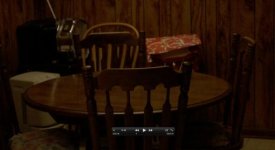
(posted below an image that's relatively clean and the same exact shot with 4 ND )

Scene file was set to...

Detail Level -7
V Detail -7
Coring -7
Chroma Level 0
Chroma Phase 0
Color Temp 0
Master Ped -2
Gamma Cine-D
Cine-Like Matrix

iso 250
180 shutter
 

Attachments

  • Screen shot 2011-03-09 at 1.31.59 AM.jpg
    Screen shot 2011-03-09 at 1.31.59 AM.jpg
    14.2 KB · Views: 0
  • Screen shot 2011-03-09 at 1.32.16 AM.jpg
    Screen shot 2011-03-09 at 1.32.16 AM.jpg
    20.8 KB · Views: 0
I mean, gain shows up the most in blacks. The dark shot is under exposed, the light shot is exposed correctly, maybe a little hot. If something is exposed correctly there shouldnt be any noise.
 
So does that mean that, no matter how low you have your gain/iso set (250) in this case, it will make the image muddy if there are dark parts of the image?

Let's say I want somebody sitting in a dark room next to a lamp and shade.

I expose for the lamp and the left side of the person's face, nearest the lamp.

If I were shooting a low ASA film, anything that wasn't exposed properly would dim and fall into black.

With the AF100, it seems, no matter how little gain/iso you use, if the image is dark it becomes noisy, blocky and muddy.

I was just interested if anybody has achieved the types of shots/exposures I'm talking about, or if this is just what we have to live with for getting a camera under $6,000
 
The Cinelike matrix emphasizes noise so to avoid noise this is the worst matrix. If you use Norm2 blacks will be noisefree and you can even get rid of even more noise by lowering master pedal a bit.
 
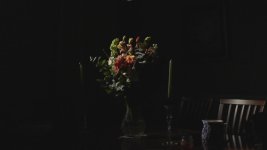
You can achieve the look, I think you're going for. Here's a screen grab from a test I did. I'm extremely happy with the fall off to black

ISO 200, 24 & 85 mm Nikkor
Detail and V-detail: -5
Coring: +2
Master Ped: -2
Gamma: HD NORM
Matrix: Norm2
Skin DTL: OFF
 

Attachments

  • flowersHardWideSm.jpg
    flowersHardWideSm.jpg
    22.9 KB · Views: 0
Yeah I still get blockiness in the midtones...mainly in the transition area. I'm interested to see how that shot above would react if you splashed a dim light in the background?
 
This is compression 101. Shoot with slightly more light and make darker in post for cleaner dark areas.
 
The reason I used ISO 250 is that I figured the less electronic distortion you use on the picture, the less digital artifacting there would be. Is this incorrect?

The problem IS in the midtones mostly. Deep, deep blacks are usually okay. Especially if you lower the Master Ped down to about -3, -4.

As far as the screenshot above is concerned, I still see some pretty blocky pixels in there, but the general idea he has right. That's the kind of shot I want, but with the blacks, black.

Maybe lower down the master ped for these types of shots and just up the light on the face (object)?
 
This is compression 101. Shoot with slightly more light and make darker in post for cleaner dark areas.

I thought this is what I was going to have to do, but hoped that it wasn't true.

I've shot a lot of video over the years, but nothing that has been especially low light. The only reason I'm very concerned about this is I have a project coming up in the next two months that is going to be VERY VERY dark.
 
Here's a screen grab under softer light that illuminated the background. I'm not sure there's enough there for you to discern what you're looking for. I'm very pleased with the quality of the slight "grain" and do not perceive blocking in either. The background left is a curtain in soft focus thus the vertical shadow, right is the wall.
 

Attachments

  • softFlowers.jpg
    softFlowers.jpg
    46.9 KB · Views: 0
the background shade is relatively the same. I get the most problems in areas of gradients from about 40ire to black. Black looks good.
 
I still see some blockiness back there. I guess my problem is the way these newer digital cameras present noise.

On the DVX100B, it looked more organic, like 16mm film (I've posted an example from the DVX100B. Everything behind the hand is full of noise)

All noise from this new crop of HD cameras looks like, for lack of a better word, crap.

See, my complaint isn't that there is noise with this camera. It's that the noise is BRUTALLY UGLY.

If it looked anything like the wonder camera DVX I'd shoot with the gain all the way up. I quite liked that look on that camera.
 

Attachments

  • Screen shot 2011-03-09 at 11.19.15 AM.jpg
    Screen shot 2011-03-09 at 11.19.15 AM.jpg
    9.6 KB · Views: 0
So, just realized how the DVX screenshot looks blocky after uploading. I guess I shouldn't put too much stock into these JPEG compressions huh? : (

Should have figured as much. I still think the meat of my post was correct though. The older cameras seemed to have a more organic noise.
 
Yeah, I wonder if this can be fixed somehow...I know exactly what your talking about...Its not circle grain...its blocked and odd...i wouldnt even call it grain...and I wouldn't consider it something that I would like to get used to. Grain is grain is grain...What I am seeing and what others are seeing is not what I consider to be grain...I hope this can be smoothed out with a firmware update...I know I am not the only one seeing this.
 
I can see it in my monitor detail both up and down. Obviously, not the best lighting conditions...but...I expect circular grain not blocks in low light situations.
 
I am doing a test right now with somebody in front of a window, exposing for the window and letting them and the room fall into total black.

I'm going to do this using a low Master Ped and hopefully I get a nice thick BLACK silhouette.....
 
I will say that your settings really are working against the camera. Take the time to read Barry's book on the Menu settings. -7 Coring makes no sense. If all you want is crushed blacks without carrying the rest of the signal with it by your -2 Ped, try B.Press as a Gamma Curve. Taking out all of the detail, well while it is subjective, I don't personally think taking any control to its extreme is a good maneuver.

My 2 cents,

Jan
 
Back
Top