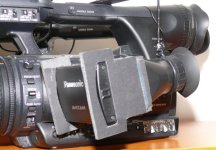
I found the shade hoods on the market for our model 130/160 was not long enough to shade the LCD from the light hitting the screen. When the light hits it just at the right point & angle... you can not see anything. So I made my own.
What you will need
1) Corrugated plastic. This can be found for free these days by taking down an old road side sign.
2) Spray paint to paint the corrugated plastic to the desired color (and hide the text since it was a former sign.)
3) Appx one foot (30 Centimeters) of elastic band fabric. For free use the one from your old worn out underwear. I decided to buy some from a fabric store for about $1. stick to the one inch width.
4) Staple gun with at least 4 staples and cardboard to staple into so you don't destroy the subsurface (my table in this case)
5) Exacto or similar knife/razor blade and a screw driver.

Rough instructions.
1) Cutting the plastic to size: 5.5-6.5" (14-16cm) will be the length of the hood. You decide the length. you just can't go too long because the hinge of the LCD is not strong enough to hold too much weight. You will take the measurement of the size you want to make your sides. I made mine 2.25" (5.7cm) by 3.5" (8.8cm) for top and bottoms measurements. Remember to measure and cut to the desired size of the inside of the hood. (not exterior dimensions)
Take the knife and cut into the side you desire to be the outside. slice the top layer of the plastic. ie do not cut all the way through. You will make 3 "half-way" slices and the last measurement will be last side and cut all the way through both layers. I suggest you cut it a few centimeters long so you can shave it down to size/ fit.
2) Paint the plastic. I painted one side. waited an hour and paint the other side. I then let it dry overnight or longer so the paint cures.
3) I fold over the elastic fabric and staple it in place. See picture.

I place folded cardboard under it so the staples go into the cardboard and not into my table.
I do one side first and then fold over the staples with a screw driver.

4) Cut the fabric to size and staple the last side. This is a little bit more challenging. See picture of how I position myself to get the staple in. Using the table sdie/edge. And push the fabric to the side so you can push down and staple on the table and not in the air.

Then don't forget to fold in the last set of staples. Don't stretch the fabric in place. (ie make tight)
You need it to be barely loose so you have space for it to wrap around the LCD monitor.
5) I then tape the two lose edges together. You can use gaffer tape or good old fashion clear scotch tape.
6) Not required, but I put gaffer tape around the edge that slides against the LCD molding frame.
Finished

and inside

Final notes: Make your own measurements and slice two sides and see if they are the right size for you. Making it too large will have it going over the edge. Making it too small will have you covering over the monitor. So figure out if it will fit before you finish your project.
I picked flat grey because I do equestrian events. Horses can spook from shiny surfaces and whites. Plus black can absord the sun and make the surface potentially hotter.
I have used a wider fabric bands but it is much harder to slide it on.
Trim the two inside sections of the edges so they fit neatly together when you tape them together.
my original version is photographed below.
It was a tad large on the sides. You can see it the first picture.
If you noticed in the second photo; the edge is rough because it was so long-- the weight would cause the screen to flop down.
plus I assembled prior to painting which didn't allow me to paint the whole thing. It looked a tad sloppy.


What you will need
1) Corrugated plastic. This can be found for free these days by taking down an old road side sign.
2) Spray paint to paint the corrugated plastic to the desired color (and hide the text since it was a former sign.)
3) Appx one foot (30 Centimeters) of elastic band fabric. For free use the one from your old worn out underwear. I decided to buy some from a fabric store for about $1. stick to the one inch width.
4) Staple gun with at least 4 staples and cardboard to staple into so you don't destroy the subsurface (my table in this case)
5) Exacto or similar knife/razor blade and a screw driver.

Rough instructions.
1) Cutting the plastic to size: 5.5-6.5" (14-16cm) will be the length of the hood. You decide the length. you just can't go too long because the hinge of the LCD is not strong enough to hold too much weight. You will take the measurement of the size you want to make your sides. I made mine 2.25" (5.7cm) by 3.5" (8.8cm) for top and bottoms measurements. Remember to measure and cut to the desired size of the inside of the hood. (not exterior dimensions)
Take the knife and cut into the side you desire to be the outside. slice the top layer of the plastic. ie do not cut all the way through. You will make 3 "half-way" slices and the last measurement will be last side and cut all the way through both layers. I suggest you cut it a few centimeters long so you can shave it down to size/ fit.
2) Paint the plastic. I painted one side. waited an hour and paint the other side. I then let it dry overnight or longer so the paint cures.
3) I fold over the elastic fabric and staple it in place. See picture.

I place folded cardboard under it so the staples go into the cardboard and not into my table.
I do one side first and then fold over the staples with a screw driver.

4) Cut the fabric to size and staple the last side. This is a little bit more challenging. See picture of how I position myself to get the staple in. Using the table sdie/edge. And push the fabric to the side so you can push down and staple on the table and not in the air.

Then don't forget to fold in the last set of staples. Don't stretch the fabric in place. (ie make tight)
You need it to be barely loose so you have space for it to wrap around the LCD monitor.
5) I then tape the two lose edges together. You can use gaffer tape or good old fashion clear scotch tape.
6) Not required, but I put gaffer tape around the edge that slides against the LCD molding frame.
Finished

and inside

Final notes: Make your own measurements and slice two sides and see if they are the right size for you. Making it too large will have it going over the edge. Making it too small will have you covering over the monitor. So figure out if it will fit before you finish your project.
I picked flat grey because I do equestrian events. Horses can spook from shiny surfaces and whites. Plus black can absord the sun and make the surface potentially hotter.
I have used a wider fabric bands but it is much harder to slide it on.
Trim the two inside sections of the edges so they fit neatly together when you tape them together.
my original version is photographed below.
It was a tad large on the sides. You can see it the first picture.
If you noticed in the second photo; the edge is rough because it was so long-- the weight would cause the screen to flop down.
plus I assembled prior to painting which didn't allow me to paint the whole thing. It looked a tad sloppy.


Last edited: