Direct comparisons between HDMI out and ALL-I/IPB internal on the 5D MIII

yoclay

Veteran
There has been a lot of questions about this update giving "clean" HDMI out on the 5D Mark III. However, most of the threads keep getting bogged down in side questions.

I think we need to see more screen shots with exactly the same scene between HDMI-out and internal ALL-I/IPB and then look at the histograms. Same exposure/fstop, etc. Put it on a tripod! If you use a profile use it in both tests. (Cinestyle or Prolost/neutral would be nice for instance). Keep the moving elements/variables to a minimum, no wildly swaying trees please!

If there is a difference we will see it.
I have seen one shot where there was noticeably better highlight roll-off and a whole bunch where there was no difference at all.

Please post your uncorrected images here with their histograms.

Let's see what's really going on with this update.
 
Last edited:
And I'll add: grade the footage heavily! You probably won't see a difference until you start pushing the image. I'm not interested in uncorrected images, unless they are the original files to play with.
 
Oh, so this a wish thread? ;) I'd really like to see a wideish shot with lots of foliage, leaves and/or trees. Internal and hdmi-out. The compression, at least on the 5dmII, do evil things to that sort of shots.
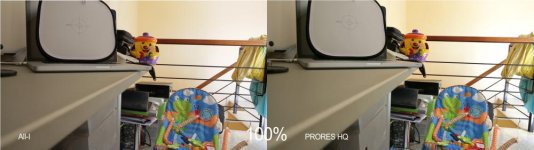
 
This is side by side, Prolost Flat setting in the camera, IPB vs HDMI out recorded to a Nanoflash (4:2:2 50mbs). Footage as is, sharpened, and then graded heavy with MBL. Output as a movie with FCPX and compressed by vimeo (though the original can be downloaded I guess). Reason being because thats how most of my footage ends up anyways, so I wanted to see a real world comparison (if you cant see the difference on an internet movie then where would you see the difference anyway)?

I specifically shot foliage, leaves and trees, because that was where the 5dmk3 seems to suffer most!

If you want original still images then let me know how you want them.


Password is 'nano' .
 
Thanks for your contribution Simon, but what is of interest hear is to compare the histograms of two exactly identical scenes between the two forms of output. Unfortunately it would be impossible to do this with an already heavily graded set of footage or half an image from each side of a frame with moving elements in them.
 
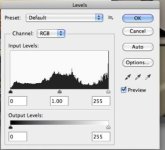
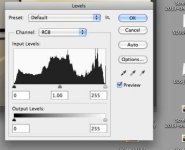
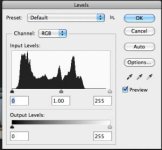
This is an example of what I am talking about.
You can see the histograms of both images side by side.
The HDMI/Prores image looks to have much more info and better Highlight roll-off.
The seen is brighter because there is more info in the shadows and yet holds detail in the highlights on the right side of the wall.
I have not seen this repeated though.
Everything else I have seen from other people appears to have virtually identical levels.


ALL-I_VS_PRORES.jpg

ALL-I on the left, HDMI-out Prores HQ on the right:

Sparky33's ALL-I (in camera).jpg Sparky33's Prores HQ (HDMI).jpg

Notice the gradual roll-off in the highlights on the right side of the histogram of the Prores image compared to the clipping in the All-I image.
 
Last edited:
And I'll add: grade the footage heavily! You probably won't see a difference until you start pushing the image. I'm not interested in uncorrected images, unless they are the original files to play with.

No, this time around we don't want heavily graded footage. (unless of course you want to do that as an afterthought :-) ) We want to see how much info is actually there to work with BEFORE grading.
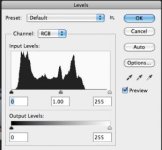
Thus the reason for my request to post screen grabs of the levels as well. Or othewise post the original footage and someone else can get the levels for you.
 
I saw one difference I'd like to note that I saw between the internal recordings and the external recordings from the Nikon D800 that might also pertain to the Canon 5D3's internal and external recordings. I noticed that that the externally recorded footage was a little noiser probably due to the fact that the noise wasn't being covered up by the compression artifacts. The good part about real noise instead of muddied noise due to artifacts is you can clean it up a lot more with programes like Neat Video. After cleaning up the noise as best as I can with both the internal and externally recorded footage from the D800 I realized I was able to get almost a half of stop of latitude more in the externally recorded footage. This and the added gradeability of the external footage sold me and I now always use an external recorder when using a D800. Now I know the Canons shot better internally recorded footage than the D800 so the difference might not be as big, but it's definitely worth testing.
 
I specifically shot foliage, leaves and trees, because that was where the 5dmk3 seems to suffer most!
First, thanks for sharing the post. :thumbsup: But the 5Ds do not have a problem when you put the foliage in such shallow focus. There is when you slap a wider lens and shot a forest that the compression starts working hard. Or if you just had focused on the forests behind the leaves that you focused on.
 
Allrighty, some not-so-scientific-experiments. First of all, let's put IPB and ALL-i to rest. Even in moderate motion, IPB breaks down. Here's a zoom of both (different exposure a bit as I was testing Blackmagic capturing at the moment and not specifically IPB vs ALL-i):

ALL-i: (I accidentally named the files the other way around, this is actually ALL-i)
https://dl.dropboxusercontent.com/u/45915964/5D_IPB_Motion_zoom.jpg

IPB:
https://dl.dropboxusercontent.com/u/45915964/5D_ALL-i_Motion_zoom.jpg

As you can see, IPB creates compression artifacts that smooth the image. How some people can't see the blurring and smoothing that goes on when using IPB is beyond me. ALL-i actually keeps the noise completely intact and looks pretty much like the uncompressed HDMI. ALL-i is probably one of the only codecs in consumer cams that doesn't break up motion.

Lets' compare Blackmagic uncompressed 8bit through HDMI to ALL-i:

ALL-i:
https://dl.dropboxusercontent.com/u/45915964/5D_ALL-i_Motion.jpg

Blackmagic (green tint, apparently because the HDMI sends out 601 instead of 709 but still flagging it 709 (or something). Also I had to bring down the highlights when using HDMI. After effects kept them clipped until I brought them down.
https://dl.dropboxusercontent.com/u/45915964/5D_ALL-i_Blackmagic_Motion.jpg

You REALLY need to zoom in to see differences.
 
Last edited:
Thanks Maarek,
Well that pretty much answers that question in terms of greater dynamic range, info, roll-off, etc.
(Not necessarily in terms of greater sharpness or noise)

As we can see from the screengrabs of the levels your images from the two outputs sources are virtually identical.
We can also see from the spikes in the HDMI image where you did a little work.

Below left, ALL-I captured internally, on the right the Blackmagic HDMI out image:

All- I internal.jpgBackmagic HDMI capture.jpg
 
Thanks for posting. Some differences but not that large. Some of the detail can be attributed to the lenses at f2.8, not the best for the full frame. I liked the RAW from the BMCC the best but the 5D does not look miles away. To me, the All-I on the 5D looks the worst. The HDMI output is a bust imho. Green cast? Come on Canon! No sense in doing something 3/4 of the way there...

On a side note, I read a post on EOSHD about a new lag in the externally viewed & internally viewed images introduced by the firmeware upgrade. Anybody else see this?
 
Thanks for posting. Some differences but not that large. Some of the detail can be attributed to the lenses at f2.8, not the best for the full frame. I liked the RAW from the BMCC the best but the 5D does not look miles away. To me, the All-I on the 5D looks the worst. The HDMI output is a bust imho. Green cast? Come on Canon! No sense in doing something 3/4 of the way there...

On a side note, I read a post on EOSHD about a new lag in the externally viewed & internally viewed images introduced by the firmeware upgrade. Anybody else see this?

Yes there is a lag, it's also present in 1D C, the lag is about half a second
 
Thanks for your confirmation. I have yet to install and to be honest, I do not think I will install the upgrade. More lag is not a good thing.
 
Wow... seeing the 5D up against the BMC makes it look way too soft in my opinion. Purpose camera is the right word here....

But all in all, Canon disappoints.
 
Back
Top