Dialling in the AF100

to my eyes the ungraded tigger is underexposed by atleast half a stop, (only viewing on an iPhone here, but that enables me to tilt my screen around and see non-pure White on the bg in huge pixel clumps), with a greyer left side. this matches what I see on your waveform where the White level drops down on the left side.

I've shot quite a bit of yoga on my hvx's (now px'd for my af101), tanned woman in White clothes in a White infinity cove, 16 hours in all, (see maya Fiennes on my website under motion), and the big lesson I learnt, very much like greenscreen is to light your background seperately to the subject.

the hvx and af footage in my mind should never be seen as a digital negative, rather as a digital transparency due to being 8-bit, and for on-the-knife-edge lighting like on White should be exposed pretty much spot-on.

just my 2p worth

mike.c
 
Last edited:

I believed the trouble was shooting in Cine gamma modes that there's absolutely no headroom. The moment anything clips, it is unrestorable and ugly. That's why on the HVX200 I was accustomed to getting the whites "nearly but not quite"- as I do on the Hasselblad when shooting stills. I could have pushed the light on the background up (just by turning up the dial on the LED panel) but I chose- it appears wrongly- to keep it in the high 90's to be safe from clipping. The easiest thing in the world would be to turn the wick up to blow the background out, but that's even more perilous because of the highlight clipping issues which can result in very ugly coloured patches if one channel clips sooner than the others (which incidentally is something you cannot see on a WFM *or* a vectorscope- you really need to see the RGB parade, ideally of what's coming off the sensor as well as what is going onto the recording, as clipping can be concealed in a vectorscope, see threads passim).

But yup, it worked... here's an ungraded shot of Tigger.
TiggerToppedOut.jpg

That's a hell of a lot better. I made two changes- turned off the I turned off the Chroma bias to warm tones (from -3 to 0 in Editman's 5dii scene file) and pushed the exposure up to about 105% on the background, so the "bow" of tones goes from 100 to 105% (and nothing hits 107% which is where the luma appears to clip on this camera from watching the WFM as I change aperture).

It hasn't clipped in any ugly way (which I'd certainly have worried that the HVX200 would if anything was showing at 105% Zebra) and looks much more like the desired result out of the camera.

I still want to know how much more latitude one gets to pull things around if using Nanoflash rather than onboard codec, but it is certainly a more attractive result than the two-stage graded shot, I agree. I guess I have to be braver about regarding superwhites as the right place for pure whites to be on the AF100. I'm nervous about those razor thin margins between right and clipped for busy shoot days (where I can imagine missing the critical difference between 105% and OK and 107% and clipped to hell) but maybe I just need to live a bit more dangerously!

Cheers, Hywel.
 
Last edited:
Much better!

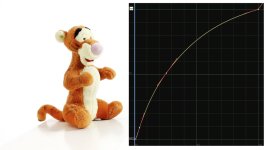
I slapped a curve and a slight desaturate on it in Nuke, see attached which gets you much closer in feel to your hasselblad shot.

Resolution would help get more as your pic is only 1k, but nothing on Tigger is clipped, and the white is 100% with lovely non-clipped edges. Note the hooked down black before the curve takes off just to get a bit more 'in there' to make your black a bit longer like your studio look.
 

Attachments

  • TiggerToppedOut_CC.jpg
    TiggerToppedOut_CC.jpg
    160.4 KB · Views: 0
I just like to say a public thank you to Barry, who set up a shot for me to compare the on-board codec with Nanoflash recorded codec. As others have seen, the different is literally imperceptible in normal viewing and you have to lean in really, really close to see any benefit. Banding was visible in the scene by construction- a plain white card with slanted illumination is pretty much the worst-case scenario for this. It is perceptible in the ungraded footage and gets more visible as you pull the footage around- but it seems to make not one whit of difference whether you do it to the Nanoflash version or the on-camera version. The banding appearence is very similar (and the inoffensive, hardly visible noise likewise).

Which is a very good thing for me to know. There is just no point me throwing £3000 away getting an external recorder for my AF100- it doesn't address specific issue I am seeing in the grade anyway. I'm sure it would be well worth it if I were doing green screen work, where the better colour sampling would be a bigger factor, and I'll certainly consider a Ninja at some point if they work just to get the transcode to ProRes done in hardware with a redundant copy of the footage. But for me it looks like that money would be a LOT better spent elsewhere, probably a top notch broadcast monitor so that I can be a lot braver with riding the superwhites to get cleaner images without clipping.

The above exercise was also well worth doing to show that the LED lights are fine- they do have a bit of a lump in the green, but this can be well controlled by white balance. I spent the afternoon comparing the LED lights to daylight and found that 1/2 strength minus green was enough to give me an entirely acceptable mix with daylight. (Actually I think it is probably somewhere between 1/4 and 1/2 minus green but skin tones look much better erring on the side of magenta than with even a very slight green tinge, so have gone a little extra for safety).

So... banding does exist, is probably unavoidable in these challending circumstances, but riding the levels right up to 105% helps a lot on pure white backgrounds. The codec seems to make very little difference, one might be able to trade off a little extra noise for less banding. Any major improvement is only likely to come from buying a 10 bit camera (and my interest in a Red Epic is even more piqued with the promise of something more like the stills shoot way of working but I digress).

It may even be the lower noise of the AF100 is allowing banding which the higher noise of the HVX200 was hiding- it doesn't seem to be the codec's fault. Plain walls lit with a gradient are to be avoided, I think. And aggressive grading is also to be frowned upon, sadly. Less of an issue than avoiding stockings, fences, brick walls and tiled roofs like I had to with the Canons, at least!

Cheers, Hywel.
 
Shooter, your frame grabs look GREAT for the "live" footage, but to my eye at least there's hints of colour casts coming in on the third and fourth shots on the backgrounds. By no means objectionable, but something which might start to cause issues if the footage is graded. Which is what you've been telling me I guess Where were the waveforms for these shots, and were you editing on a PC or a Mac/FCP (i.e. is Quicktime gamma shift a potential issue?) Also, what scene file gamma choice (and roll-off choice) were you using out of interest? I will admit that I've never seen any footage from my AF100 as clean as that out of the camera, so I'd certainly like to understand why I haven't!

Frame grabs straight off the camera ... no CC / Grade...via Adobe Premiere ( native footage)

You mention "hints of color casts". The footage shot is actual tap water with actual cherries in a real glass pyrex bowl. Its not a shot of a pure white card.

My experience grading this footage ( from this codec) is..every thing reasonable is possible.
 
Any major improvement is only likely to come from buying a 10 bit camera

It may even be the lower noise of the AF100 is allowing banding which the higher noise of the HVX200 was hiding- it doesn't seem to be the codec's fault. Plain walls lit with a gradient are to be avoided, I think. And aggressive grading is also to be frowned upon, sadly. Less of an issue than avoiding stockings, fences, brick walls and tiled roofs like I had to with the Canons, at least!

It's really a pity because now our eyes will be trained to look for banding flaws instead of moire/aliasing. It's a shame because if we had a 10bit camera this wouldn't be such an issue.

Perhaps, and I don't know - I haven't tried this - but perhaps if one has to shoot in a challenging situation (not brick walls or metal frame glasses anymore but slight gradients on flat backgrounds) we should shoot on purpose with a NOISE setting then fix with Neat video.

I wonder if would be a workable band-aid?
 
Yes... although I like my still photos as clean as possible, always have done, I'm not at all averse to some organic noise in moving images. I'm not at all bothered by the noise I've seen on the AF100 thus far and indeed have been adding a pinch of grain in to some footage. The banding, sadly, does bother me. So my balance would be higher noise less banding and I'll be trying out settings to achieve that I think.

Since the Nanoflash didn't help it looks like the finger is pointing at the 8 bit acquisition not the codec, but as we've demonstrated collectively getting the exposure right up there on these white backgrounds also helps a whole lot.

I don't have any concerns planning shoots on location where I'm hiring well-appointed houses with lots of clutter, but the talking head tutorials on plain white will remain a trickier proposition I guess :)

Shooter, the colour casts I meant were on the grey gradients behind the test shots. I didn't try looking at the actual pixel values to be sure but they looked like them might be slightly off pure neutral tones? That's the sort of thing that seems to cause banding issues when I grade footage because any slight deviation from pure grey tends to get pulled more extremely away from neutral when you start doing any manipulation of colour and you can end up with perceptible colour steps because all pixels which were very slightly green and now significantly greener than their grey neighbours, making it more visible, if that makes sense?

As I said in my original post I feel like I have an awful lot to learn about getting the AF100 to do what I want it to do in varied situations :)

But thanks everyone- it has been very useful!

Cheers, Hywel.
 
I think an external recorder would help in situations that stress the AVCHD codec. Such situations may include busy wide angle scenes, scenes with lots of moving leaves or water, or camera movement. If you shoot mostly talking heads, then there is no need to get one.

Also, will you always have a white background behind your subjects? What if the background were grey or blue (sky)? It may not be easy to get rid of banding in these cases. Maybe worth a test?
 
Back
Top