Doctor Gonzo
New member
I have a HPX170 with 16GB P2. G5 Tower (PPC). Final Cut Pro 6.0.4
I successfully offloaded clips from my camera using the P2CMS software following the instructions from Barry Green. This worked fantastic. I log and transfered into FCP successfully.
However, I cannot delete the files from the P2 card. Is this a known problem with Mac? I can reformat in the camera to remove the files but is this the best way? Will I have to do this everytime?
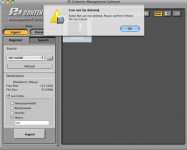
I cannot delete files using P2CMS. It says the files are locked. The P2 card is not write protected.
I also cannot drag to the Trash from the card on the desktop. All the files are locked. I cannot unlock them in the info window (grayed out).
I'd rather not have to purchase Raylight or Shotput.
Thanks
brad
I successfully offloaded clips from my camera using the P2CMS software following the instructions from Barry Green. This worked fantastic. I log and transfered into FCP successfully.
However, I cannot delete the files from the P2 card. Is this a known problem with Mac? I can reformat in the camera to remove the files but is this the best way? Will I have to do this everytime?
I cannot delete files using P2CMS. It says the files are locked. The P2 card is not write protected.
I also cannot drag to the Trash from the card on the desktop. All the files are locked. I cannot unlock them in the info window (grayed out).
I'd rather not have to purchase Raylight or Shotput.
Thanks
brad