C200: Decisions... C300 MKII OR C200

ollywood88

Well-known member
Hey all,

I am finally going to part with my beloved C500 and Odyssey 7q.

I have been looking at the c300 mk2 or C200. The 2k 60fps on the c300 mkii is beautiful this camera seems more practical, however I just love the 4k raw lite from the c200. But the trade off is the file size.

My questions are.

1) Has anyone choose the c200 over the c300? or vice versa.
2) How many cards gets you through the day on the c200b? Does the C200 also do 2k 60fps but in 8 bit?
3) Workflow is it a pain with an older generation iMac? for 4K LITE RAW?

Thank you any opinions would be great, on the fence with both. I would go used with the c300 mkii and new with the c200.

Thanks
 
If your primary purpose is to shoot raw without an external recorder, and you're looking for something as small and light and low cost as possible, and/or require 4K60, C200.

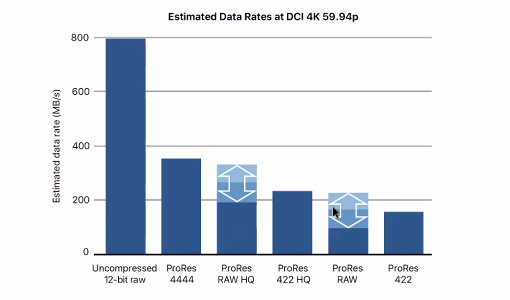
Otherwise, C300 II, the 12-bit RGB 444 is just about as flexible as raw with comparatively ultra tiny files at 225Mbps. 410Kbps 10-bit 422 for 4K is also excellent (though I've found 12-bit RGB 444 keys better for green screen. For YouTube, scaling 12-bit RGB 444 to 4K with slight post sharpen looks just as good as 4K 10-bit 422 in terms of detail). And if you need raw, you can shoot ProRes RAW with an external recorder (Atomos Shogun Inferno), which will give you smaller files (smaller than ProRes 422 HQ!) vs. Canon's Raw Light (C200 can only do massive-file-size internal RAW Light: 1Gbps!). I would expect ProRes RAW to not have any visible quality loss vs. RAW Lite (someone would need to shoot a test with a C300 II + Inferno and C200 to know for sure).

ProRes RAW bitrates:
Screen-Shot-2018-04-05-at-10.26.46-AM.png


ProRes RAW Performance:
Screen-Shot-2018-04-05-at-4.30.35-PM-768x318.png


You can also use Resolve to relatively quickly transcode Canon's huge & slow RAW Light files to ProRes, DNxHD, JPEG2000 Wavelet (paid version of Resolve), etc., then you won't need to store the massive raw files long term. If you've gotten by OK with 8-bit DSLRs (or C100/C300) and can work with mostly baked in color, the C200's 8-bit 420 H.264 works well for many people: excellent quality, tiny files, easy to edit.
 
Last edited:
I would expect ProRes RAW to not have any visible quality loss vs. RAW Lite (someone would need to shoot a test with a C300 II + Inferno and C200 to know for sure).

The C300II only ends up doing 10bit vs the C200's 12bit RAW. I don't know the real world differences.
 
  • Like
Reactions: jcs
The C300II only ends up doing 10bit vs the C200's 12bit RAW. I don't know the real world differences.

Looks like it's a case of 10-bit raw encoded with Canon Log 2 (semi-baked including gain, not really raw like the C500?) on the C300 II vs. 12-bit linear(?) (fully raw but compressed?) on the C200? Two different tradeoffs- would need to test in post to see major differences or advantages.
 
I own the C200 and work in a rental house with several C300 MK IIs so I've had a good amount of time with both cameras. To answer this really depends on your needs-

If you find yourself doing a lot long-form shooting (live events are a good example) and don't need to meet a requirement such as 10bit or 422 AND you happen to do some work that will benefit from the internal RAW (narrative filmmaking, projects that will be projected onto a big screen, etc), I think the C200 is a great choice.

If you find yourself doing corporate or live event work that requires the extra color space and maybe needs a quick turnaround, it's hard to beat the codec options in the C300 MK II.


Also, I'm simply referring here to internal recording options. Once you factor in external recording options, the C300 MK II beats the C200 in many ways and it opens up SOME 422 recording options on the C200, albeit with larger ProRes formats in most cases.

I ultimately chose the C200 because I was upgrading from a C100 and find myself mostly shooting things that end up on the internet and require minimal grading. That said, I occasionally get something very cool that benefits from the extra color space of the Canon Cinema Raw Light so it's nice to have that option.
 
Looks like it's a case of 10-bit raw encoded with Canon Log 2 (semi-baked including gain, not really raw like the C500?) on the C300 II vs. 12-bit linear(?) (fully raw but compressed?) on the C200? Two different tradeoffs- would need to test in post to see major differences or advantages.

It is weird that I have had a very hard time finding information about RAW implementation on the C300 II, so a lot of this is a guess. I am pretty sure that it is the same as the C500. 10bit Canon RAW. You have to be in Canon Log 2 or Canon Log 3 to get a RAW output from the SDI port. The Atomos recorders that I have bake in a Canon Log 2 look into ProRes footage with responses to ISO and white balance metadata. CDNG appears to give a linear RAW recording, but I haven't done much testing as it doesn't have a readily available workflow.
 
1) I switched from a C100MKii and a C500 + Odyssey 7Q to a C200 & C200B. Briefly entertained the C300MKII, but then remembered how much I hate the ergonomics of the C300MKI and that dumb three story building design - camera, handle, clamshell :) For how I shoot most of my stuff the C200/C200B was a no brainer and getting 4K 60P with no crop was icing on the cake.
2) Depends on what you're shooting. If you're doing interviews all day you're going to need a lot of cards (get EgoDisk)

3) Workflow is a breeze even on an old machine if you utilize proxies in Premiere (can't speak to FCP)
 
It is weird that I have had a very hard time finding information about RAW implementation on the C300 II, so a lot of this is a guess. I am pretty sure that it is the same as the C500. 10bit Canon RAW. You have to be in Canon Log 2 or Canon Log 3 to get a RAW output from the SDI port. The Atomos recorders that I have bake in a Canon Log 2 look into ProRes footage with responses to ISO and white balance metadata. CDNG appears to give a linear RAW recording, but I haven't done much testing as it doesn't have a readily available workflow.

I found the same thing- very hard to find detailed info on the C300 II raw format. When I found that Canon Log 2 was needed to enable 4K raw output, I figured it made sense that it was 10-bit semi-raw / half-baked as 10-bit log is said to be fairly equivalent to 12-bit linear. Thus converting 10-bit Canon Log 2 raw to 12-bit linear for CDNG or ProRes RAW would be effectively a lossless operation.

For narrative I've found raw is fine (but not required), however for daily/quick turnaround really prefer straight-out-of-camera looking great footage with only quick exposure/gamma/contrast/curves tweaks to get an awesome look. This is possible with Canon Log 3 and custom tweaks with the C300 II. Only recommend Canon Log 2 for well lit shots (else noisy shadows), else Canon Log 3 for everything else (or Wide DR for live streaming etc.). Along with 12-bit RGB 444 XFAVC it's an excellent workflow with fairly small files (225Mbps) and the 50Mbps 422 10-bit long GOP footage looks pretty good too (YouTube delivery). For live streaming/capture to computer, I've found the HDMI output does not match internal recorded footage, so different settings were needed to get 'live looks great' output. For 4K60 I use the 1DX II which IMO has better color (skintones) than the Canon Cinema cameras (limited to 8-bit though).
 
I found the same thing- very hard to find detailed info on the C300 II raw format. When I found that Canon Log 2 was needed to enable 4K raw output, I figured it made sense that it was 10-bit semi-raw / half-baked as 10-bit log is said to be fairly equivalent to 12-bit linear. Thus converting 10-bit Canon Log 2 raw to 12-bit linear for CDNG or ProRes RAW would be effectively a lossless operation.

For narrative I've found raw is fine (but not required), however for daily/quick turnaround really prefer straight-out-of-camera looking great footage with only quick exposure/gamma/contrast/curves tweaks to get an awesome look. This is possible with Canon Log 3 and custom tweaks with the C300 II. Only recommend Canon Log 2 for well lit shots (else noisy shadows), else Canon Log 3 for everything else (or Wide DR for live streaming etc.). Along with 12-bit RGB 444 XFAVC it's an excellent workflow with fairly small files (225Mbps) and the 50Mbps 422 10-bit long GOP footage looks pretty good too (YouTube delivery). For live streaming/capture to computer, I've found the HDMI output does not match internal recorded footage, so different settings were needed to get 'live looks great' output. For 4K60 I use the 1DX II which IMO has better color (skintones) than the Canon Cinema cameras (limited to 8-bit though).

You can get RAW output with Canon Log 3, FWIW.

I agree with your analysis of the modes, but more than half of my clients just want the "proxy" footage from the SD card recording. Some of them even insist that I give the "proxy" footage to them in C-Log. ¯\_(ツ)_/¯
 
You can get RAW output with Canon Log 3, FWIW.

I agree with your analysis of the modes, but more than half of my clients just want the "proxy" footage from the SD card recording. Some of them even insist that I give the "proxy" footage to them in C-Log. ¯\_(ツ)_/¯

In my indoor max DR test (one light on face with bright practical lights in background) I found the best results of max DR and low noise with Canon Log 3 (+ other custom tweaks). Need to do more tests, though starting to think Canon Log 2 doesn't have any real world practical performance benefits. Again, need to test more but it doesn't appear Canon Log 2 provides any extra (real) latitude in the highlights over Canon Log 3 (again, with my custom tweaks).

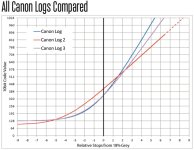
From: https://learn.usa.canon.com/app/pdfs/c300_markii/QuickStart_CanonLogs_10_12_FINAL.pdf
CanonLogs.jpg

It's important to note the dotted lines for Canon Log 2 show where the code values would go, if they weren't cut off at 871 (why was this done??). So at best from this chart Canon Log 2 would provide less than 1/3 more stop over Canon Log 3. Also, Canon Log 3 10-bit code values = 1020 - 128 = 892 code values, Canon Log 2 = 871 - 95 = 776 code values. 892 - 776 = 116 more code values for Canon Log 3. Must be some historical reasons (tape-based non-visual data...) not to normalize sensor output from the float 0-1.0 range then quantize to whatever integer bitdepth and use 100% of the bits (data levels), e.g. 1024 code values for 10-bit, 4096 code values for 12-bit etc. From Cinema5d's test, they showed below 15 stops for Canon Log 2, and from my own experience, I don't think Canon Log 2 provides any more usable stops over Canon Log 3, since the gain would be in the shadows, which are extremely noisy (and thus not very useful except perhaps if shooting very bright sun).

The C300 II's (24-35Mbps) 420 8-bit proxy files are actually quite good, especially if just doing corporate or YouTube videos as tiny, easy to edit files. Both Canon Log and Canon Log 3 can be quickly tweaked with just contrast, perhaps a slight curve/gamma tweak and you're good to go without any LUTs or complex grading. So easy to see why clients would be cool with 24-35Mbps Canon Log (even Canon Log 3) proxies.

For those shooting Sony, you might find it interesting that Canon Log 3 is basically the same curve as Sony SLog2 (lower blacks), and Canon Log 2 is basically the same curve as Sony SLog 3 (slight diff. in highlights). Canon Log 2 is almost identical to ARRI LogC (slight diff. in knee). Found this out experimenting with https://cameramanben.github.io/LUTCalc/ . Thus it's clear to see why A7S II footage shooting SLog2 was easy to get great results in the same way C200 shooting 8-bit Canon Log 3 looks great.
 
I used to own a C300MKII, but sold it when I got hired in-house at a company. Shortly after, I was asked to buy us a camera package for our company. Uses like: green screen explainer videos, event coverage, corporate interviews, etc.

I ended up choosing the C200 for its superior ergonomics (XLRs and audio levels built in to body), 60p 4K, un-cropped 120p 2K, tap to focus screen included, and internal raw (better for green screen).

I bought 3x 512GB CFast cards, which gives me an hour of raw recording each, which should be plenty. When shooting with my C300MKII, I used 3x 128GB cards, which gave me 44 minutes of recording each, and I was never really wanting more. I plan on shooting almost exclusively in RAW because the cards and hard drive space is not a limiting factor for me.

The C300MKII worked pretty well for me, but I only actually needed timecode once in all of my years of shooting, and I was constantly frustrated by having to completely change my rigging when adding audio. By FAR the biggest thing I will miss is relay recording on my CFast cards.
 
I used to own a C300MKII, but sold it when I got hired in-house at a company. Shortly after, I was asked to buy us a camera package for our company. Uses like: green screen explainer videos, event coverage, corporate interviews, etc.

I ended up choosing the C200 for its superior ergonomics (XLRs and audio levels built in to body), 60p 4K, un-cropped 120p 2K, tap to focus screen included, and internal raw (better for green screen).

I bought 3x 512GB CFast cards, which gives me an hour of raw recording each, which should be plenty. When shooting with my C300MKII, I used 3x 128GB cards, which gave me 44 minutes of recording each, and I was never really wanting more. I plan on shooting almost exclusively in RAW because the cards and hard drive space is not a limiting factor for me.

The C300MKII worked pretty well for me, but I only actually needed timecode once in all of my years of shooting, and I was constantly frustrated by having to completely change my rigging when adding audio. By FAR the biggest thing I will miss is relay recording on my CFast cards.

Interesting. I am curious about your work flow.

- Does your company not archive footage? Do you archive to a non raw format?
- 3 - 512 cards jacks up the price pretty quickly.
- Can the 120p output to 1080/10/422?

I am also looking at buying a camera in the next few weeks as well. The C300ii just works really really well, but the benefits of 4k/60p are pretty huge.

- I would add that any client wanting to shoot 7/8 30/40 minute interviews in one day probably will be fine with 1080p, which can be done via an external recorder.

- If you're not handing off footage a ton, with really quick turn around times, C200 is probably fine. If you're managing jobs from start to finish the C200 should work. I would be worried that you would often be forced to shoot 1080p to an external recorder or low bit rate 4k because the RAW is too large to handle. In those cases the C200 quality is actually worse and a step down from than that of the C300ii.
 
- If you're not handing off footage a ton, with really quick turn around times, C200 is probably fine. If you're managing jobs from start to finish the C200 should work. I would be worried that you would often be forced to shoot 1080p to an external recorder or low bit rate 4k because the RAW is too large to handle. In those cases the C200 quality is actually worse and a step down from than that of the C300ii.

If ones main concern is recording a lot of 4K footage to a broadcast level ready-to-handover codec the C200 just doesn’t cut it. Maybe we could pin this above the C200 section of the forum?

Still if your “long interviews clients” are returning customers who have come to trust your work I would offer them the following: how about we save a ton of disk space from now on on well lit, stationary and thus easy to compress interviews and spend some raw goodness on the B roll? Doesn’t address the above mentioned sticky rule but might be an approach to some shooters who Aren’t in that „it needs to be 4K and a high bit rate codec“ situation...
 
Interesting. I am curious about your work flow.

- Does your company not archive footage? Do you archive to a non raw format?
- 3 - 512 cards jacks up the price pretty quickly.
- Can the 120p output to 1080/10/422?

I am also looking at buying a camera in the next few weeks as well. The C300ii just works really really well, but the benefits of 4k/60p are pretty huge.

- I would add that any client wanting to shoot 7/8 30/40 minute interviews in one day probably will be fine with 1080p, which can be done via an external recorder.

- If you're not handing off footage a ton, with really quick turn around times, C200 is probably fine. If you're managing jobs from start to finish the C200 should work. I would be worried that you would often be forced to shoot 1080p to an external recorder or low bit rate 4k because the RAW is too large to handle. In those cases the C200 quality is actually worse and a step down from than that of the C300ii.

-We do archive footage, but we just put it on an on-prem server.
-3x 512 cards is only 3K. Compared to RED that’s not much. If you’re concerned about price I think there are cheaper options than the SanDisk cards.
-No, it’s raw or 420 just like everything else the C200 does.
-We are only shooting 4K and don’t want to deal with an external recorder.
-This is for in-house use. I’m never heading off footage to anyone but myself or my team.
-With sufficient hardware, RAW doesn’t take any longer to turn around than anything else. Assuming you are exposing properly, you can always just slap a LUT on it. I’ll also always shoot 420 as a backup in case of a corrupt card or something (just like I did on my C300MKII).

We plan on buying the C300MKIII whenever it comes out as an A-Cam, assuming it comes with RAW lite and doesn’t have the dumb XLR layout again.
 
Both great cameras, just different. I own the C200 and we have been using a loaned C300 MKII for a year to shoot our documentary. For me personally, I am shooting the majority of our interviews and about half of our b-roll in Cinema RAW Light. But we are also using the C300 MKII to shoot some interviews and b-roll and even using the XF-405 to shoot a lot of event footage off of boats. The XF-405 is almost identical to the C200 shooting .MP4, we shoot WDR and it looks great, I am impressed with the 405 for a lot of types of shooting. As far as your choice, it's the same thing we've all been saying for almost a year now. If you need TC, genlock, and need an in-camera 10-bit 4:2:2 codec, buy the C300 MKII, it's a great camera. If you can deal with Cinema RAW Light, with the C200, you get 12-bit DCI 4K with slightly more sharpness, bit rate and flexibility than the XF-AVC codec from the C300 MKII. The ergonomics on the C200 are leagues better than the C300 MKII (the clamshell and stupid AV cables suck) and internal 4K 60p RAW is much nicer to have for us. We're shooting all of our racing and b-roll footage in 4K 60p and it's working out well.

Not really that hard of a choice, just buy what suits your situation. So much teeth gnashing by people frustrated that the C200 isn't a C300 MKII. Two different cameras, two different feature sets for two different users.
 
One note I'll add - If you mostly do post on your own stuff and keep the production to post-production workflow in house, the C200 is fantastic. If you're mostly being hired as a day player to shoot and hand off cards, I'd strongly consider the C300MKII. For the past year every project that I've been hired to only shoot has been the first C200 project for that client and/or their editor and it's been a pain. Now that Canon finally fixed the proxy workflow with the firmware update I'm hoping that will smooth everything out, but not having timecode sync capabilities has made me feel like the amateur who showed up to a pro set with a canon rebel on more than one occasion.
 
Back
Top