Follow along with the video below to see how to install our site as a web app on your home screen.
Note: This feature may not be available in some browsers.
The manual warns against prolonged LV usage. With LV always on the sensor never rests.
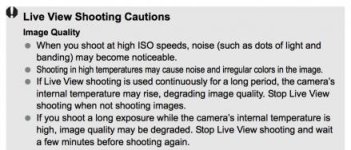
View attachment 101091
Use it when shooting and composing the shot, but shut it off in between takes. I think the small pauses for the sensor can amount to much in the end.
My camera has produced at least 12 dead pixels in it. They show up tremendously bad at HD, and pretty bad at 4K. Noticable only after about 800ISO. I purchased it last February, and it is presently getting a new sensor replacement. The card buffer issue, I've had happen once. my 256GB Sandisk extreme 160 kept stopping. It was very cold at the time, dunno if that had anything to do with it, but it hasn't happened since last march.
Well, there is no real way to use this particular camera in a production environment without having the LV 'on'. Switching it on and off constantly does not really make sense, as you can not compose your shots without it, and apart from this, it does not seem to affect at all the temperature of the unit. The LV feed is routed to an HDMI monitor with a "no mirroring" setting, which is the usual way these things are done in cinema production. The camera gets hot during 4K recording, not from the LV. It probably does heat up the sensor slightly, but this is negligible - you can probably leave the LV on for a day and it won't get hot from only that (not that we have done this) As a 'cinema' camera without an independent optical viewfinder, this camera relies entirely on LV to be operational.
As for the hot pixels, they are never there when the camera is cool, they are always there when the camera is warm. They have always been there, probably in every single unit. We have not caused them and we are not using the camera improperly.
As for the power, yesterday it was on battery power, as a battery pack lasts one hour without a problem, but usually we have it on AC power.
...
I just want to ask a few questions before I put my 1DC to the stress test.
1) What is your ambient temperature for your shoot?
2) I guess my 1DC already have hot spots on it already ? ^^
3) Exactly what brand of Memory card you are using?
....
We are shooting in Mexico. Good luck trying to find a 1DC for rent here... In fact I am pretty sure that trying to do that would make for a pretty good documentary in it's own right. Thanks for the good words anyway.
Canon told us 3 days ago that we will be contacted by their "Customer relations" department in an effort to fix the situation. So far, they have not even bothered to write though, let alone do something meaningful.
Geko, very sorry to hear about your issues and bad experience with Canon service.
I just want to clarify something. Please note I'm talking DSLR's in general, not 1Dc specific as I don't have personal experience with that model:
Hot pixels will appear in stills mode, but not during what is considered normal shooting. I don't know why for a fact, but I'm going to guess it is because the sensor never has a chance to get hot.
I sometimes do long exposure photography, which means my exposure times will vary between 2-30 minutes. Depending on the exposure time, if I do a couple in a row (or a very long one) , hot pixels will appear. I always shoot at ISO 100, because the tests I've done at higher ISO's (400 and 800) have more apparent hot pixels. I have seen this on both the 5D Mark III and 6D. Of course when shooting stills this is a minor issue and easy to fix in post.
It may be that the hot pixel issue is not specific to the 1Dc and 4K recording, but rather something all DSLR's have in common once pushed beyond a point.
I start to wonder if the C100, C300, C500 have them too?
I start to wonder if the C100, C300, C500 have them too?No.....
Jim Martin
EVSonline.com
Well, in fact since this is mainly a 4K problem, and since the C100 and C300 currently do not do 4K, and the C500 is probably owned by just a couple of people (and it does have a giant heatsink and active cooling) we really would not know if this thing will continue. The new C300mkII doesn't look good from the pictures - it lacks the heatsink of the C500, and the current advertising reminds me very much of the advertising of the 1DC - "4K in a small package" and all... We will see, but the performance of the C300mkII will be a dealbreaker for their 'cinema' line.
Sorry that you've had problems with the 1DC but to equate that to the C100/300/500 would not be accurate. The 1DC chip is not the same as the C line. While the 1DC is part of the Cinema EOS line, it is made by the still division, not the video division. The 4K chip in the C series is the same in all three cameras and has not experienced the problems you're having with the 1DC. As for "performance of the C300 MK II will be a deal breaker for the cinema line", that is 100% not correct and has nothing to do with your problems so please don't try to "spread it" on the C line....it's a disservice to your fellow posters and people who read this forum.Well, in fact since this is mainly a 4K problem, and since the C100 and C300 currently do not do 4K, and the C500 is probably owned by just a couple of people (and it does have a giant heatsink and active cooling) we really would not know if this thing will continue. The new C300mkII doesn't look good from the pictures - it lacks the heatsink of the C500, and the current advertising reminds me very much of the advertising of the 1DC - "4K in a small package" and all... We will see, but the performance of the C300mkII will be a dealbreaker for their 'cinema' line.
Sorry that you've had problems with the 1DC but to equate that to the C100/300/500 would not be accurate. The 1DC chip is not the same as the C line. While the 1DC is part of the Cinema EOS line, it is made by the still division, not the video division. The 4K chip in the C series is the same in all three cameras and has not experienced the problems you're having with the 1DC. As for "performance of the C300 MK II will be a deal breaker for the cinema line", that is 100% not correct and has nothing to do with your problems so please don't try to "spread it" on the C line....it's a disservice to your fellow posters and people who read this forum.
Thanks!
Jim Martin
EVSonline.com