
Navigation
Install the app
How to install the app on iOS
Follow along with the video below to see how to install our site as a web app on your home screen.
Note: This feature may not be available in some browsers.
More options
You are using an out of date browser. It may not display this or other websites correctly.
You should upgrade or use an alternative browser.
You should upgrade or use an alternative browser.
Data rate unchanged after patch update
- Thread starter Petanque
- Start date
Where does one find these readings, in QTp for example?any decent player will give you a "close to" reading like splash lite or quick time pro (not as accurate from my tests).
Ok, there seems to be confusion with terminology here:
mbps = Mega (1 million) Bits per Second (a common measurement unit in A/V world. These are the units in PTool)
MB = Megabyte (1048576) (a common measurement unit in computer world)
1 byte = 8 bits
Now as to the question:
mbps = Mega (1 million) Bits per Second (a common measurement unit in A/V world. These are the units in PTool)
MB = Megabyte (1048576) (a common measurement unit in computer world)
1 byte = 8 bits
Now as to the question:
When transferring to FCP the footage is no longer in AVCHD, but ProRes format. Applying the formula above 17.2 MB/s = 137.6 mbps. The best AVCHD rates we can achieve at the moment in camera are around 50 mbps.I have transferred the footage to fcp and the data rate is as it always has been in such situations: 17.2 mb/s [sic]. Is the bitrate adjustment patch working?
Ok... thanks for clarifying the bit about the transfer, but I don't understand, are you saying that I am in fact getting almost three times the bitrate than is actually possible? Not sure what that "(sic)" is about, here is a photo of the fcp screen:Ok, there seems to be confusion with terminology here:
mbps = Mega (1 million) Bits per Second (a common measurement unit in A/V world. These are the units in PTool)
MB = Megabyte (1048576) (a common measurement unit in computer world)
1 byte = 8 bits
Now as to the question:
When transferring to FCP the footage is no longer in AVCHD, but ProRes format. Applying the formula above 17.2 MB/s = 137.6 mbps. The best AVCHD rates we can achieve at the moment in camera are around 50 mbps.

At the end of the day, the question is: How can I see the bitrate? On a mac. For less than $2000.
Where does one find these readings, in QTp for example?
Show Movie inspector in the menu somewhere from memory if you have a quick look.
I dont use a mac but what you posted it shows that you are transcoding the original AVCHD footage to ProRes "at" 17MB/sec? It is not an indication of bitrate of original file. You could be transcoding anything from any camera to prores and it will still say 17MB/sec. This is how i am interpreting the image.
Last edited:
Nope, MB/s is megabytes/second (see Petanque's screenshot). Megabit per second is usually expressed as mbps.17.2 mb/s - meaning 17.2 mbit/sec, not megabytes
Mb = Megabit, MB = MegaByte ...
Ok, I guess the question wasn't clarified enough. 17 MB/s is bitrate on transcoded ProRes stream. You should be looking at information on the original AVCHD stream. How do you transcode into FCP? Whatever program you use to open the original .MTS file should give you that bitrate information on AVCHD stream.Ok... thanks for clarifying the bit about the transfer, but I don't understand, are you saying that I am in fact getting almost three times the bitrate than is actually possible? Not sure what that "(sic)" is about, here is a photo of the fcp screen:
I'm not a Mac guy, but I see that MediaInfo is available for many platforms including Mac. To lookup basic AVCHD stream info it should suffice (see screenshot).At the end of the day, the question is: How can I see the bitrate? On a mac. For less than $2000.
http://mediainfo.sourceforge.net/en
Attachments
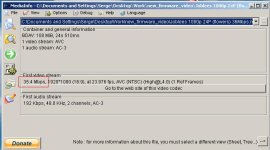
When you convert from AVCHD to anything else you can very well have a higher bitrate. It doesn't necessarily mean you'll have more detail or resolution though.
Last night I converted from AVCHD to JPEG and put it in a .MOV container for someone and the bitrate was in the mid 150mbit/s range. It actually looked worse than the 30mbit/s AVCHD..
Last night I converted from AVCHD to JPEG and put it in a .MOV container for someone and the bitrate was in the mid 150mbit/s range. It actually looked worse than the 30mbit/s AVCHD..
Got it. Thanks.Show Movie inspector in the menu somewhere from memory if you have a quick look.
I dont use a mac but what you posted it shows that you are transcoding the original AVCHD footage to ProRes "at" 17MB/sec? It is not an indication of bitrate of original file. You could be transcoding anything from any camera to prores and it will still say 17MB/sec. This is how i am interpreting the image.
Ok, after all the info, I think I understand:
-You need to use the MTS files to get the actual bitrate information (obvious in retrospect)
-You can open the MTS files in VLC and then open Media Information from the Window menu
-Click on statistics and you can watch the bitrate rise and fall in real time
In the end, I am getting higher than previous bitrate readings. Thanks for the help.

Tracey Lee
Well-known member
Can someone please explain the GOP, what it is and what settings it should have? I didn't use those at all and my AVCHD footage is still looking amazing.
Great. Be careful with VLC, it has known problems with playing back AVCHD files (ugly macroblocking and stuff).Got it. Thanks.
Ok, after all the info, I think I understand:
-You need to use the MTS files to get the actual bitrate information (obvious in retrospect)
-You can open the MTS files in VLC and then open Media Information from the Window menu
-Click on statistics and you can watch the bitrate rise and fall in real time
In the end, I am getting higher than previous bitrate readings. Thanks for the help.
may look to wiki MB especially for phrase "(compare Mb, for the megabit)."Nope, MB/s is megabytes/second (see Petanque's screenshot). Megabit per second is usually expressed as mbps.
And if on wall will be written something, that not alltime mention located behind that object ... /censored proverb/
in current case it is related to bitrate, and that is possible was got from media header, not calculated from media itself.