
Navigation
Install the app
How to install the app on iOS
Follow along with the video below to see how to install our site as a web app on your home screen.
Note: This feature may not be available in some browsers.
More options
You are using an out of date browser. It may not display this or other websites correctly.
You should upgrade or use an alternative browser.
You should upgrade or use an alternative browser.
D800 posterization
- Thread starter macgregor
- Start date

Samuel H
Major Contributor
It goes from an 8-bit intermediate image to an 8-bit final image. The intermediate one has more contrast than it should. If the final one has more contrast one than the intermediate one (which happens even with quite general settings), these issues appear. *** Using a higher-contrast setting may or may not eliminate these issues: it depends on what kind of light response curve is built into the intermediate image, and how close to that you can get with your final image.
Wesley Byram
Well-known member
Pre-grading, 8-bit footage shouldn't show posterization. It is after grading than having only 8 bits per channel becomes a big issue. The problem here is that there's some grading in-camera. From my tests with Flaat, I've found that while the in-camera image processing is much better on the D800 than on the D7000, it's still far from perfect (or, even, far from what the in-camera jpg processing can give you). The camera first debayers the image and creates an intermediate image with 422 8-bit color, then applies the picture control, contrast and saturation settings, etc, then records the result to H.264 420 8-bit (or outputs 422 8-bit through hdmi)...
Interesting. That would indeed be a recipe for posterization. I'm curious. Is there a combination of picture controls that give you a direct 1-1 mapping of the intermediate image to the output image? It seems like, if one is going to be post grading the footage, it would be best to start with footage that is as close to the intermediate as possible, if said intermediate is only 8 bit 422 anyway.
Samuel H
Major Contributor
That picture control that gives you the 1:1 mapping of the intermediate image (probably) is exactly what you want if you're recording 422 externally. But I don't think Nikon has given any information about what it may be, and it's not going to be easy to find (you'd need to have a D800 with external recorder, and a perfectly smooth gradation target that covers at least 4 stops of light, has no flicker, and remains perfectly constant for hours; and then a lot of patience; and aim for "improvement", since "perfect success" is actually not all that likely)

ripupthehwy
Well-known member
I love my D800 and enjoy shooting with it. However this banding (Posterization) crap is just un-acceptable.
Original

after color correction (crushing blacks)

Shots filmed with standard nikkor 50mm lens. 1.8f 200iso. Using SD card in camera and flaat_11 settings
Is there a way to avoid this? Do i have to crank up the ISO above 400 and make it grainy to hide this? Will attaching a Ninja 2 recorder via hdmi do any better?
Original
after color correction (crushing blacks)
Shots filmed with standard nikkor 50mm lens. 1.8f 200iso. Using SD card in camera and flaat_11 settings
Is there a way to avoid this? Do i have to crank up the ISO above 400 and make it grainy to hide this? Will attaching a Ninja 2 recorder via hdmi do any better?
ripupthehwy
Well-known member
Okay, since no one is responding I did another quick test incorporating input from others in the post.
FIRST, let me say this: The above video, as well as the stills derived from them, show MORE posterization or LESS posterization depending on the particular LCD screen you view them on. (I still say glass tube TV screens were far superior, and concealed a multitude of sins. lol )
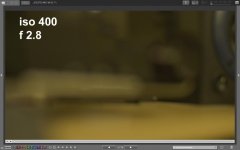
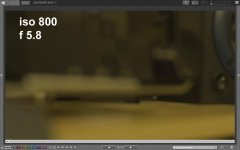
Anyway. I created a shot below with posterization/banding. It seems the problem is more evident on shallower DOF images and out of focus items in your shots.
I'm definitely beginning to believe that higher ISO settings on this camera are less prone to the problem. The trade off is that as you ISO up and then close your aperature to compensate, the deeper the DOF you get.
Note: Look at top 3 pics. The others were too compressed when saved as jpegs and introduced false banding. The other photos I can't seem to delete.
FIRST, let me say this: The above video, as well as the stills derived from them, show MORE posterization or LESS posterization depending on the particular LCD screen you view them on. (I still say glass tube TV screens were far superior, and concealed a multitude of sins. lol )
Anyway. I created a shot below with posterization/banding. It seems the problem is more evident on shallower DOF images and out of focus items in your shots.
I'm definitely beginning to believe that higher ISO settings on this camera are less prone to the problem. The trade off is that as you ISO up and then close your aperature to compensate, the deeper the DOF you get.
Note: Look at top 3 pics. The others were too compressed when saved as jpegs and introduced false banding. The other photos I can't seem to delete.
Attachments
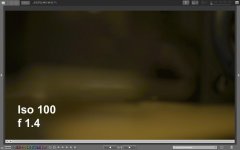
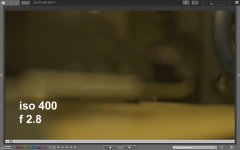
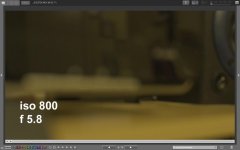
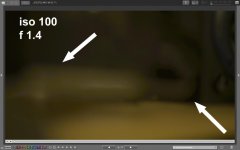
Last edited:

BobbyMurcerFan
Well-known member
Mac,
Have you seen this same issue with the other Nikon DSLR's you've used?
Have you seen this same issue with the other Nikon DSLR's you've used?

macgregor
Veteran
Is there a way to avoid this? Do i have to crank up the ISO above 400 and make it grainy to hide this? Will attaching a Ninja 2 recorder via hdmi do any better?
That's what I said a few weeks ago. THe noise introduced above 400ISO is the only way I could find to solve the posterization problem.
I tried recording to a Ninja, same result, because this seems not to be an issue related to the codec but to the camera image processor.
I remember seeing something similar with the D7000.
Last edited:
ripupthehwy
Well-known member
I'm also seeing that if you can live with the preset looks and their lower dynamic range than the flaat settings, you will have less problems with banding.
Thanks for sharing this!
I had the D800 on preorder, but I decided to spend less and got a Canon T4i. Then I needed high ISO and I wound up buying the 5D3 just a couple of weeks ago.
Is this common with the D800? Are people reporting this elsewhere?
It will be interesting to see how the next Nikom does on video. I would still love a D800E for stills.
Best,
Michael
I had the D800 on preorder, but I decided to spend less and got a Canon T4i. Then I needed high ISO and I wound up buying the 5D3 just a couple of weeks ago.
Is this common with the D800? Are people reporting this elsewhere?
It will be interesting to see how the next Nikom does on video. I would still love a D800E for stills.
Best,
Michael
ripupthehwy
Well-known member
I think it all comes down to the fact there's a learning curve with every DSLR camera. I've seen many people shoot AMAZING video with the D800 and I have to learn more of the work arounds for it. This posterization / banding issue seems more common in out of focus areas at low ISO. I'm learning that if you can find them in your shot before "rolling" (pressing record) you can usually make them go away by playing with your ISO, Aperature/fstop, and Composition of your shot.
We have some sony AVCHD video camcorders at work and I'm going to see if I can reproduce the problem with them.
unadog, I shot with a canon T2i last year and did pretty well with it. However it constantly overheated and the shutter would close every couple of minutes. It was really only good for just a few quick shoots. I think you're much better off stepping up to the 5D or D800. I will be curious to see if you have any color banding issues wit
We have some sony AVCHD video camcorders at work and I'm going to see if I can reproduce the problem with them.
unadog, I shot with a canon T2i last year and did pretty well with it. However it constantly overheated and the shutter would close every couple of minutes. It was really only good for just a few quick shoots. I think you're much better off stepping up to the 5D or D800. I will be curious to see if you have any color banding issues wit
unadog, I shot with a canon T2i last year and did pretty well with it. However it constantly overheated and the shutter would close every couple of minutes. It was really only good for just a few quick shoots. I think you're much better off stepping up to the 5D or D800.
Thanks! I do have both the Canon T4i and the 5D3. I just got the 5D3 so have not had a chance to conduct extensive tests with it yet.
I know that the 5D3 does not do line skipping, and is supposed to have resolved the aliasing issues. Phillip Bloom had a decent comparison of the 5D3, D800, and D4. The first two both look like very good cameras, with some pros and cons for each.
The T4i has a two stage sensor warning for heating. It will show yellow when it first starts to get warm, then red when it gets close to shutting off.
I have never had a sensor warning for heat on the camera. I will have to test some day to see what happens with extended shooting, like my son's musical group with continous shooting on a tripod, etc. So far I have not seen it in the course of my normal work.
I am looking forward to the days that we get "trickle down" of a true cine sensor like that on the C100, along with the Log Gamma, higher bit rate output, etc. I needed the 5D3 for still images, so after spending $3K there, I can't afford another $3K or more for video only (I am off on "disability" right now, so I can't justify teh incremental cost for my work.)
Cheers! Good luck - let us know how it all works out for you!
Best,
Michael

Ted Spencer
Veteran
Wouldn't another solution be to use an ND filter (along with a commensurately higher, banding-free ISO) to help maintain the desired f-stop/DOF? You'd need a mattebox, but I'd think most folks with D800 systems who are 'pro' enough to be concerned about this specific issue would.
Just sayin'...
Just sayin'...
ripupthehwy
Well-known member
Sounds like a great Idea. I do have a mattebox so I will give this a try next time. Thanks. I'll be posting a short film I just finished with the D800 on here tomorrow.
Ted Spencer
Veteran
Cool! Doing extensive tests for one my own right now...
ripupthehwy
Well-known member
Here's my first shoot with the D800. I used the flaat11 preset. I had alot of posterization with it but was able to hide most of it in color correcting.
http://www.youtube.com/watch?v=zKyui1XvxH0&feature=plcp
http://www.youtube.com/watch?v=zKyui1XvxH0&feature=plcp
Last edited:

eteam
Well-known member
Miguel (and others),
There is a recent dpreview.com thread discussing contouring (aka "posterisation" or "banding") in still images, particularly in blue skies.
One particularly informed and astute participant (Marianne Oelund) conjectured that the effect was caused by contrast enhancement, either in-camera (excessive sharpening or leaving ADL enabled) or in post-capture rendering.
So here is an experiment: Given a scene in which there is apparent "banding", take a still image using a completely neutral profile (sharpening turned down, ADL turned off). Or capture the still image in RAW format, and render the RAW image file to JPEG with less invasive 'grading' settings.
If this still-image experiment shows absence of "banding", then you know that the problem is (at least in part) due to processing (rendering) elections rather than the sensor or the lens or the camera. The next logical step would be apply these same 'neutral' settings whilst capturing video, to confirm that the in-camera downsampling process is (or is not) the point at which "banding" is introduced.
-- Bob Elkind
There is a recent dpreview.com thread discussing contouring (aka "posterisation" or "banding") in still images, particularly in blue skies.
One particularly informed and astute participant (Marianne Oelund) conjectured that the effect was caused by contrast enhancement, either in-camera (excessive sharpening or leaving ADL enabled) or in post-capture rendering.
So here is an experiment: Given a scene in which there is apparent "banding", take a still image using a completely neutral profile (sharpening turned down, ADL turned off). Or capture the still image in RAW format, and render the RAW image file to JPEG with less invasive 'grading' settings.
If this still-image experiment shows absence of "banding", then you know that the problem is (at least in part) due to processing (rendering) elections rather than the sensor or the lens or the camera. The next logical step would be apply these same 'neutral' settings whilst capturing video, to confirm that the in-camera downsampling process is (or is not) the point at which "banding" is introduced.
-- Bob Elkind
Last edited:
diegocervo
Well-known member
Thanks for sharing these info.
I noticed the same banding problem when testing my d800E with both my shuttle2 and a ninja2 and was wondering if it was a user error at setting the d800 output. It was so evident that for the first time in my life I didn't see any reason to use an external recorder to gain quality!!
It still may be useful for other reasons (422, no recording limit + footage ready to be ingested into NLE), but I'm not so sure if it's worth the hassle on each job.
I noticed the same banding problem when testing my d800E with both my shuttle2 and a ninja2 and was wondering if it was a user error at setting the d800 output. It was so evident that for the first time in my life I didn't see any reason to use an external recorder to gain quality!!
It still may be useful for other reasons (422, no recording limit + footage ready to be ingested into NLE), but I'm not so sure if it's worth the hassle on each job.
Ted Spencer
Veteran
Thanks for sharing these info.
I noticed the same banding problem when testing my d800E with both my shuttle2 and a ninja2 and was wondering if it was a user error at setting the d800 output. It was so evident that for the first time in my life I didn't see any reason to use an external recorder to gain quality!!
It still may be useful for other reasons (422, no recording limit + footage ready to be ingested into NLE), but I'm not so sure if it's worth the hassle on each job.
Could this be (at least partly) a D800E issue? I don't recall the exact reason(s) off the top of my head but I did hear from reputable folks that the "E" version is not recommended for video for image quality-based reasons.
eteam
Well-known member
Could this be (at least partly) a D800E issue? I don't recall the exact reason(s) off the top of my head but I did hear from reputable folks that the "E" version is not recommended for video for image quality-based reasons.
The D800E is 'not recommended' for video because its anti-aliasing (AA) filter is much weaker than the AA filter in the D800. The weaker AA filter will result in more -- and more noticeable -- aliasing artifacts (moiré, for example).
The AA filter differences between D800 and D800E have absolutely no relation to or bearing on "banding". Banding and aliasing are entirely separate issues and concerns.
-- Bob Elkind