CPU change result in software licenses breaking?

firehawk

Veteran
Thinking of upgrading my i7 CPU to something better but will that hardware change be enough to break my software licenses?
3ds Max, Adobe CS6, lots of plugins.
I will keep the same motherboard and plan on not changing anything else. I've already changed all the HDD to SSD.

I've always heard that if you change your system significantly *enough* that the liceneses would break. But does that mean change in number of components equals *enough* or just changing a certain major component(s) equals *enough change* ?
What qualifies as major? Motherboard? Processor? GPU?
 
That's interesting...I've never heard of that for anything but Windows 10.

Have you experienced that before with anything else?

The only time I've had any trouble is when the license I tried to use for some random software (always on a Macintosh) didn't work because it was already registered in which I then either e-mailed the company and mentioned upgrading in which I was issued a new key, or made sure to deactivate the licenses and transfer them (for the few that needed that to happen). But a lot of software doesn't seem to care.
 
Yes I've run into this before, not often but not only with CPUs but also when upgrading to larger system drives or SSDs when cloning the OS on both Windows 7 and 10. Cineform used to be very tough on this. I believe the registration of of a lot of software registers the serial number of both the CPU and HDD. I know when I have cloned a drive with something like Aomei or EaseUS and dumped it back to a bigger SSD, done it in the last couple of months, a number of software app broke. On going back to base for verification they failed activation. I had to go the the sites in question and de-register the software from the old hardware and re-register the software to the new upgraded setup. All went fine it's just a pain in the backside. It just reinforces the need to make sure you keep a record of all serial numbers etc.

Chris Young
 
I never have experienced it personally but I've read and heard it for many years. I don't know if they tie it (license) to a MAC address, motherboard or what. Nor do I know if it's different for different software companies (I expect it is).
I just know I don't want to cause myself a lot of extra trouble.
 
Ahhh. Thanks. That's what I'm talking about.

I've cloned HDD and SSD many times even to larger capacity changes twice but I use a hardware clone device that does it at the bit level. Wonder if that makes a difference?
Sounds like a CPU change will be trouble.
I've got all my serials but wow that's a lot of time and I wonder if adobe will still even let you re activate cs6. Autodesk is moving to rental only also so in the near future may not be able to activate old licenses again once they shut down the servers etc.
They sure make it hard to operate legally
 
I re-activated a CS6 product on one of my machines earlier this year, so that part should be okay. Files were still on the site to download, too.
 
It can, but re-activating isn't the problem it used to be. Adobe software doesn't matter because the authorisation allows any computer use, just a limit to how many. Changes to motherboard items has done it to me a couple of times - new graphics card triggered one re-authorisation and a re-flashing of the motherboard itself caused the other.
 
Ahhh. Thanks. That's what I'm talking about.

I've cloned HDD and SSD many times even to larger capacity changes twice but I use a hardware clone device that does it at the bit level. Wonder if that makes a difference?
Sounds like a CPU change will be trouble.
I've got all my serials but wow that's a lot of time and I wonder if adobe will still even let you re activate cs6. Autodesk is moving to rental only also so in the near future may not be able to activate old licenses again once they shut down the servers etc.
They sure make it hard to operate legally

That's what happened to Cineform. Once the servers shut down you could no longer activate the software. Funny you mention hardware clone as I think that is the safest way to clone a drive, slower but safer. Though with SSDs not too slow. No PC required just a dual cloning dock. Trouble is I have had the same broken activation with the new clone drive on hardware clones. To confirm this in one instance I formatted the original drive and then using a cloned drive of the same size cloned back to the original drive and all worked fine. That's why I believe the drive serial/ID is involved.
 
Thanks guys.
I probably have 50 serial #s so I'm trying to determine if the slight boost in productivity gained from upgrade is worth the loss that could occur.

I'll have 2 identical c: drives before I start (1in use, 1backup clone).

So I'm wondering if it could be as easy as changing processor and then trying to boot up with the c: drive as is. Or will windows 7even break too? All the drivers are installed on the c: but the processor would be changing...
If windows still boots then it *might* be as easy as re-activating all my still installed software via internet.
But I think autodesk license may break and not allow re activation due to them ending all perpetual licenses. Plus I don't have the installer and they removed it from their site for my old versions.

Worst case I guess everything breaks and I have to install OS again plus all drivers plus all software and plugins. If that's the case no way it's worth it.
So if that happened I wonder if I could put the old processor back in, swap back in the backup c: and be as I was before all this....but I think not as my licenses would be broken
 
Personally, I recommend just adding another computer to your studio/life.

Maybe a bit more money, but saves the headache(s).

You can keep everything as is while updating/moving to the other one.
 
So I'm wondering if it could be as easy as changing processor and then trying to boot up with the c: drive as is. Or will windows 7even break too? All the drivers are installed on the c: but the processor would be changing...
If windows still boots then it *might* be as easy as re-activating all my still installed software via internet.
But I think autodesk license may break and not allow re activation due to them ending all perpetual licenses. Plus I don't have the installer and they removed it from their site for my old versions.

Look I think just upgrading the CPU will work in most instances and most programs will work fine and you just have to re-active any software that requires online activation. As long as you have good backups to go back to in the case of misadventure I think it's worth a go. In some cases you may have to deactivate your old activation online and then register and activate the software to the new hardware. Should you need installers for programs you have lost installers for and they are no longer available try using something like "EaseUS Todo PCTrans." Well worth the $49 for the full version whereby you can capture most but take note not ALL already installed programs from your existing OS drive. This enables you to archive programs off for simple re-installation onto a new OS or drive or system. I recently went through all of this with a colleague where we installed a new MOBO and CPU and then transferred all his software from a spinning HD to a NVMe drive on the new motherboard running a fresh install of Win 10. From memory the only think I had to do was go into BIOS and set up the boot sequence and check it was set up for AHCI as opposed to IDE. He then had to re-activate his Adobe and Vegas Pro software. Took a while but was way faster and far less drama than starting from square one especially with the fact he was missing many installers. To avoid those issues EVERY app I have installed over the last twenty years has its installer backed up on a number of PROGRAM INSTALLERS CACHE drives. Call me retentive but this practice has saved my backside, and other backsides for that matter numerous times over the years. Many of them are now useless as they are unsuitable 32-bit apps but hey you never know when one of them might be needed. As always all care but no responsibility comes with these suggestions:)

Chris Young

https://bit.ly/38H4uD9
 
Doing a big system swap out is like that old joke...

"I just bought the axe George Washington used to chop down the cherry tree!"
"Was it in bad shape?"
"Not at all, the previous owner had replaced the handle four times and the head twice."

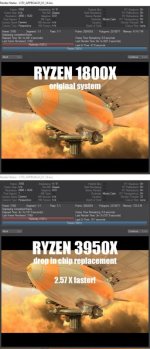
Around Christmas time I swapped a first gen RYZEN 1800x chip for the latest, greatest 3950x, along with a different set of ram and a different graphics card. Beside the system drive, only the motherboard remained the same. Since I had to do a motherboard firmware upgrade before the chip swap, the system has actually been more stable than it was before. Kudos to AMD for actually delivering on their promise of a couple generations of compatibility.

Windows 10 had no issues with the license, and all the apps were fine after some back and forth with lic work... Resolve, Fusion and Lightwave had dongles so no issues, Adobe was just a few minutes updating via Creative Cloud as was Neat Video, Syntheyes, Simplify 3D, Zbrush and Dragonframe were fine.

You will have some hiccups, but nothing that you can't resolve in an afternoon as long as your chip upgrade is actually workable with your old motherboard.

Regards,
 
Personally, I recommend just adding another computer to your studio/life.

Maybe a bit more money, but saves the headache(s).

You can keep everything as is while updating/moving to the other one.

That is a nice idea but here's my situation. Sometimes I cant' see out of the box so I'll share:

I have a main desktop (the one I'm talking about changing CPU in this thread). It has a ton of software on it. I do most of my post work on this. video and 3d.

I have a notebook which is set up identical to the desktop. same drive names, same software, everything so I can take it into the field and swap projects back and forth seamlessly between it and the desktop if needed.

I will hopefully soon have a much more powerful threadripper PC that will take on all the heavy 3d animation work (version 2020 only)

I only have enough licenses for all the software for two machines and some of my software is old which uses old hardware and OS (WIN7). In the case of Adobe CS6 and Autodesk getting extra licenes is no longer an option. In the case of re-activating my old versions of 3ds Max that is probably not an option anymore either.

My old desktop stuggles with 4K footage and 3D work so I was thinking of upgrading the CPU so it will do a little better. Since it's old hardware I am limited on CPU choices for it but also since it's old the upgrade isn't costly, unless it turns into a license breaking nightware of time wasting and loss of use of software. :)

So if I could just swap in a new CPU and boot up with all my old drives/drivers intact and it work that would be amazing. Even if I had to reconnect to internet to re-activate some software. But if it turns into a nightmare I'm better off not doing it.
 
Look I think just upgrading the CPU will work in most instances and most programs will work fine and you just have to re-active any software that requires online activation. As long as you have good backups to go back to in the case of misadventure I think it's worth a go. In some cases you may have to deactivate your old activation online and then register and activate the software to the new hardware. Should you need installers for programs you have lost installers for and they are no longer available try using something like "EaseUS Todo PCTrans." Well worth the $49 for the full version whereby you can capture most but take note not ALL already installed programs from your existing OS drive. This enables you to archive programs off for simple re-installation onto a new OS or drive or system. I recently went through all of this with a colleague where we installed a new MOBO and CPU and then transferred all his software from a spinning HD to a NVMe drive on the new motherboard running a fresh install of Win 10. From memory the only think I had to do was go into BIOS and set up the boot sequence and check it was set up for AHCI as opposed to IDE. He then had to re-activate his Adobe and Vegas Pro software. Took a while but was way faster and far less drama than starting from square one especially with the fact he was missing many installers. To avoid those issues EVERY app I have installed over the last twenty years has its installer backed up on a number of PROGRAM INSTALLERS CACHE drives. Call me retentive but this practice has saved my backside, and other backsides for that matter numerous times over the years. Many of them are now useless as they are unsuitable 32-bit apps but hey you never know when one of them might be needed. As always all care but no responsibility comes with these suggestions:)

Chris Young

https://bit.ly/38H4uD9

Thank you again. Thinking about this some more I should have installers for everything except 3ds max 2013 and 2016. I only have web installer for those and Autodesk removed their end so they will never work again. I never saved the offline installer (ugh!) and now it's too late. But the sites you mentioned might remedy that except I dont' think Autodesk will allow re-activation at this point. I only need those two old versions for some old plugins that do not work in my v2020.

I think Adobe CS6 would still be re-activatable if it breaks. I even have the DVDs for it. But What I don't want to do is have to reinstall the entire CS6 Masters collection plus all the updates for all those programs and then all the plugins. Or break hardware drivers for my optical drives, Matrox hardware etc.


Since I will have two identical main system C:> bootable drives with everything installed is there a chance that the computer might boot once the CPU is changed? I'm guessing there will be some driver or config that is different between processors that will cause a problem with Windows, or BIOS or something??

Also any ideas if changing from an i7 CPU to a (better) i7 CPU will cause less problems than changing from an i7 to Xeon?
I have a list of compatible CPUs for my motherboard but what I mean is changing to a Xeon more likely to break things than staying with an i7?
 
I hear you...it doesn't really sound like a straightforward task no matter which way you look at it.

Sometimes it may be worth evaluating if dropping old software/upgrading/learning something else in favor of newer hardware is the best option for the future.

Satisfaction in a dialed-in workflow with existing tools that saves you time and money is very difficult to give up, but sometimes it's the better, long-term plan.

Even if you can get some of those upgrades working with everything, do you think the performance boost will be worth it? (Only you would know based on what you do.)

Newer software is optimized to run better and faster on newer hardware. In the end, I think it's usually worth it to update and/or pay for everything new (including new licenses where you can), and then use all of that updated software on one newer computer and only the older workstation for those times when you need to. Sometimes it's not good to hold yourself back with older software and hardware and you may be missing out on much better performance and new features.

Let us know what you decide to do/how it's going.
 
Wait a minute, I just read your situation more carefully... I wouldn't recommend doing this... didn't realize you're trying to keep older versions alive and don't have installs. Add more ram, sure, that always improves things... better video card, why not?

But do carefully check what socket your mobo has and what chip you can upgrade to and if it's even worth it for a smaller % increase in CPU power. It probably won't be, almost certainly. Just migrate away as you can, and keep it for accessing the older code and plugins.

I do understand, and also try and keep machines going as long as possible (still have a working Amiga 3000 with Video Toaster and PVR recorder card crammed in it, for that matter, also a machine running XP and another with Win 2000 all with "vintage" installs of software that doesn't exist or has moved on).

Heck, just last week I had to un-archive a job from 2004 and discovered that current AE wouldn't load it, period, and had to go back to AE6 to get it up and running.
 
Wait a minute, I just read your situation more carefully... I wouldn't recommend doing this... didn't realize you're trying to keep older versions alive and don't have installs. Add more ram, sure, that always improves things... better video card, why not?

But do carefully check what socket your mobo has and what chip you can upgrade to and if it's even worth it for a smaller % increase in CPU power. It probably won't be, almost certainly. Just migrate away as you can, and keep it for accessing the older code and plugins.

I do understand, and also try and keep machines going as long as possible (still have a working Amiga 3000 with Video Toaster and PVR recorder card crammed in it, for that matter, also a machine running XP and another with Win 2000 all with "vintage" installs of software that doesn't exist or has moved on).

Heck, just last week I had to un-archive a job from 2004 and discovered that current AE wouldn't load it, period, and had to go back to AE6 to get it up and running.

Thanks again. Yeah my "problem" re-installs are with 2 old versions of 3ds Max.
I've checked my Mobo and know which CPUs I can go with and basically I can get 2 more cores, 300MHz more and 10MB more cache best out of any compatible CPU upgrade.
Not a big gain.
My sys RAM is already maxed at 64GB.
My GPU could be upgraded to something better than GTX780 3GB though.

Yeah talking about old machines. Ahh the old Video Toaster I remember that. I still have a WIN XP Matrox RTX 3.2Ghz circa 2004 that works great on the rare occassion I need it. And my 1st NLE Pentium2 MMX 450Mhz with a (then) whopping 512MB RAM, haha.


I may be looking at this wrong but the 2013 i7 desktop in question still does what it needs to do except for its struggle with 4K
 
I hear you...it doesn't really sound like a straightforward task no matter which way you look at it.

Sometimes it may be worth evaluating if dropping old software/upgrading/learning something else in favor of newer hardware is the best option for the future.

Satisfaction in a dialed-in workflow with existing tools that saves you time and money is very difficult to give up, but sometimes it's the better, long-term plan.

Even if you can get some of those upgrades working with everything, do you think the performance boost will be worth it? (Only you would know based on what you do.)

Newer software is optimized to run better and faster on newer hardware. In the end, I think it's usually worth it to update and/or pay for everything new (including new licenses where you can), and then use all of that updated software on one newer computer and only the older workstation for those times when you need to. Sometimes it's not good to hold yourself back with older software and hardware and you may be missing out on much better performance and new features.

Let us know what you decide to do/how it's going.
All good points and I'm still weak from overworking and sick so I'm not thinking my best. The gain from upgrading the CPU on the old desktop would be small. But maybe enough to accomplish what I want at a small cost. My current software does what I need.
Certainly a new computer with all new software would be faster/better/new features but I really don't want to buy any more software for years to come. I'm trying to stick with my current cameras and software for several more years and kill GAS, haha.

My thinking was to use the old desktop and old notebook as long as I can for video work and some 3d, and use the threadripper for heavy 3d and in future years it eventually become my replacement video post machine at which time I will invest in new software.
 
Thanks again. Yeah my "problem" re-installs are with 2 old versions of 3ds Max.
I've checked my Mobo and know which CPUs I can go with and basically I can get 2 more cores, 300MHz more and 10MB more cache best out of any compatible CPU upgrade.
Not a big gain.
My sys RAM is already maxed at 64GB.
My GPU could be upgraded to something better than GTX780 3GB though.

Yeah talking about old machines. Ahh the old Video Toaster I remember that. I still have a WIN XP Matrox RTX 3.2Ghz circa 2004 that works great on the rare occassion I need it. And my 1st NLE Pentium2 MMX 450Mhz with a (then) whopping 512MB RAM, haha.


I may be looking at this wrong but the 2013 i7 desktop in question still does what it needs to do except for its struggle with 4K

In that case, definitely NO on the process! My swap out was changing an 8 core to a 16 core, with other improvements in the new chip design that resulted in a whopping render speed increase worth every penny of cost and the (nil) effort of doing it.

If your changes don't result in at least a 50% speed increase, it just isn't worth the gamble, IMO.

RYZEN_3950x_upgrade.jpg
 
Back
Top