GH2 corrupted random MTS file from the SD card???

roei z

Veteran
HI-

i started shooting my feature and have a problem with one random file,
that refuses to be imported to AVID :(
this can very worrying - i have no way of knowing this until i import to AVID.
did anyone came across this before??
this file plays fine in WMP and VLC, but AVID pops up an error only on this particular file.
(serious error accured, recommend to exit the application immediately...)

any ideas? solutions? any free software to transcode the MTS to DNxHD?

it's a bit stressing so i'll appreciate any solution, thanks !
 
did you try mpegstreamclip?
or i had results with ffmpeg to transcode to an intermediate format and then transcode to prores for fcp.

or if you have it, premiere and AE cs5 can almost import everything
 
i just don't understand, why does Avid having a problem with this file, while all other applications handle it fine ?
i don't even know what's WRONG with it!
 
The tail end of an MTS file can be corrupted if power is switched off or the SD card removed too soon after video recording is stopped. It sometimes takes a bit longer for the camera to finish the process of recording a file, so make sure to give it enough time to finish.
 
Thanks ipowell :)
But what I did was just shooting and stopping while the camera was
On...
I did have low battery at some point and switched with a new one..
So you mean to be very aware to wait 10 seconds until i turn the
Camera off?
I sure hope that may be the only reason.
But still, how come the file plays fine on wmp,vlc, premiere ?
 
damn, i bumped into 2 more import failings into avid..
this is serious.

please- considering i absolutely must remain editing on AVID and with the DNxHD codec- can anybody provide a solution for :
converting the files to DNxHD outside Avid ? couldn't find a decent software that would simply just do it.
or-
trim the MTS files bad tails ? (i have Premiere pro- can it be done with that?)

thanks!

* ok, used TMPGenc for DNxhd. at least i'm safe.
 
Last edited:
well that's where i first stumbled upon the corrupted files from the GH2 issue.

avid simply cannot 'digest' them, resulting in trial and error waste of time (especially when having tons of footage each day).
so now i have to isolated the 'infected' files and use TMPGenc to whatever DNxHD i need.

now i have 2 questions:

-when i usually import the MTS files into avid at DNxHD36 for offline work and space saving, they result in a similar size as the original MTS, right?
but when i first transcode using TMPGenc to DNxHD36, the file gets about 3 times bigger than the original MTS, before it even get imported into avid :(

-so now after having a DNxHD to be imported to avid, what happen when it "fast imports" the file? it creates ANOTHER same size file in the AVID mediafiles folder?
you see my problem? transcoding to DNxHD outside of avid gives me one 3x size file (on 36 res), and then another copy in the mediafiles folder? this is madness!
how can i save valuable space like that? i already made 2 back ups of the SD card files...

any suggestions? (considering i HAVE to use AVID is it is my long time companion) :)
 
I tried DNxHD36 transcoding. The size doubled.

I'm sure you will get a ton of help from AVID user forum.
 
About saving space... I've been looking into how to export each avchd clips in a sequence... automatically so that I can replace the original clips with "trimmed" transcoded clips.

I gave up.
 
thanks.
can you please explain a bit on the Adobe workflow? i didn't seem to find the DNxHD output options..
 
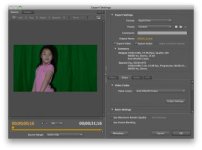
Click on Codec Settings button to choose specific DNxHD.

Screen shot 2011-04-07 at 8.33.55 PM.jpg

Kinda hard to see it. QuickTime Format. Video tab -> Video Codec: Avid DNxHD Codec. Click Codec Settings button.
 
Back
Top