Core 2 Duo Build Project: 2007

USLatinContent said:
Lastly: Why ATI? NVIDIA's 8800GTS 320MB kills it for very little more $$ and has open GL... don't listen to Kholi there... he is just an ATI fan-boy, rofl


Cuz I intend to run Motion 3 on it ...... :D It seems to like the ATI cards better NVIDIA cards from what I'm reading around the internets.

I'll look at alternative PSU's. If I eventually want to go Q6600 and OC it to 3.0ghz, what minimum should I be looking at?

Thanks y'all.

Dillon
 
a simple rule of thumb is to go with a brand name and at least 500W but whats actually important is to have enough amperage and clean power... a power conditioner could help but not sure if it does help anything other than the audio..

I see... motion likes ATI...? hummm... not planning on getting it but good to know.


I too want to hear about Penny's price... but expect $800-ish or as low as $500

Hey Kholi do you have a Win-Crap boot set up? I would love to see what Vegas does with your Q6600...

Pfista and Dillont, I can't tell you how much the case matters for cooling... look at Kholi who now has to mod his case to get the extra 0.2GHz (total of 0.8GHz more cause he has 4 cores)... I see no intake fans in yours Pfista...

Take a look at the Antec 900 if you want good case air-flow... there are many others that come ready for heavy OC'ing


Pfista, the 320MB will do 95% of what the 640MB GTS will do if you stay at 720p, but if you are looking at editing 1080p the 640MB might come in handy when CC'ing all those pixels (or gaming with 1680 x 1050 LCDs and above :D ) so the extra $60-$80 starts to be worth it... especially if the 8900 series does come out before you buy it... you could get the 320MB and then possibly step up to the 640MB for free if the 8900 comes out within your 90-days
Also, stick with 7200.10 from now on, they are waaaaay faster... don't look for the 3GB/s instead make sure it says 7200.10
Get the HZ's from G. Skill they are using top-notch memory modules which are proven to OC as high as anything in the price range...
I don't know about that board... not super popular amongst gamers as far as I know...

You guys take a look at my half-assed teas of my short in the footy section?
 
Last edited:
Question: How much does the temperature of the room the PC is in have to do with its overclocking abilities?
 
bballplaya283 said:
Question: How much does the temperature of the room the PC is in have to do with its overclocking abilities?

not that much. unless you're living in an igloo or death valley.
 
I beg to differ... 25C ambient gives me 37C idle while 28C ambient gives me a good 42C... loas is affected a bit more than Idle I think... a few degrees is a big deal some times... it all depends of where your temps fall... could not matter at all... Kholi could use a few degrees really bad right now...

The movement is from Figgin' operators were four of us... though none of those are mine... the dolly were from a car cause we had no way to carry the 2x4's and PBC for my Rowe Dolly... location was 90 miles away... we are using it on the scenes to come though
 
USLatinContent said:
Also, stick with 7200.10 from now on, they are waaaaay faster... don't look for the 3GB/s instead make sure it says 7200.10
Get the HZ's from G. Skill they are using top-notch memory modules which are proven to OC as high as anything in the price range...
I don't know about that board... not super popular amongst gamers as far as I know...
7200.10 for what? the hard drives?

I'm probably not going to over clock any... I mean if you convince me to then maybe. But I don't know how to do it. And also, I have a dvx100b so as of right now i'll only be editing sd.
 
well why not is what I say... it is just a matter of hitting Delete when you boot up and learning a few things... then downloading a few little tiny free apps and using them to make sure all is stable (running tests to see if it crashes) and using the others to monitor temperatures... You'll be cutting SD like cutting warm butter with a supped-up light saber, your render would be super fast.... and you can't damage anything... only gain... you only have to follow a few guidelines...

Get a Gigabyte DS3 and follow the Legion Hardware article about the DS3 and E6300 guidelines... very easy stuff.... or get an ASUS 650i... there are more posts about OC'ing on an ASUS 650i than there were articles about Anna Nicole Smith's death... just look in the Intel Motherboards section in Overclock.net there is a huge sticky about it

The 7200.10 HDDs are Perpendicular HDDs and they are practically the same $$$ you get 320GB for $80... they are faster (much faster) and more reliable....
 
USLatinContent said:
Get a Gigabyte DS3 and follow the Legion Hardware article about the DS3 and E6300 guidelines... very easy stuff.... or get an ASUS 650i... there are more posts about OC'ing on an ASUS 650i than there were articles about Anna Nicole Smith's death... just look in the Intel Motherboards section in Overclock.net there is a huge sticky about it

The 7200.10 HDDs are Perpendicular HDDs and they are practically the same $$$ you get 320GB for $80... they are faster (much faster) and more reliable....

Alright, so If I get the Gigabyte DS3 is that compatible with the E6600? Could I use the same guidelines as that they mention for the E6300? What about the ASUS P5B Deluxe?
 
Since there are several people asking about power supplies and power requirements I figured I'd post a few links that might be helpful.

Power Supply Fundamentals
http://www.silentpcreview.com/article28-page1.html

Measured Power Draw of high and low end systems
http://www.silentpcreview.com/article28-page4.html


For those interested specifically in the GeForce 8 cards here are a few reviews with power requirements:

GTX and GTX SLI (measured as entire system power draw)*
http://techreport.com/reviews/2007q1/geforce-8800-sli/index.x?pg=14

Measured power draw of the cards themselves (8800 GTS 320, GTS640, GTX)
http://www.xbitlabs.com/articles/video/display/gf8800gtx-roundup_6.html#sect0

Both System and Card power draw
http://www.hardware.info/en-UK/articles/am9na2pxZA/nVidia_GeForce_8800_GTX_Test/18

Any of these systems (SLI GTX included) could be run off of a quality 400 watt PSU (assuming you have enough amps allocated to the 12v rails rather than the 3v and 5v). Granted this does need to be a high efficiency, quality PSU.

*The Tech Review power draw was measured at the wall. I'm not sure about the others. This matters because PSUs are rated for the amount of watts they produce after converting the AC wall power to DC power. This is an inefficient process and the most efficient PSUs on the market only reach 80% efficiency. It could therefore be argued that these power requirements should be dropped by at least 20% when looking for a PSU.

EDIT: I should add that you need to take into account the number of hard drives you might use etc. If you have a ton of add in cards or hard drives the power requirements will go up a little bit. Also average room temperature should be taken into account. I'm assuming most people here don't live in Zimbabwe (for example) or other extreme climate.
 
Last edited:
I would get this ASUS add follow this thread:

http://www.overclock.net/intel-motherboards/146744-asus-p5n-e-sli-650i-thread.html

Both boards (DS3 too) are Quad compatible and will take like DDR2 1100 and a 1333MHz FSB chip... the actual socket for the CPU is the 775 wich is the new Intel socket... expect 8-cores at least in the 775's

The E6600 has a slightly higher multiplier than the E6300 which means you'll be setting it to lower FSB's to achieve the same clocks you would on the E6300 with the lower multi, it is all simple math... higher multi's are known to be slightly better than lower ones even if the chips being compared are clocked to the same speed...

Shaw! Nice post dude! Thank you very much!
 
That's the MoBo... I'd still get these RAM sticks though cause they are proven to run 4-4-4-12-2T @ a whopping 1100MHz or super low timings (which you can set the RAM to with the ASUS board) like I use mine at 4-4-4-12-1T still at @ 950MHz

The Partiots should be good but I haven't read up on them... if you want them for sure then I'd look em up on Overclock.net or other forums to see what people get out of them and at what voltages... I would try and see what they can do when set to 1T which is super-fast timings

The Antec 900 works very well cooling wise... send me a link for the other case...
 
Yeah I think I'm going to stick with the antec.

So this way I can overclock ram, processor, and graphics card? Or do I have to get other cooling things?
 
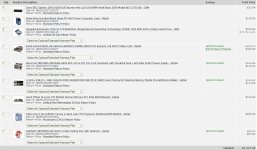
I can't pull up the image anymore and I can't remember if you had a CPU cooler in the list... if you do and it is the Zalaman 92mm (I think that's what you put there) then yes... with that CPU cooler and the Antec 900 you are good to go with overclocking your CPU, RAM and Videocard as much as they'll go on without volt-mods or phase cooling... I guess what I mean is that you'll max them out to the point where 90% of overclockers can possibly get them... the rest spent a big chunk of money on some extra fancy stuff that gets them a bit more... if you see crazy numbers like 4 or 5GHz or even higher, those are not "real" clocks but just bench-mark junkies who love taking hardware to their max limits... those are achieved for very short periods, just enough to pass a few tests and get the proof for bragging rights... you could get something like a 4GHz stable 24-7 clock though... but that would take some serious equipment like a nice phase cooling system or a crazy water chiller...

My advice to you is to get the Tuniq Tower (won't be able to get a fan on the side panel (the panel with the window) or just get the Zalaman 110mm... both of these will handle Quad OCs very well if you later upgrade and you won't have to worry about upgrading your cooler... then this cooler will be good for about 2-4 years or more for you

My take on things:

_If you are cutting DV... get the E6600 and you'll be slicing dicing like it is nuthin' and then you OC... lol... at 3.5GHz then you'll get ridiculous render times, I mean it will be sooooooooo sweet...

_If you want to cut 1080p... get a Duo, preferably the E6600, and OC it to the 3.5GHz mark if you can... be happy... wait... then pick up a native Quad when they drop to the $250 mark... say Feb next year.... maybe a tad more... if you can spend more then get something fancier earlier...


BTW, only get the 640MB GTS if you think you might get a GPU intensive Color Correctors and you are planning on CC'ing HD with it... otherwise the 320MB will save you $80 right now and still to about 80-90% of what you need it to... I didn't notice much of a difference, just a tad closer to real-time on a few Magic Bullet effects... Then again, if you want to game with it and you have a 1050 vertical LCD then I would start considering the 640MB, I did notice a bit more of a difference there... and if you happen to have a 1200 vertical rez LCD then you have to get the 640MB if you want to game on it.

One last thing... pay extra care when picking your PSU... this is a long term investment here... it won't really get obsolete... and it will make or break your OC potential... run your pick by Shaw... he gets PSU's better than me
 
Thank you so much for helping me with everything USLatinContent! I really appreciate it!

The cart screen shot is attached

Yeah, I'll check with shaw about the PSU.

Thanks again for all of your help.

-Michael
 

Attachments

  • cart.jpg
    cart.jpg
    136 KB · Views: 0
Back
Top