C100: Conversion Progressive/Interlaced

Pteraser

Member
Hello.

I did some tests using Clipwrap, FCP7 and FCPX involving one file shot on the C100 and the results were not what i expected.
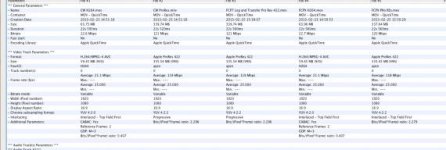

Screen shot 2013-02-25 at 16.20.22 .jpg
This file is in low resolution
Please download the pic at
https://mega.co.nz/#!wQhmhCgZ!Jd_o9Gxxj-AFzJ9794hSkQk34Y8sbgAVRSDvZtqjsaY


First, I inserted the SD card into a card reader, and then fired up Clipwrap.

File 1 and File 2 were converted by Clipwrap.

File 1 was just a rewrap and File 2 was transcoded to Pro Res.

File 3 was converted by FCP7 Log and Transfer.

File 4 and 5 were converted by FCPX

File 4 is the h264 and file 5 is Pro Res.

So, i thought that i was able to have progressive files in Clipwrap using rewrap. But it seems it was not the case.

As anyone tested this.

Is there something i'm not doing right?

I used VideoSpec for this test. Is available at

http://www.macupdate.com/app/mac/25921/videospec

Thanks.
 
Disregard VideoSpec for a moment, import your rewrapped ClipWrap clip into FCPX and then click on it to mark it in the event browser.

Check your inspector (cmd+4) under info and see what your field dominance is listed as. My bet is 'progressive'.

If you start a new project and let FCPX auto detect the clip properties, it will create a 1080p25 project and all will be good.
 
Thanks, you are right. But the footage seems to have some issues that look like interlaced only on FCPX window. Not on the finder before import and also when i export it there are no issues.

Please download it at

https://mega.co.nz/#!dF4WCJhS!OFt2bED0DNVzwkcCS4RgsGmoQKkJ6eP_flt79VE0-Vo

I've noticed now that the issue doesn't happen if the file is pro res, but if it is h264 it show some problems like the one in the pic.
 

Attachments

  • Screen Shot 2013-02-26 at 22.40.37 PM.jpg
    Screen Shot 2013-02-26 at 22.40.37 PM.jpg
    19.9 KB · Views: 0
Last edited:
Hey,

I can't download your file. The web service hangs. I can't see the download.

Have you set FCXP to 'better performance' or 'better quality' in preferences?
 
Hi Matt,

You really shouldn't have to any manual labor in FCPX to handle C100 footage if it's correctly re-wrapped with ClipWrap. I guess that is the stand out feature of that workflow. Of course, we shouldn't have to go via ClipWrap at all....

Anyway, if you DO use ClipWrap, auto detect settings will work just fine: project sets up as progressive and field dominance too.
 
Well, here's the funny thing - from someone who is a fan of ClipWrap...

On a recent assignment, I'd built up 1500+ shots over a number of days' shoot. Knowing issues in FCPX, I used ClipWrap to just put the rushes into a QT wrapper. I could log and name them here and have the cards put and shooting again quickly.

Half way through the job, ClipWrap was updated, touting C100 support. Hmmm. Update during the job? In this case, made sense.

Fast forward to the edit. About 25% of the rushes had green flashes at the start. Furthermore, FCPX wasn't liking them and doing very odd things. So I re-wrapped ALL the rushes, relished them, all in the new and known good version. Problems persisted, and was running out of pre-edit time so a ProRes pass was out. I took all seven cards into FCPX, used the above tip, and the edit ran as sweet as a nut. Text book case history on the wonderfulness of FCPX.

I've not got the time to get to the bottom of this yet, but there's something fishy going on, and I'm back to an exclusive FCPX ingest on stuff that positively has to work first time.
 
In FCPX, select the clip in the Event browser, and switch to the Inspector window using the 'Info' tab on the Settings View - set the 'Field Dominance Override' to Progressive (assuming that your Project timeline is progressive).

Allan Tépper has a (long but) excellent article that covers this. Salient points here.


I did that Matt. I already read that article.
The issue is most visible if i don't select better quality in the preferences and when the viewer window of FCPX is smaller
 
I'm taking back what I said this morning. Shoot today has had me twiddling thumbs this afternoon until our next interview is ready, and I've done an import in FCPX, and a ClipWrap (not transcoding) in the latest version. Agreed, this is beyond the 'interpret footage' issue, and has run into what I thought was an issue with motion and compression and strong colours (see different thread).

I'm still seeing a rare flash frame in the CW version, and even though it's a talking head interview, I'm seeing the same interlace artefacts you're probably seeing in the FCPX version. Not every frame, not everywhere, but watching lips and teeth, and around the eyes, they're there, cropping up in subtle motion areas. It's also present to a much lesser extent in the ClipWrapped version, and I'm waiting on the CW and 5DtoRGB ProRes versions.

It's subtle... But... When you know what you're looking for, Aargh! It's literally only a frame or two here and there. The whole image is progressive, except for little areas of interlace.

Sorry can't share todays footage, will have to mock something up and will dual record to the PIX at the same time.

Right - got to shoot now, but will see if I can run a test tomorrow.
 
Back
Top