thisisapocalypse
Well-known member
Hi everyone - so I've had this particular issue with my GH1 that I haven't been sure was related to the codec itself, or whether or not my camera might just have an issue.
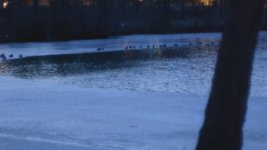
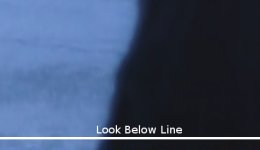
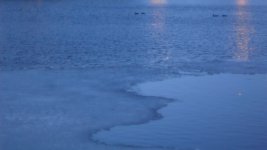
So, my issue is particular. At the bottom of my 1080/24p footage I get a "band" all the way across the very bottom of the image that is about 8 pixels tall where there is a serious drop in detail, and also vertical lines of color, not in a fixed way, but in a way that almost looks like noise, it's in every bit of footage I have with varying degrees, but it's always 8px tall and always the same symptoms. All of these shots were taken locked down.
I can't tell if I've just got too much detail in the image for the codec to handle, or what it is exactly.
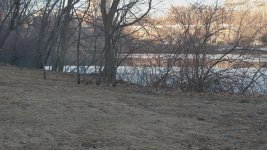
All of the above images were shot locked down on a tripod. All shot at 1080/24 on a Class 6 Patriot 16gb card and transcoded in Cineform (the artifacts show up both in Cineform and the straight AVCHD footage).
I've attached several images here, these are screengrabs from Vegas, full 1920x1080 - you'll have to pull them up and zoom all the way in and then scroll across, but if you do, you should see what I mean.
Anyone else experienced this? In preperation for the Feature film I'm about to shoot, I've been doing camera tests and while I noticed this problem when I got the camera, I thought maybe it was just that I was underexposing the area too much or it was just that I taxed the codec too much - in scenes that are light in color, you don't notice the band as much, but when it gets dark it gets nasty, especially if I do any grading, and it also seems like I'm seeing more compression artifacts overall than I'm noticing in other user's GH1 footage, and I've always felt like the footage didn't look quite as sharp either. I've gotten some good stuff, no doubt, but I'm wondering if something is not working all the way here.
I'm on Firmware 1.1
These happens at all ISOs, and I'm using various Canon FD lenses, I don't have the kit lens.
Take a look. Thanks everyone!
So, my issue is particular. At the bottom of my 1080/24p footage I get a "band" all the way across the very bottom of the image that is about 8 pixels tall where there is a serious drop in detail, and also vertical lines of color, not in a fixed way, but in a way that almost looks like noise, it's in every bit of footage I have with varying degrees, but it's always 8px tall and always the same symptoms. All of these shots were taken locked down.
I can't tell if I've just got too much detail in the image for the codec to handle, or what it is exactly.
All of the above images were shot locked down on a tripod. All shot at 1080/24 on a Class 6 Patriot 16gb card and transcoded in Cineform (the artifacts show up both in Cineform and the straight AVCHD footage).
I've attached several images here, these are screengrabs from Vegas, full 1920x1080 - you'll have to pull them up and zoom all the way in and then scroll across, but if you do, you should see what I mean.
Anyone else experienced this? In preperation for the Feature film I'm about to shoot, I've been doing camera tests and while I noticed this problem when I got the camera, I thought maybe it was just that I was underexposing the area too much or it was just that I taxed the codec too much - in scenes that are light in color, you don't notice the band as much, but when it gets dark it gets nasty, especially if I do any grading, and it also seems like I'm seeing more compression artifacts overall than I'm noticing in other user's GH1 footage, and I've always felt like the footage didn't look quite as sharp either. I've gotten some good stuff, no doubt, but I'm wondering if something is not working all the way here.
I'm on Firmware 1.1
These happens at all ISOs, and I'm using various Canon FD lenses, I don't have the kit lens.
Take a look. Thanks everyone!
Attachments



Last edited: