
Navigation
Install the app
How to install the app on iOS
Follow along with the video below to see how to install our site as a web app on your home screen.
Note: This feature may not be available in some browsers.
More options
You are using an out of date browser. It may not display this or other websites correctly.
You should upgrade or use an alternative browser.
You should upgrade or use an alternative browser.
Colossal PIX240 issue with ProRes 422
- Thread starter truelife
- Start date
I totally have faith that you will solve it, Paul. While I'm agitated by the issues- I do know that it's V1 of the PIX and it will get better.However, my problem persists even when I try the pull down removal method you suggest. I have attempted to record using camera signal and also by setting PIX to 23.98- both exhibit the issue.Truelife and AllYour concerns are taken seriously - the issues raised here are currently being investigated as a matter of high priority and an update will be made available once a solution is found.With regards to the Sony PsF output issue, whilst we are looking for the solution, here is a possible workaround:- In the F3's [Video Set/23.98p Output] menu, set to 1080i59.94 (2-3 pulldown). - Then on PIX, apply a 2-3 pulldown removal by setting the PIX file resolution/rate to 1080p23.976. This removes the 2-3 cadence in real-time. The resulting recording will be true 1080p23.976.With regards to the DNxHD issue in v1.02, this was fixed in v1.05 which has been available since December 2011 and is available on the Sound Devices website.Paul IsaacsTechnical Development ManagerSound Devices

Tomas Riuka
Well-known member
It is a great looking unit, but they lost me at the power consumption.. 26 Watts.
tell that to Cinedeck EX, drawing 70 watts


Postmaster
Dark Side of the Camera
I wonder how Ninja/Samurai managed, to have those tiny batteries lasting all day long.
Atomos Support
New member
"I wonder how Ninja/Samurai managed, to have those tiny batteries lasting all day long."
Frank, basically its just 3-6 watts based on your screen use and what SSD/HHD being used, they have no moving parts needed to remove excessive heat as this uses extra power but real reason is just really good engineering from ground up
Robbie Atomos
Frank, basically its just 3-6 watts based on your screen use and what SSD/HHD being used, they have no moving parts needed to remove excessive heat as this uses extra power but real reason is just really good engineering from ground up
Robbie Atomos
CinemaElectronika
Well-known member
Robbie,
Very welcome onboard... As will be also your inputs and support.
Very welcome onboard... As will be also your inputs and support.

Duke M.
Veteran
"I wonder how Ninja/Samurai managed, to have those tiny batteries lasting all day long."
Frank, basically its just 3-6 watts based on your screen use and what SSD/HHD being used, they have no moving parts needed to remove excessive heat as this uses extra power but real reason is just really good engineering from ground up
Robbie Atomos
I shoot with both the HDD and SSD using the menu screen. Batteries generally last me about 2/3rds of a day. Much better than the other two 10 bit units I tried. Its more in the league of the Nanoflash, which I greatly appreciate. Plus the kit is the most complete of any unit I've ever owned.
The fact that you can rotate out batteries is an enormous advantage.
Good job guys!
Paul Isaacs
Active member
The Sound Devices PIX 240 and 220 v1.07 New Firmware Update is available here:
PIX Firmware Download | Sound Devices, LLC
This includes lots of new stuff and bug fixes.
We have also identified the cause of the PsF issues - there are actually two separate issues, one of which is addressed in this release. The other issue continues to be worked on.
The issue that has been addressed in this v1.07 release is actually more due to a limitation of NLE's and their inability to detect the difference between PsF and standard Interlaced. So we have made a minor change to the PIX file header to force NLE's to interpret and display PsF footage correctly. Since the PIX is currently one of the few (or perhaps the only) video recorder capable of recording 1080PsF23.98, this PsF NLE issue was always likely to show up with PIX footage. I have attached a screenshot from FCP7 showing the artifacts that appear when the NLE interprets the PsF footage incorrectly. The top image is the one where we have forced the NLE to interpret as PsF with v1.07 firmware. You can clearly see the artifacts are no longer present.
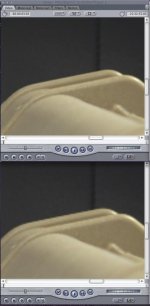
The other issue, which will be fixed soon, happens when scaling a 1080PsF23.98/24 signal to 1080p23.98/24.
The workaround until this is fixed is to set to 'Same as Video Input' and record as PsF.
We have also updated our Approved Storage Device List. Check it out here:
Approved Storage Devices for Sound Devices Products|Sound Notes|Sound Devices, LLC
Paul Isaacs
Technical Development Manager
Sound Devices
PIX Firmware Download | Sound Devices, LLC
This includes lots of new stuff and bug fixes.
We have also identified the cause of the PsF issues - there are actually two separate issues, one of which is addressed in this release. The other issue continues to be worked on.
The issue that has been addressed in this v1.07 release is actually more due to a limitation of NLE's and their inability to detect the difference between PsF and standard Interlaced. So we have made a minor change to the PIX file header to force NLE's to interpret and display PsF footage correctly. Since the PIX is currently one of the few (or perhaps the only) video recorder capable of recording 1080PsF23.98, this PsF NLE issue was always likely to show up with PIX footage. I have attached a screenshot from FCP7 showing the artifacts that appear when the NLE interprets the PsF footage incorrectly. The top image is the one where we have forced the NLE to interpret as PsF with v1.07 firmware. You can clearly see the artifacts are no longer present.
The other issue, which will be fixed soon, happens when scaling a 1080PsF23.98/24 signal to 1080p23.98/24.
The workaround until this is fixed is to set to 'Same as Video Input' and record as PsF.
We have also updated our Approved Storage Device List. Check it out here:
Approved Storage Devices for Sound Devices Products|Sound Notes|Sound Devices, LLC
Paul Isaacs
Technical Development Manager
Sound Devices

powervideo
Well-known member
I wonder how Ninja/Samurai managed, to have those tiny batteries lasting all day long.
I bought two sets of the small Sony F570 batteries. They are only something like $35.00 each, and now I don't have any worries about leaving the Samurai on all day. I like to leave the Samurai on in case I forget to repower after turning the power off on the camera. The included Atomos batteries last several hours in normal operation.

Peter G. Johnson
Active member
The PIX_1.07 firmware won't unzip? Tried Apple and PC.
The Sound Devices PIX 240 and 220 v1.07 New Firmware Update is available here:
PIX Firmware Download | Sound Devices, LLC
This includes lots of new stuff and bug fixes.
We have also identified the cause of the PsF issues - there are actually two separate issues, one of which is addressed in this release. The other issue continues to be worked on.
The issue that has been addressed in this v1.07 release is actually more due to a limitation of NLE's and their inability to detect the difference between PsF and standard Interlaced. So we have made a minor change to the PIX file header to force NLE's to interpret and display PsF footage correctly. Since the PIX is currently one of the few (or perhaps the only) video recorder capable of recording 1080PsF23.98, this PsF NLE issue was always likely to show up with PIX footage. I have attached a screenshot from FCP7 showing the artifacts that appear when the NLE interprets the PsF footage incorrectly. The top image is the one where we have forced the NLE to interpret as PsF with v1.07 firmware. You can clearly see the artifacts are no longer present.
View attachment 48510
The other issue, which will be fixed soon, happens when scaling a 1080PsF23.98/24 signal to 1080p23.98/24.
The workaround until this is fixed is to set to 'Same as Video Input' and record as PsF.
We have also updated our Approved Storage Device List. Check it out here:
Approved Storage Devices for Sound Devices Products|Sound Notes|Sound Devices, LLC
Paul Isaacs
Technical Development Manager
Sound Devices
This sounds "strange".
I've been working with psf format for years already and NEVR heard of NLE interpreting it wrong- I used many different NLE, but not FCP thought

Psf is the way to pass data over HD-SDI, but at the end when it became a file, there is no such a thing like psf. MOV format has no header to say this is psf format- for files world psf is simply progressive footage.
All current recorders uses psf over HD-SDI- PIX is not the only one.
Last edited:
The PIX_1.07 firmware won't unzip? Tried Apple and PC.
Some kine of problem with the download. For me it expands to a file with suffix .zip.cpgz. Even with changing suffix to .prg the Pix does not recognize
Ned Soltz
Last edited:
Paul Isaacs
Active member
All current recorders uses psf over HD-SDI- PIX is not the only one.
Agreed!
However PIX is one of the only devices that gives the option to record 'PsF' or 'P' within the .mov file.
Paul
Paul Isaacs
Active member
Some kine of problem with the download. For me it expands to a file with suffix .zip.cpgz. Even with changing suffix to .prg the Pix does not recognize
Ned Soltz
What browser are you using? It downloads/unzips for me fine using Chrome and Firefox. If you're using Safari, that can be set to auto-unzip in prefs/general/"Open safe files after download". Maybe that is the issue?
Paul
Agreed!
However PIX is one of the only devices that gives the option to record 'PsF' or 'P' within the .mov file.
Paul
I think it's possible to detect if input signal is p or psf (Samurai does it- no?), convert internally if needed and than there is no reason to have 2 options in the settings menu. Whatever the data is psf or p it will end up the same on file stage, where there is really no such a thing like psf.
If F3 sends psf and PIX records in p mode than half data will be lost- as on picture above (at least by my understanding). For eg. 25psf F3 will send half data/per frame (aka filed) every 1/50th of the second (as full data is send in 2 fields), but PIX will record at 1/25th (because of 25p setting) and than it will miss half data of each frame. I may be wrong with my logic, but this is what we see on these grabs.
Last edited:
Paul-
Just curious if you think my issue falls within these fixes. It seems that my issue is not a resolution issue so much as a strange handling of codec. The wavy lines through the image and pixelization were evident in Quicktime and via SDI out from the PIX to a monitor. I am glad to see this update and hope to load it upon return to the office tomorrow night. I'm eager to see its effects- hopefully it will solve the issue. That said, I assume the firmware won't magically restore any footage already affected by the issue, correct?
Just curious if you think my issue falls within these fixes. It seems that my issue is not a resolution issue so much as a strange handling of codec. The wavy lines through the image and pixelization were evident in Quicktime and via SDI out from the PIX to a monitor. I am glad to see this update and hope to load it upon return to the office tomorrow night. I'm eager to see its effects- hopefully it will solve the issue. That said, I assume the firmware won't magically restore any footage already affected by the issue, correct?
Paul Isaacs
Active member
there is no reason to have 2 options in the settings menu.
The PIX has the optional ability to scale to PsF to allow progressive signals to be displayed on monitors that can only display interlaced.
Tomas Riuka
Well-known member
Just wanted to catch up and ask, what's the situation with Pix240? Any new developments to solve issues? I have my F3 on hands and want to purchase Pix, but current issues make me think about cinedeck, until they are fixed...