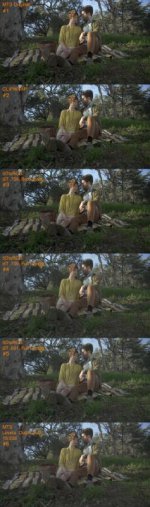
Clipwrap -VS- 5dRGB -VS- BMD shuttle

Dermot

Well-known member
I was asked to do this....
I tested;
MTS transcoded to DNxHD185x, via 5dRGB, with gamma settings at None
MTS transcoded to DNxHD185x, via 5dRGB, with gamma settings at 2.2
MTS transcoded to DNxHD185x, via 5dRGB, with gamma settings at 1.8
MTS linked directly into the timeline
MTS re-wrapped through Clipwrap to h.264
DNxHD185x recorded from camera output on a BMD shuttle


So i had a total of six clips with the same frame range, shot on my FS100, this was a set-up in Paris cafe using my Angenieux 28-70.. actor agreements preclude me using most of the footage i shot, but i found some stuff with only our AD and scriptie in the frame.


So some techie / post notes;
- I'm using an Avid|DS finishing system with Avid's own Qt decoders, not the desktop decoders that some software uses
- The project is 25Fps, uncompressed, 422, 32 float processing, storages are set for 16 bit cashe's
- i set limiters/clippers to video legal, and for this i linked to the footage using a 709 input LUT, much as most NLE's use


So first the frame as linked, this is the BMD recorder's output as an example;
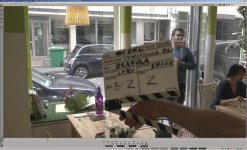
BMD imported.jpg
Three things became apparent instantly;
1) the linked native MTS, and the re-wraped into h.264 were absolutely identical
2) all three transcodes from 5dRGB were absolutely identical, it seems Avid's DNxHD decoder ignores the switch inside 5dRGB
3) the BMD recorder's Qt is much sharper to the eye on first viewing


So six clips now become three, MTS, 5dRGB & BMD, makes my life easier....


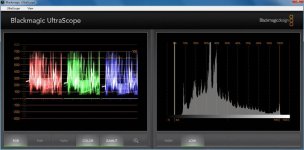
First the scopes on the BMD clip linked;
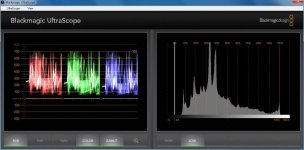
Shuttle 185x.jpg


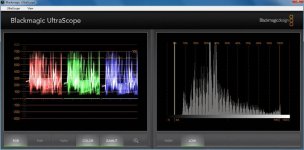
Then the 5dRGB clip;
5dRGB transcode 185x.jpg


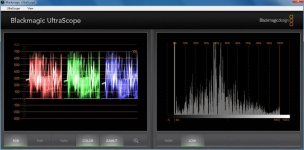
And last the MTS;
MTS linked.jpg


Yea.... anyone who says a tech can't spot the difference between a native/rewraped/transcoded MTS from a DNxHD or Prorez native recording need to test it further i think.. seems pretty obvious what the source is for each of the clips, and one is likely to be accepted and two are likely to get a technical rejection.


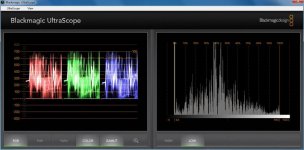
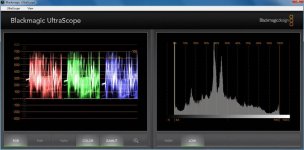
Next i did a base grade, sat up, some playing with highlight roll off on the guys forehead, clippers on, after i applied the same grade i noticed that the histogram & scopes were showing greater differences;
BMD;
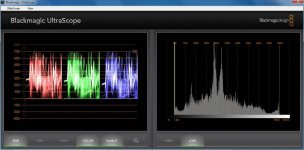
BMD shuttle graded no dithering.jpg


5dRGB;
5dRGB graded no dithering.jpg


MTS;
MTS graded no dithering.jpg


Now on the where i have long felt the real differences are.. gradeing and secondaries.. the challenge i gave my self was to isolate the girls face and bring down the saturation on her without letting anything touch the guy's face or the walls, and do this without masking;


first the BMD, this worked pretty well, no visible noise - here the secondary is filled with false color to see what I'm effecting;
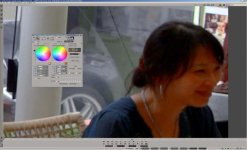
BMD secondaries.jpg


next up is the 5dRGB, it's really unworkable without roto, masks & tracking;
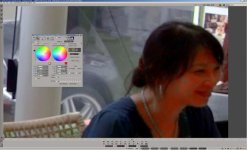
5dRGB secondaries.jpg


And last is the native MTS clip, probably worse yet;
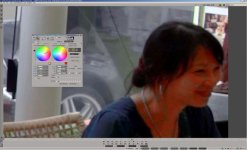
MTS secondaries crap.jpg


And last is the frame from the BMD with a base grade and an additional secondary to drop the sat on the honking red door sign, something impossiable to do on the clips sourced from the AVCHD orignal;
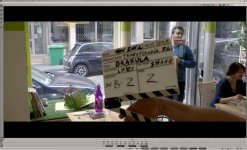
BMD graded.jpg


My takeaway is;
1) an external recorder is money well spent
2) claims by clipwrap that they do not alter the image seen to be true
3) claims by 5dRGB that they do a very good transcode seem to be true
4) there's no significant gamma or levels shifts between any of them when decoded by Avid's own Qt decoder

This is a re-do of a test i did before buying my BMD recorders, and I'm not surprised by the results... i have often mentioned that i think an external recorder will help alot in gradeing and keying.. this is why i say that ;-)

d
 

Attachments
  • BMD shuttle graded + dithering.jpg
    BMD shuttle graded + dithering.jpg
    63.3 KB · Views: 0
Last edited:
Why did you re-wrap to h264 with clip wrap? going to prores would be more accurate? h264 is not an editing codec
 
Hi Dermot,

Thanks for taking the time to do this. Props for sure.

Take a look at the attached files. I did 6 different outputs using both ClipWrap and 5DtoRGB all exported with 4:2:2 ProRes HQ

1) MTS Original
2) ClipWrap
3) 5DtoRGB - BT.709, Broadcast Range
4) 5DtoRGB - BT.709, Full Range
5) 5DtoRGB - BT.601, Full Range
6) MTS - Original with Levels adjusted in NLE to 15-235

#1 to #3 look very similar. The Clipwrap and the 5DtoRGB BT .709 Broadcast Range look very similar

However, there appears to be drastic change in dynamic range when you change 5DtoRGB to Full Range. #4 to #5. At that point, ClipWrap (which does not offer the Full Range option) and 5DtoRGB have a very different looking output, with 5DtoRGB appearing to have a wider dynamic range.

In short, #3 to #4 is where the difference in perceived dynamic range starts.

Option #6 has the output levels adjusted in Premiere from 0 to 255 (default) to 15-235 which is suppose to simulate what 5DtoRGB does. And by all appearances, it does have that wider dynamic range look. I got this from an EOSHD.com article. Now I know that EOSHD makes wild claims and anything they say has to be taken with a grain of salt and researched a lot more. Which is why I am asking you.

http://www.eoshd.com/content/8612/mac-avchd-gamma-issues-the-fix

It's obvious that it's the "Broadcast" vs "Full Range" option in 5DtoRGB that is causing this drastic difference.

I have 2 questions for you

1) Obviously if it's going to TV, "broadcast" is probably the right option; but if you are going to Youtube, Vimeo or a theater projector, wouldn't you benefit from using "Full Range" to get the wider dynamic range?

2) The difference between ClipWrap and 5DtoRGB when using "Full Range" is pretty drastic. Is this perceived increase in dynamic range on 5DtoRGB real? Or is it doing something crazy to file and giving a false dynamic range that might be harmful to the file in other ways? For myself, I do like the "Full Range" look, but not sure if that's doing anything bad to the actual footage.

Thanks for your help in me understanding this better.

BTW. The attached file on DVXuser is really small. Not sure why it resized it so small. But a larger .jpg is available here to look at. On a Mac, you have to click the magnifying glass in Safari to get it 100% actual size.

http://www.builtbyugene.com/images_client/colortests.jpg
 

Attachments

  • colortests.jpg
    colortests.jpg
    41.9 KB · Views: 0
Last edited:
First, thanks to Dermot for sharing these tests .


Hi Dermot,

Thanks for taking the time to do this. Props for sure.

Take a look at the attached files. I did 6 different outputs using both ClipWrap and 5DtoRGB all exported with 4:2:2 ProRes HQ

1) MTS Original
2) ClipWrap
3) 5DtoRGB - BT.709, Broadcast Range
4) 5DtoRGB - BT.709, Full Range
5) 5DtoRGB - BT.601, Full Range
6) MTS - Original with Levels adjusted in NLE to 15-235

#1 to #3 look very similar. The Clipwrap and the 5DtoRGB BT .709 Broadcast Range look very similar

However, there appears to be drastic change in dynamic range when you change 5DtoRGB to Full Range. #4 to #5. At that point, ClipWrap (which does not offer the Full Range option) and 5DtoRGB have a very different looking output, with 5DtoRGB appearing to have a wider dynamic range.

In short, #3 to #4 is where the difference in perceived dynamic range starts.

Option #6 has the output levels adjusted in Premiere from 0 to 255 (default) to 15-235 which is suppose to simulate what 5DtoRGB does. And by all appearances, it does have that wider dynamic range look. I got this from an EOSHD.com article. Now I know that EOSHD makes wild claims and anything they say has to be taken with a grain of salt and researched a lot more. Which is why I am asking you.

http://www.eoshd.com/content/8612/mac-avchd-gamma-issues-the-fix

It's obvious that it's the "Broadcast" vs "Full Range" option in 5DtoRGB that is causing this drastic difference.

I have 2 questions for you

1) Obviously if it's going to TV, "broadcast" is probably the right option; but if you are going to Youtube, Vimeo or a theater projector, wouldn't you benefit from using "Full Range" to get the wider dynamic range?

2) The difference between ClipWrap and 5DtoRGB when using "Full Range" is pretty drastic. Is this perceived increase in dynamic range on 5DtoRGB real? Or is it doing something crazy to file and giving a false dynamic range that might be harmful to the file in other ways? For myself, I do like the "Full Range" look, but not sure if that's doing anything bad to the actual footage.

Thanks for your help in me understanding this better.

BTW. The attached file on DVXuser is really small. Not sure why it resized it so small. But a larger .jpg is available here to look at. On a Mac, you have to click the magnifying glass in Safari to get it 100% actual size.


gene - Dermot encoded to DNxHD, this is a YCbCr format , not RGB . There is no range conversion because, there is no RGB conversion. Full range vs. standard range refers to Y'CbCr <=> RGB conversions . So if he exported to a RGB format, e.g. TIFF, the range conversion should have taken effect

Different software handles DNxHD very differently. Some treat it as 8bit, some limited range, some full range. It's very inconsistent between software with levels and gamma shifts. You could argue Avid's implementation is the way it "should be" . So in your tests, what format did you export , and what software are you using to make the screenshots?

The dynamic range is the same in the original file, you're just converting to RGB differently. You can do the same thing in any software that treats the original footage as Y'CbCr . All the "dynamic range" is accessible in the original file if you use YCbCr (or called YUV) filters

The key to understanding this is different color models, RGB vs. Y'CbCr. RGB screenshots are a representation of the original data. 8bit YCbCr color model can hold many more values than 8bit RGB . There are "out of range" or "out of gamut" values when converting from YCbCr to RGB. Graphically, you can see this represented in the color cube model, you can see all values of 8bit RGB are fully contained within the Y'CbCr model
(scroll down to the 3rd diagram)
http://software.intel.com/sites/products/documentation/hpc/ipp/ippi/ippi_ch6/ch6_color_models.html

Full range Rec709 8bit conversion means the Y'CbCr=> RGB conversion is "mapped" from Y' 0-255 CbCr 0-255 to RGB 0,0,0 - 255,255,255
Std range Rec709 8bit conversion means the Y'CbCr=> RGB conversion is "mapped" from Y' 16-235 CbCr 16-240 to RGB 0,0,0 - 255,255,255

This is the reason why you see a flatter, lower contrast image with full range conversion

With filters that do not operate in YCbCr , those "superwhites" and "superdarks" are clipped by the RGB conversion because of the standard range conversion. You lose the ends Y' 0-15 , 236-255, CbCr 0-15, 241-255

All colorspace/color model conversions are lossy. There are rounding errors, and they don't "map" directly to each other, the more conversions, the more losses you accumulate

For myself, I do like the "Full Range" look, but not sure if that's doing anything bad to the actual footage.

It depends what you want to do with it. Any moderate grading, curves, adjustments will cause the image to "fall apart", especially with 8bit, compressed formats. Demot showed that nicely above. The more you have to adjust, the more damage occurs. If your desired output is similar to what full range gives you , then go ahead. If you have to bring the black level back to more standard levels, then Std range would make more sense . It's analgous to people shooting "flat" with various profiles. It's easier to "massage" the image without bad things happening if the recording was initially a "better" format such as 10bit, uncompressed.
 
Damien;
thnx for the thnx! i don't often share my tests - mainly due to time it takes to write and double check everything, yesterday i was on hold for a producer decision ;-)

Evan;
i rewrapped as that had been my workflow pre-BMD recorders so that was my baseline, we do transcode everything for off-line (DNx36), but link back to the orignals for finishing, so the best of both - i have the footage handy, i'll use Clipwrap to render a DNxHD185x from the clip and comapre.. stay tuned

as for accurcy? linked MTS and re-wraped MTS seemed identical on my scopes and to my eye.. i feel confident that the re-wraped is accurate

Morgan;
i see clear diffrences in keying and gradeing, although the histo's show the curves and the parade's are pretty much the same at the start - banding aside.. once i applied the same grade to all three, the histos and parade showed even more diffrences... and really the compression artifacts in both the AVCHD are a limiting factor in pulling secondaries

The banding so very obvoius in the AVCHD sourced footage can be delt with by adding film grain to dither the image,or use an antibanding filter, but both will affect the image... and the external recorder's images are noticably sharper on a big screen, so to soften an already somewhat soft AVCHD image to reduce banding and then show it against a clip that starts sharper, and then does not need the extra pass of softening makes a good case for any of the external recorders to get the best out of the camera.

Gene;
i used the w32 version of 5dRGB and it does not seem to offer FULL/BROADCAST switch, only the gamma switches that Avid ignores.. but 1->3 match my resualts, and for me that also matched the external recorder - in earlier test running the camera directly into scopes and checking the DNx185x recording i found a match there, and they both maintain full range,as does the all ACVHD footage i tested.

I'm defering to PDR'd reply, much better said than i could, and i was only guessing ;-)
now to the questions;
1) Obviously if it's going to TV, "broadcast" is probably the right option; but if you are going to Youtube, Vimeo or a theater projector, wouldn't you benefit from using "Full Range" to get the wider dynamic range?

- a big question, there's no wider range from the camera, only change is how the image is mapped in the system, the camera orignals will hold 0-255 if you chose profiles/exposures/lighting/frameing/set design/locations that use that range, 0-1023 if you are using an external recorder.

Yes for broadcast - legal levels are the only choice... for anything else you have to consider both the screen you are gradeing on, and the main target deliverable
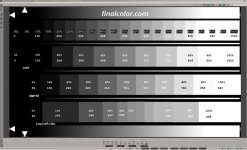
my first thought is -look at the frame below, can you clearly see the diffrences between 0->10 on the CGR scale? if you can then you can see full range - next step is to go get the master from Kevin Shaw's Final color site add make really sure...
if you can't see the diffrences clearly, but can see the diffrences in 0->10 on the SMPTE chips then i would advise to work inside broadcast levels and use a LUT to scale to full range for theatres,
- for vimeo/youtube i can set a monitor to be sRGB, and i use a LUT/transform to get from broadcast to sRGB
If you can't clearly see the diffrences in the SMPTE scale then maybe look for another monitor to work off of.. you will never see a accurate black
baseline.jpg
I only work in full range when theatrical is the main deliverable, and then i'm usualy working in P3 or behind a 2383 / 2393 LUT and need to do another pass for broadcast/web, the monitors i use for full range work are the Dolby refrence monitor (42" and $42,000), the Sony BVM-OLED (24" and $24,000) or a Christe 2200 projector (20 foot & $110,000), i'm not aware of any monitor that displays P3 comptely that costs less than the Sony tho... and it's really to small for gradeing for a big screen... i'd leave gradeing in full range alone unless you are sure of your tools

2) The difference between ClipWrap and 5DtoRGB when using "Full Range" is pretty drastic. Is this perceived increase in dynamic range on 5DtoRGB real? Or is it doing something crazy to file and giving a false dynamic range that might be harmful to the file in other ways? For myself, I do like the "Full Range" look, but not sure if that's doing anything bad to the actual footage.
Again defered to PDR, but my rule of thumb is that any transforms before gradeing are best started with moderate care (and 32float processing). guess it's the same answer really!
 
Last edited:
Hey Dermot,

Great simple test, very helpful, thank you.

Did you have your BMD set to QuickTimes or the other setting i can't quite remember (MTS?). I'd be wondering whether there is a difference between wrapping the DNxHD files in QT vs the-other-option. Shouldn't be but with all these various post workflows who knows.

gene - Dermot encoded to DNxHD, this is a YCbCr format , not RGB . There is no range conversion because, there is no RGB conversion. Full range vs. standard range refers to Y'CbCr <=> RGB conversions . So if he exported to a RGB format, e.g. TIFF, the range conversion should have taken effect

PDR,

AFAIK the HDMI output of the FS100/700 is full RGB, not YCbCr. Assuming that it's full RGB coming out of the HDMI then the BMD must be doing the YCbCr (BMD support have stated that it records Rec709 not RGB signal which would imply YCbCr conversion)

I did have this hair brained scheme a while back to mix the DNxHD output with the AVCHD to see if an increase in colour depth could be achieved, *if* the outputs were slightly different. I concluded that from the HDMI and AVCHD they were identical colour values (no surprise), but i wonder about the SDI out again of the 700.

I've had conflicting advice from BMD themselves, originally saying that the BMD was capturing 16-235 then they double checked and said 0-255. We know that it's 10 bit so the ranges are 0.1023 with gaps in i assume.

cheers
Paul
 
i have often mentioned that i think an external recorder will help alot in gradeing and keying.. this is why i say that ;-)

Of course, just to most people "heavy grading" seems to involve nothing more than changing the hue and contrast/brightness.
 
PDR,

AFAIK the HDMI output of the FS100/700 is full RGB, not YCbCr. Assuming that it's full RGB coming out of the HDMI then the BMD must be doing the YCbCr (BMD support have stated that it records Rec709 not RGB signal which would imply YCbCr conversion)

Hi Paul, those comments were replying to gene, in the context about encoding MTS to DNxHD in 5DtoRGB, and differences in observed levels . (MTS to DNxHD in 5DtoRGB incurs no RGB conversion)

But in regards to the BMD:

Yes I do recall reading that the FS100 HDMI output was indeed RGB - was that ever confirmed anywhere? That is unexpected because the majority of HDMI connections from cameras output 8bit YCbCr422 signal. And was the HDMI output confirmed to be 8bit or 10bit ? I'm fairly certain the SDI output is 10bit YCbCr422


I did have this hair brained scheme a while back to mix the DNxHD output with the AVCHD to see if an increase in colour depth could be achieved, *if* the outputs were slightly different. I concluded that from the HDMI and AVCHD they were identical colour values (no surprise), but i wonder about the SDI out again of the 700.

DNxHD can be "tricky" to do tests with, because the results can vary depending on which software you are using. It can even vary depending if the DNxHD is mov or mxf wrapped and this can make the interpretation confusing. Uncompressed 10bit 422 (v210) , however is usually treated the same in all programs

If the SDI is 10bit YCbCr422, and the HDMI is 8bit RGB, I think SDI would be a better choice with the BMD


Another question for Dermot - what are your thoughts on recording uncompressed vs. DNxHD in a situation where you needed to do secondaries, fairly heavy grading ? How much are you "leaving on the table" ?
 
Another question for Dermot - what are your thoughts on recording uncompressed vs. DNxHD in a situation where you needed to do secondaries, fairly heavy grading ? How much are you "leaving on the table" ?

we are leaving alot on the table, and it's really down to cost/benfit ratio's....

for greenscreen or a day shooting a TVC, i would use uncompressed, for the film i shot this fall the decision was to record DNx185x, we shot 87 hours over 43 days and i did not have a DiT, only me + 1st Ac + clapper/loader, as it was backups were going into the next day at times

If i had more budget i might have revised the workflow.. but i have finished films shot on Alexa to Prorez and although it's a comrpomise, it is workable

Now Q FOR U... (or anyone else with techie chops) Looking at the histo of the BMD Qt - would it seem that the HDMI output is 10bit/YUV? and any guesses as to where the 8Bit has been dithered to make a 10bit output? it really seems to be well done - neither 5dRGB's or my dithering of the ACVHD can get as sharp or clean.. but then we are starting with 27mbs master and Sony is starting from uncompressed output from the A/D, and after what ever profile selections are made in the camera's software?
 
Last edited:
Looking at the histo of the BMD Qt - would it seem that the HDMI output is 10bit/YUV? and any guesses as to where the 8Bit has been dithered to make a 10bit output? it really seems to be well done - neither 5dRGB's or my dithering of the ACVHD can get as sharp or clean.. but then we are starting with 27mbs master and Sony is starting from uncompressed output from the A/D, and after what ever profile selections are made in the camera's software?

Yes, I agree and wouldn't expect any post treatment of AVCHD to come close in terms of "sharp" or "clean" compared to HDMI or SDI out, even with DNxHD compression on top. It' s just not possible.

For 10bit vs 8bit - I don't know. At "face value" a smooth 10bit histogram or waveform would suggest 10bit non quantized values, wouldn't it ? But I think it depends on many things. I wouldn't necessarily put too much weight on a histogram or waveform tracing - the reason is I've seen 8bit source => 10bit conversion look smooth even without dithering - depending on what software or hardware is being used. On the other hand, some decoders quantize values, treat them as 8bit. This was mentioned earlier with some software and 10bit DNxHD, also mentioned in other threads. There is wide variability in which different software handle formats. So there are a lot of variables, and difficult to get precise answers.

I think the definitive test would be to record uncompressed, open up in a hex editor or similar tools . I've seen some people with signal engineering backgrounds poke around this board - they would be the ones to ask
 
Yes I do recall reading that the FS100 HDMI output was indeed RGB - was that ever confirmed anywhere? That is unexpected because the majority of HDMI connections from cameras output 8bit YCbCr422 signal. And was the HDMI output confirmed to be 8bit or 10bit ? I'm fairly certain the SDI output is 10bit YCbCr422

They're specs that have floated around. In theory the HDMI is 4:4:4 8bit RGB (well, full RGB technically).

I have an HDLinkPro and DeckLink 3D here, i wonder if i can hook up the SDI and check. I'm fairly certain that the SDI is 8bit (perhaps wrapped in a 10bit wrapper). I was unable to use SDI on our production because i had the wrong SDI cables (the BMD uses these mini ones). I have the cable now though so can test it, i don't want to test it because if i find it's 10bit then i'm going to be seriously kicking myself and it will hurt.

Aside from Avid products which i don't use, is there a recommend reference for DNxHD injest. I'm on Win 64, the DNxHD are wrapped in QuickTimes and i'm using Nuke X and the adobe suite. I believe NukeX defers to the standard QT wrapper - but i don't know for sure. Is it worth transcoding from the QuickTimes and rewrapping the data in a different wrapper? What choices do i have for performing the transcode process?

Another question for Dermot - what are your thoughts on recording uncompressed vs. DNxHD in a situation where you needed to do secondaries, fairly heavy grading ? How much are you "leaving on the table" ?

I'll jump in here too. I did extensive tests between uncompressed, DNxHD and cineform codecs. Looking a noise in the shadows and comparing all 3. I found that cineform if it was set to film scan (highest) did a little better but really it was pretty well matched with DNxHD. The differences with the uncompressed were slightly differing noise patterns. The data values were identical and i found no reason to use uncompressed compared to DNxHD in a practical sense. The camera source had noise, it's not like it's a perfectly noise free image and neither DNxHD nor Cineform would create any additional artefacts - blocking or otherwise.

In additional to Dermots perfect example of why a recorder is vital in some post cases, if you have detailed scenes and any movement the built in AVCHD can fall apart very quickly, so whilst you may pull a secondary on a static scene, when that scene or camera moves you may suddenly loose your key because of the compression blocking.

For the price of a BMD there's simply no reason to not go down this route. And i don't have any shares in BMD.

cheers
paul
 
Hey Guys,

I think there is a display issue with Quicktime and Sony AVCHD. I use Premiere on a Mac

On my previous post, I transcoded FS700 .MTS footage using 5DtoRGB. When set to FULL RANGE, there was a very noticeable difference in the dynamic range of between the original .MTS and the Pro Res 4:2:2 transcoded clip.

Well, I did the same test using my Canon 60D footage which is h264 based. When using 5DtoRGB set to FULL RANGE, there is no noticeable difference in the dynamic range. The original and the Full Range transcode footage looks exactly the same; unlike the AVCHD footage which has a very noticeable difference.

Seems like Quicktime plays friendlier with Canon's h.264 footage than with Sony's AVCHD.
 
Hey Guys,

I think there is a display issue with Quicktime and Sony AVCHD. I use Premiere on a Mac

On my previous post, I transcoded FS700 .MTS footage using 5DtoRGB. When set to FULL RANGE, there was a very noticeable difference in the dynamic range of between the original .MTS and the Pro Res 4:2:2 transcoded clip.

Well, I did the same test using my Canon 60D footage which is h264 based. When using 5DtoRGB set to FULL RANGE, there is no noticeable difference in the dynamic range. The original and the Full Range transcode footage looks exactly the same; unlike the AVCHD footage which has a very noticeable difference.

Seems like Quicktime plays friendlier with Canon's h.264 footage than with Sony's AVCHD


The reason for this difference is Canon DSLR footage is yuvj420p , not yuv420p . The "j" means it's flagged as full range in the AVC bitstream. Open source decoders (libav) decode this full range (i.e. they obey the flag) . Any decoder based on Quicktime will clamp the data to Y' 16-235 (ie it will ignore the flag) . If you don't clamp the data, but decode standard range, the data in the superbright (Y'236-255) , and superdark (Y' 0-15) will be clipped (not clamped) - it will be lost permanently . I'm fairly certain 5DtoRGB uses libav and open source implementation for everything, including prores encoding (it's not Apple certified). If you didn't use full range, you will get clipping (blacks crushed, whites blown out)
 
Did you have your BMD set to QuickTimes or the other setting i can't quite remember (MTS?). I'd be wondering whether there is a difference between wrapping the DNxHD files in QT vs the-other-option. Shouldn't be but with all these various post workflows who knows.
I wrapped in Qt, mainly due to option of non-Avid software needing to access the cam orignals

AFAIK the HDMI output of the FS100/700 is full RGB, not YCbCr. Assuming that it's full RGB coming out of the HDMI then the BMD must be doing the YCbCr (BMD support have stated that it records Rec709 not RGB signal which would imply YCbCr conversion)
really seems to be YUV in this case, but maybe the camera polls the device it's handshakeing with and output varies? Nothing but a guess, and i have no way of testing it... the assumption that the FS100 outputs RGB seems to me to be incorrect

I've had conflicting advice from BMD themselves, originally saying that the BMD was capturing 16-235 then they double checked and said 0-255. We know that it's 10 bit so the ranges are 0.1023 with gaps in i assume.
l
No gaps in the output to the BMD, so the camera is either sending a very (VERY) good dithered 8bit, or it's sending a 10bit signal, the DnxHD codec in 10bit will not dither an 8bit input.. so likely a very well dithered 8bit...

Sorry it took so long to reply, work got in the way!
 
Last edited:
Back
Top