I had a gig the other day, and with the zebras set at 65 it showed that the talents hair was going to be blown out. The talent had silvery white hair. Anyway, I fiddled with the exposure and in the end went with what I knew was going to be clipped hair. Actually, I wasn't sure what to do. I flipped on ND2, but after playing with the exposure, either the skin was going to be underexposed or the hair blown out. So, I went with the hair, and in the edit the hair was all clipped, but no yellow. But then I burned it to a DVD and it now looks way worse with lots of sickly yellow. So, I'm thinking of Color Correcting. I have a great CC software(Davinci) and am wondering what the steps would be to try to tame the yellow hair a bit. Any input on CC ing would be appreciated. Thanks in advance.

Navigation
Install the app
How to install the app on iOS
Follow along with the video below to see how to install our site as a web app on your home screen.
Note: This feature may not be available in some browsers.
More options
You are using an out of date browser. It may not display this or other websites correctly.
You should upgrade or use an alternative browser.
You should upgrade or use an alternative browser.
Clipped hair and yellow!
- Thread starter gbadgley
- Start date
The hair turned yellowish because the blue channel saturated before the red or green channels. That means there's not enough blue in the hair, or conversely, too much red and green. If you can isolate the hair as a secondary CC, turning up the blue channel or turning down both red and green may be enough to correct the problem.

Shooter
Veteran
How can anyone tell without seeing a frame grab of what you did?
I cant tell from your description if you even understand what the zebras are telling you or how you exposed the image.
What did the wfm tell you?
WFM is a serious tool (advantage) that we have in the AF100. Not many cameras provide it. Use it. It rules!!!
I cant tell from your description if you even understand what the zebras are telling you or how you exposed the image.
What did the wfm tell you?
WFM is a serious tool (advantage) that we have in the AF100. Not many cameras provide it. Use it. It rules!!!

Rolf Silber
Veteran
WFM is a serious tool (advantage) that we have in the AF100. Not many cameras provide it. Use it. It rules!!!
+ 100

KyleProhaska
Veteran
We need a screenshot to really know how to help.
Shooter
Veteran
And...here...we...go! (in my best Heath Ledger impersonation).
By the way, not a dig at you at all OP. I just know the felling, and very well.
Dont think we ever saw a single frame of your footage either. :kali:

Postmaster
Dark Side of the Camera
If the blue channel clipped there is no usable information, but you can always cop the "hair" of the red or green channel into the blue channel.
Bit of a stunt, but doable.
Frank
Bit of a stunt, but doable.
Frank
KyleProhaska
Veteran
Dont think we ever saw a single frame of your footage either. :kali:
Exactly. Post footage or frames and then we'll talk.

KyleProhaska
Veteran
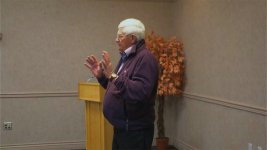
Well the AF100 should hold info into 110IRE or a little higher. What happens if you pull down those highlights a little? Obviously the center of his head is still going to blow but you can probably minimize it. The yellow can be fixed pretty well with a simple secondary. Just choose that area of the image and either drop the saturation a little, try to even out the channels, etc. It's pretty hot on the top of his head but you can only do so much. Honestly with the image you posted and the angle the light is at on his hair (which would blow out VERY easy no matter what), I think any cam would have some issues.
HOWEVER, it looks like you could've stopped down just a bit more and that would've helped. Also the RED channel was way off balance. Did you have your white balance set manually and high on the Kelvin scale?
Were you using Cine-D for this? What are your internal settings, please post.
HOWEVER, it looks like you could've stopped down just a bit more and that would've helped. Also the RED channel was way off balance. Did you have your white balance set manually and high on the Kelvin scale?
Were you using Cine-D for this? What are your internal settings, please post.
Last edited:
Shooter
Veteran
The top light directly on top of him... is over exposing light parts of the image ( hair , finger tips, nose, cheeks, watch, collar...)
Tricky place he was standing ( with white hair and all) and hard to manage apart from moving him.
Solution is to expose down for highlights.. and light up the subject (frontal fill ) .
Kind of soft image BTW.
Tricky place he was standing ( with white hair and all) and hard to manage apart from moving him.
Solution is to expose down for highlights.. and light up the subject (frontal fill ) .
Kind of soft image BTW.
KyleProhaska
Veteran
I AWB'd to a white card held by the talent held to his face. My settings are:
1) Video cam
2) 1080 60i
3) Chroma Level 3
4) Master ped Level 4
5) Gamma HD Norm
6) Matrix FLuo
All other settings at default
Chroma level 3 is a very bad idea. The camera is saturated enough and to help avoid this sort of yellow clipping (or blue) you should have chroma turned down...0 at a minimum but preferably in the negative.
And setting the pedestal that high sacrifices highlight headroom in favor of shadow details. IME, the AF100 can handle either highlights or shadows, but not both at the same time.4) Master ped Level 4
If the blue channel clipped there is no usable information, but you can always cop the "hair" of the red or green channel into the blue channel.
Bit of a stunt, but doable.
Frank
I am curious how you would do this. Care to share?

Erik Naso
Veteran
Looks like you didn't use any lights on the guy. If your going to shoot that way and I'm not judging you you have to shoot to protect the highlights and expect to do more in post. No free lunch.
The waveform is the best tool you have on the AF-100 (I think I heard this somewhere) Use it. Love it.
Thanks for posting a frame grab. This helps enormously.
The waveform is the best tool you have on the AF-100 (I think I heard this somewhere) Use it. Love it.
Thanks for posting a frame grab. This helps enormously.