Clean Blacks

lyonfilms

Well-known member
I'm hoping someone is willing to school me a little as to why DSLR-level digital video cameras have trouble shooting what I think of as "inky" blacks or "clean" blacks. I've been a professional producer and director for almost a decade and generally consider myself fairly technically adept. However, for all our larger jobs I usually have the luxury of hiring an experienced DP and at least a 1st AC (in terms of camera department basics). We almost always shoot on camera packages at the Red Epic/Dragon, F5, F55 level with the occasional Alexa shoot. For the most part these are all robust camera systems and produce wonderful images and - for the most part - don't seem to suffer from my "noisy blacks" problem.

So, I guess my more specific question(s) related to cameras like the Sony A7s (which we own) and use for small in-house jobs, or just for fun. Let's assume picture profile 4 (Gamma = Cine4 and Color Mode = Cinema) at least for purposes of this discussion. If I am purposefully shooting in a dark setting - say a room where the actor is lit only by a desk lamp. Let's say I can achieve proper exposure on the actor's face with the camera set to ISO 640 and the lens at let's say f4.0. Now normally my brain would think, "OK, the camera is at a fairly low ISO and that ISO is generally a clean ISO". Then I look at the monitor (or the final product back on the computer) and I see (a) the areas where the actor is exposed correctly are, in fact, relatively noise free - BUT the dark purposefully underexposed background is a bees' hive of noise. If the goal is to purposefully let the BG fall into deep shadow and/or dark why, at a low ISO, doesn't the camera "allow" the blacks to just be clean black?

I often think back to many beautiful scenes in the Sopranos that were set in Silvio's back office in the Bada Bing (I realize that the show was likely shot on 35mm film) - but I think of a certain angle that was often used where part of the background was black - and the blacks are gorgeous, grain-free and silky. Again, I know film stock is very different from a digital sensor, but what is the best way to achieve blacks that are purposefully silky black? Is this even possible on DSLR cameras like the Sony A7s? Or am I only going to achieve that look when I'm on the higher end rigs?

Anyway, I appreciate thoughts and experiences in this matter as I'm having fun tinkering around with this nice little camera.
 
If I am purposefully shooting in a dark setting - say a room where the actor is lit only by a desk lamp. Let's say I can achieve proper exposure on the actor's face with the camera set to ISO 640 and the lens at let's say f4.0. Now normally my brain would think, "OK, the camera is at a fairly low ISO and that ISO is generally a clean ISO". Then I look at the monitor (or the final product back on the computer) and I see (a) the areas where the actor is exposed correctly are, in fact, relatively noise free - BUT the dark purposefully underexposed background is a bees' hive of noise. If the goal is to purposefully let the BG fall into deep shadow and/or dark why, at a low ISO, doesn't the camera "allow" the blacks to just be clean black?

Because the camera sensor is required to obey the laws of physics. When you light-starve the sensor, or in this case, parts of the sensor, it generates self-noise. You also get reduced gamut, weird tonality, etc. in these underexposed areas.

The tried-and-true solution is to feed the sensor sufficient light so that it has something to capture instead of sitting there in the dark creating self-noise. IOW, put some light in those shadows. Take this capture (which is clean and without noise in the darker areas) to post and adjust contrast, color, and value to get the blacks you want. That is, color grade it. This is what color grading is actually for -- to get the look you want from the footage you've got.

Said another way, you can't light the scene for capture the way you want it to look after grading. You have to light the scene "normally" so that the camera can make a clean capture. Once you have a clean capture, you can do anything you want with it in post.
 
Because the camera sensor is required to obey the laws of physics. When you light-starve the sensor, or in this case, parts of the sensor, it generates self-noise. You also get reduced gamut, weird tonality, etc. in these underexposed areas.

The tried-and-true solution is to feed the sensor sufficient light so that it has something to capture instead of sitting there in the dark creating self-noise. IOW, put some light in those shadows. Take this capture (which is clean and without noise in the darker areas) to post and adjust contrast, color, and value to get the blacks you want. That is, color grade it. This is what color grading is actually for -- to get the look you want from the footage you've got.

Said another way, you can't light the scene for capture the way you want it to look after grading. You have to light the scene "normally" so that the camera can make a clean capture. Once you have a clean capture, you can do anything you want with it in post.

I appreciate the response. I agree, and all you said makes perfect sense and that starving the sensor of light - even if partially - will create the "self noise".

The main issue with lighting a scene to normal levels (putting light into the shadows to provide the sensor with enough light to not create the self noise) and then later in post through a professional grade changing it to how you want it to look, is that sometimes that is at least fairly complicated and involved for a scene/setting that is intended to look dark. If I window the actor (to continue my example from the first post) and then grade the rest of the room back to dark there are a few issues - first wouldn't there always been some sort of gradient or feather created by the difference between the background grade (to get it to the desired "inky" blacks) and the actor lit by the desk lamp? Those gradients or feathers are usually noticeable (assuming no roto). And if the camera moves at all (dolly, pan, tilt) then the window needs to animate/track which often draws attention to it and the transition gradient.

Also, wouldn't the background that is being graded to be dark in a non-noisy and pleasant way still look different from a background that was just inherently dark? In other words, if I light the background "normally" as you suggest to give the sensor enough light to not create self-noise, won't those details (whatever is in the background) look different/strange once their exposure is brought down in post (however the colorist chooses to achieve that)? That last question is not rhetorical, I'm honestly not sure if the graded-to-dark background (noise free) would look the same as the not graded and not lit background (noisy)...
 
The A7s is just a noisy camera by nature, no way around it. As mentioned the only way to avoid noise in the shadows is to over expose and grade down. This isn't true for all cameras however. On my C300 for example when I shoot at the lowest ISO setting of 320 there is virtually no noise at all in the shadows.
 
The A7s is just a noisy camera by nature, no way around it. As mentioned the only way to avoid noise in the shadows is to over expose and grade down. This isn't true for all cameras however. On my C300 for example when I shoot at the lowest ISO setting of 320 there is virtually no noise at all in the shadows.


The a7s isn't really noisy by nature, but the C300s common gamma curves and gain implementation hide noise better than Sony in some ways. For example the c300 doesn't really have anything like slog2 and it's gamma curves are designed around about 12 stops of dynamic range as opposed to sonys about 14. Canon Log is similar to cine4 but trades highlights for shadow in ISO 320 or any ISO under 800, similar to shooting 800 and grading down in post but with the effect done in camera.

You may find you can get less noise using a pp or creative style that supports ISO 50 or 100 ISO. Or if you want a similar effect to Canon Log ISO 320, shoot cine4 and overexpose by 1 1/3 stops and grade down 1 1/3 stops.
 
The A7s is just a noisy camera by nature, no way around it. As mentioned the only way to avoid noise in the shadows is to over expose and grade down. This isn't true for all cameras however. On my C300 for example when I shoot at the lowest ISO setting of 320 there is virtually no noise at all in the shadows.
The a7s internal recording is one of the cleanest images I've shot, and that certainly includes RED and their ilk. Externally obviously with no noise cancelling has a bit more noise, but even at 3200 it's not that bad:
lulu10182_out.jpg
 
Last edited:
if you don't have light you will get noise in shadows... thats a rule.
Thats why we use slog2 and overexposure 2-3 stops with A7s.
 
My personal solution has always been, exposing to the right, just below highlight clipping, then take down brightness in post = clean silky blacks even the noisiest of cameras.

Even if you increase exposure with ISO you get a cleaner image. For example, an underexposed image at 320 ISO is noisier than an overexposed image at 3200. Try it! But of course the ideal way is achieving exposure to the right by opening up the iris oe decreasing shutter or increasing light, they all get cleaner images, just make sure you don't clip the highlights.

It's underexposure that creates noise, not high ISOs.
 
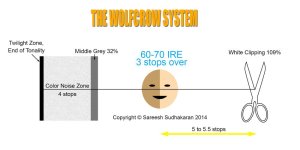
Exposing to the right while shooting with slog is not what you would want to do. Skin tones and other relevant midtones should be exposed arround 35 IRE. If you go up, the compression starts to kick in. Don't expose, what is meant to be midtones later on, over 60 IRE. Especially if shooting compressed 8 bit!!! You might get away with it with 12 bit raw...

Slog is meant to be "underexposed" (it only looks underexposed when wieved without a LUT). Overexposing slog is just nonsense!:)

If you want to get rid of noise in the blacks simply create a simple luma key from 0 to 10 IRE and apply noise reduction there. Whoila noise free blacks!;)
 
Doing that with Slog is a no - no;) It does however hold true for a REC709 gamma.
Slog2 middle gray is I think at 32IRE, that's 18IRE less then in a relatively normal REC709 gamma for which the above diagram, that toxotis70 posted, holds true. Expose faces between 32 and 50 IRE. 50IRE being the highest you'd want to go! Maybe for safety reasons set the zebras (if that's what you are using) to 35 and 45.
 
Doing that with Slog is a no - no;) It does however hold true for a REC709 gamma.
Slog2 middle gray is I think at 32IRE, that's 18IRE less then in a relatively normal REC709 gamma for which the above diagram, that toxotis70 posted, holds true. Expose faces between 32 and 50 IRE. 50IRE being the highest you'd want to go! Maybe for safety reasons set the zebras (if that's what you are using) to 35 and 45.

have you shot much with slog2 on the a7s? in my experience what you're talking about might hold true for the f5/55 with slog, heck even red and redlogfilm that sounds about right, but the a7s in my experience does not like to have it's midtones bumped up much if at all. noise creeps in real quick. so exposing your skintones to the right has been a good practice for me. i will agree that people generally overexposing by 2 stops might be a bit drastic and even detrimental, but with something like the shogun to use false colors, exposing skintones a bit higher than you might on something else has worked well.

this opinion (the two stops over business) for the a7s specifically is fairly well regarded as being accurate on many forums.
 
On (my) a7s S-Log2, in (my) experience, Exposing to the right gives an immediately superior image, oddly "especially" in the skin area, And of course it's the only way to get the least shadow noise.

No compression artefacting or whatsoever affects the higher-end range, and you take the footage in post and just lower the waveform (without stretching it), and no sort of compression or 8 bit codec break-up occurs with me, not even a bit.

I'll say it again, expose to the far right with the a7s (Slog or Rec709) and see the results yourself (this is to OP). I think this confusion comes from S-Log being differently implemented on Sony's low end cameras vs. the Fs7/F5/55, where many experienced shooters (too many for it to be wrong!) find ETTR gives major problems, however to my eyes on the a7s it's the best exposure approach (if you have time to colour correct, that is. Of course if you need direct delivery shooting rec.709 with "correct" exposure is the way to go)
 
Okey, my bad guys, sorry!:)

I know every camera is different, but didn't thought it would be this much different.
Actually it's kinda strange that the image looks nice when exposed to the right. There is so much compression going on up there in Slog2 that a compressed 8 bit codec shouldn't be able to recover... Could somebody maybe post 2 clips, one exposed to the right and one like Slog2 should be? Like the same shot, just 2 different exposures. Exposing skin to 70IRE on Slog2 just seems very strange:) The noise is probably gone bud the tonality... I doubt the tonality is as good as it would be when exposed properly... Aren't the skins plastic-y at all?
 
It doesn't take a lot of light in the shadows to reduce self noise. This is where an incident light meter is extremely valuable on set for adjusting lighting ratios. Keeping the ratio of key light on the actor to deepest background shadow fill within about 7 stops will get you what you want. It also does not take elaborate post grading to adjust the value scale for clean black. In Resolve you can adjust lift, gamma, gain, contrast against each other to get close, then apply a slight curve to the bottom end of the scale to set black cutoff.
 
Back
Top