Cinematic picture styles, what and how?

tinpanalley

Active member
I've been reading up and trying to understand the various picture styles available for DSLRs including Technicolor's Cinestyle and others. But because the different people that make them speak about them like what they do is obvious, I can't seem to find a simple explanation for what these "styles" or profiles actually do or what they actually are. Are they simply a combination of brightness, contrast, sharpness and saturation? What exactly is the file you either download free or pay for?
I also don't understand, if these are meant to give you an option for how to make your video look, why everyone is in such unanimous agreement that the Technicolor Cinestyle is so horrible. I think it looks great on my 7D so the reason I'm asking all this is because I'm thinking that maybe, in not understanding what these styles are, I'm not able to see why the Technicolor style is bad.

But aside from all that specifically Technicolor talk, I'd just like to know... what are these things, what are they installing on the camera, and what are they doing that simple picture adjustments and settings on the camera itself can't achieve?
 
Are they simply a combination of brightness, contrast, sharpness and saturation? What exactly is the file you either download free or pay for?
Yes. Some in-camera settings give (or does not) better results for color grading in post procesing. If you like your results with Technicolor, use it.
 
What is a picture style? Quite simply, a preset that determines how your camera renders an image.

Why go with third party picture styles? Most default picture styles (at default settings) either crush the blacks, clip the highlights, or give a image that is too contrasty. The third-party styles can modify colorimetry, enhance perceived dynamic range, etc...

Why do some people dislike the technicolor cinestyle? Well for me personally:
- I find it hard to gauge exposure using it (so I need to flip between styles to find exposure and then shoot, if not using magiclantern);
- I find it is not good for skin tones; and
- there is a lot of noise in the image.

What are some good picture styles, and for what purpose (in my opinion):
- John Hope's Cinema PS for a graded/final out of the camera look;
- Visioncolor for shots I will grade later in post;
- Visiontech when shooting in lower light that I will grade in post;
- Cinetech for shots that are graded, and slightly flatter than other "graded" picture styles;
- Deltavision, a very good black&white style; and of course
- Prolost flat (Canon's neutral style, tweaked).
 
Thanks for all that info. That's excellent and very helpful. I guess I'd just want something that gets me as close to the Kodak Vision film stock I used to use for filming.
 
I will add a couple of things to WebPLC's excellent post:

* When graded, CineStyle tends to create a lot of noise and macroblocking in the midtones, including skin

* I created the Flaat picture styles for Canon and for Nikon DSLRs, with three primary aims: easy to grade (flat as in near-log, that is, no built-in s-curve), good skin tones (based on the Portrait picture style, which I always found better for shooting people than the Neutral one), and good DR (with some control over how much you try to extend it, by choosing a different sub-version of Flaat). Also, they are flat but not overly crushed and desaturated (they're designed to be graded, but they look good out of the camera too), so it's kind of a midpoint between "get it right in camera" and "get a gradeable image".

Flaat for Canon
Flaat for Nikon

Shot on Flaat vimeo group
 
I guess I'd just want something that gets me as close to the Kodak Vision film stock I used to use for filming.

In that case, shoot with a "neutral" picture style (i.e. Cinestyle, Visioncolor, Flaat) and in post, grade using FilmConvert. Visioncolor is also releasing new film emulations (Impulz) in a few days. Maybe one of these two products will get you the look you want.
 
I get that the picture styles are for the camera itself and are installed through the EOS Utility. But are the grading tools like FilmConvert only for After Effects and Premiere? What about Sony Vegas and Avid? Anything for those?
 
FIlmConvert is a multi-platform plug-in (including Vegas) or you can get it stand alone.

As for Impulz, I think they are LUTs - I don't know if Vegas can handle those.
 
Picture styles were all the rage for some time. I find sometimes they're helpful, and sometimes it's hard to get back the color they take out.

If you have a look in mind for the final edit, flat profiles aren't a;ways that great. When delivering footage for someone else or wanting to make color decisions in post, I've found Samuel's Flaat profiles to be very good.

But I often take Roger Deakins' advice and try to get as close to the look I want in camera. I may do things to open up shadows a bit or bring contrast down a hair (soft overall fill but not much, things like that). If the scene is already flat naturally, or a setup with a lot of whites or light colors, I find the wrong profile can destroy a lot of that subtlety. So I'm a fan of portrait and neutral and dialing in contrast and saturation.

I do use a monitor that can be calibrated with blue-only. DSLRs don't have color bars, so I calibrate it at home on my NLE or with a video camera that outputs bars. I find LCD panels to be very stable as far as calibration goes, so I can check calibration at home before a shoot. Many camera panels (and DSLR LCDs) are pretty odd in how they render color or contrast.

I have a Nikkor zoom with a very pretty mojo to it, but high-key scenes can produce veiling flare that looks just like log footage. Leaving my camera on a flat profile means it's a fight to get color saturation back without sending skin tones all over the place. A lot of my decisions come from what I've learned from tough color grading and knowing what a specific camera can recover and what will get trashed in the process. So... test test test.
 
I assume colour correction/grading is essentially each person's own choice but is there any interface that plays particularly well with any of these styles? I don't do any effects or anything, the most I've ever had to do was some correction within scenes and maybe the odd grading for mood. I shoot pretty straight-up, "realist" stuff.
 
I have the CineVision Plus V2.0 and I must admit that it gives decent results, even with low-light. Not too hard to grade/correct in post either.

Sorry get off topic, but I've been wondering lately if I should buy this style - some projects I like to expedite and shoot with either Cinema (finished look) or Cinetech (minimal post like denoising, curves and saturation). They both give the teal & orange look, that I am still a sucker for.

Have you had a chance to compare Cinevision Plus to the other styles I've mentioned, and does it bring anything new to the table in your opinion?

ps. Hâte de voir ton film fini ...!
 
Sorry get off topic, but I've been wondering lately if I should buy this style - some projects I like to expedite and shoot with either Cinema (finished look) or Cinetech (minimal post like denoising, curves and saturation). They both give the teal & orange look, that I am still a sucker for [...] Have you had a chance to compare Cinevision Plus to the other styles I've mentioned, and does it bring anything new to the table in your opinion?

I have tried the CinePlus Cinema Style and it was way too much Teal&Orange at recording. I prefer something more neutral, and use the M31 LUT in post. Then, you can always tweak it to your taste.
Both options are affordable, which is nice.
ps. Hâte de voir ton film fini ...!

Merci! Il sera sur Youtube et Vimeo, les liens sont dans ma signature! :)
 
Last edited:
* When graded, CineStyle tends to create a lot of noise and macroblocking in the midtones, including skin

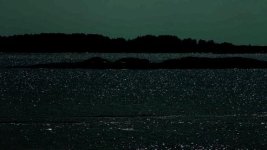
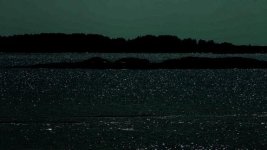
To add to your statement, when I tried Technicolor, I've been away to "get rid" of the blocking and bending issues with some color correction and a fine layer of grain. It's still there after, but way less noticeable.

1) Technicolor - Untouched:
CLIP - Technicolor untouched.jpg

2) Technicolor - S-Curve applied:
CLIP - Technicolor S-Curve Added.jpg

3) Technicolor - S-Curve applied and Levels adjusted:
CLIP - Technicolor S-Curve Added and Levels Adjusted.jpg

4) Technicolor - S-Curve applied and Levels adjusted + Levels Crushed (introduces Banding):
CLIP - Technicolor S-Curve Added and Levels Adjusted + Crushed.jpg

5) Technicolor - S-Curve applied and Levels adjusted + Levels Crushed + Grain Layer (help to mask banding):
CLIP - Technicolor S-Curve Added and Levels Adjusted + Crushed + Grain Layer.jpg

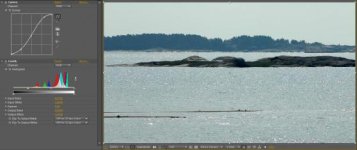
And the settings are pretty basic in After Effects:
Settings.jpg
As for the layer of grain, a simple Solid Layer (grey) with VideoCopilot FastFilmGrain preset applied. Tweak it to your own taste and you're done!

That was to demonstrate that even with the most flat profile available (Technicolor, which introduces banding issue), you can still save it a bit with some minor tweak. Of course, if you don't like grain, this technique doesn't really apply..
 
FIlmConvert is a multi-platform plug-in (including Vegas) or you can get it stand alone.
So I've picked up the filmconvert to play with the Kodak Vision emulations and while the effect is interesting, it always looks... well, like a film effect rather than like film. You might think that's obvious and that it's an almost pointless observation but in that case, what is the point of FilmConvert meant to be? It moves differently than film grain (obviously because it isn't grain) but also, I don't recall Kodak Vision stock being so grainy. Are there perhaps ideal settings that people have come to use for these that make them appear less fake? Maybe I'm just cranking the levels and colour settings too much or too little. Also, I can see how you'd add the film effect with this filter but I don't see how this would help you grade at all as the colour options are pretty limited.
 
Definitely play with the levels. I rarely leave the color and curve at 100%. Also changing the camera setting impacts the resulting grade, so there is a bit of trial and error into getting what you want.

As for the grain, if I use Filmconvert's (as I use often use Dark Energy Matter) I set it at 35% - 40% in most cases. You can also chose between different format grains.

Take a look at Philip Bloom's stuff on Youtube and Vimeo - he uses FilmConvert extensively and makes it work great.
 
Take a look at Philip Bloom's stuff on Youtube and Vimeo - he uses FilmConvert extensively and makes it work great.
Cool. I like his videos. I didn't know he was such a big filmconvert user.
For the record, I'm filming using Cinelook, Flaat-10 and Cinestyle. And also, I have my Standard setting set to what Philip Bloom actually recommends in his Canon 7D how-to video.
 
Back
Top