C200: Cinema RAW Development Issue - (Software doesn't see CRM files)

AlkaliDigital

Active member
I just received my C200 and I shot tome test RAW footage. I was able to open the .CRM files fine in Cinema RAW Development 2.0 on my laptop but my desktop doesn't "see" the .CRM files. The CRM files are seen on my computer as "execute" only files??? However, Davinci Resolve 14 sees and works with the files fine! Go figure. (except export resolution issues because I believe the free version is limited to UHD and doesn't allow the export of the full res 4096x2160)...or am I wrong?

Has anyone else had this issue with Canon's software? so strange it works perfectly in Resolve but not in Canon's Cinema Raw Development software. It is so weird.....I have uninstalled and re-installed the software but nothing seems to be working. Mac Pro Tower 5,1 Current OS
 
Hey there, did you ever find a solution for this?? I am running into a similar situation where I don't see any files in Cinema Raw Dev.
 
Are you trying to open individual .crm files? That never worked for me either.

I've always just assumed that you need to point to a complete memory card archive. Not just the .crm.
 
I just received my C200 and I shot tome test RAW footage. I was able to open the .CRM files fine in Cinema RAW Development 2.0 on my laptop but my desktop doesn't "see" the .CRM files. The CRM files are seen on my computer as "execute" only files??? However, Davinci Resolve 14 sees and works with the files fine! Go figure. (except export resolution issues because I believe the free version is limited to UHD and doesn't allow the export of the full res 4096x2160)...or am I wrong?

Has anyone else had this issue with Canon's software? so strange it works perfectly in Resolve but not in Canon's Cinema Raw Development software. It is so weird.....I have uninstalled and re-installed the software but nothing seems to be working. Mac Pro Tower 5,1 Current OS

It sounds as if your file associations are messed up. Try control-clicking on the .crm file, clicking on "get info", expanding the "open with" area and choosing Cinema Raw Development, making sure to click "change all" before closing the window.
 
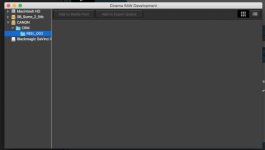
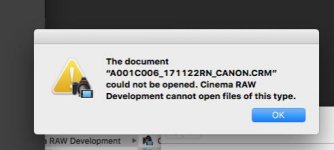
Thanks guys. I am trying to open the whole folder in Cinema RAW, similar to Adobe's Media Browser. I tried to designate Finder to open with Cinema RAW but it did not like it. See attached screenshots below. I am on the latest version of Mac OS. What am I missing here??

Screen Shot 2017-11-28 at 3.28.03 PM.jpg
Screen Shot 2017-11-28 at 3.27.26 PM.jpg
 
Ok. Got it. Call off the troops.

Looks like somehow I did not download the latest Cinema RAW. Got it working now with the latest version.
 
Back
Top