
Navigation
Install the app
How to install the app on iOS
Follow along with the video below to see how to install our site as a web app on your home screen.
Note: This feature may not be available in some browsers.
More options
You are using an out of date browser. It may not display this or other websites correctly.
You should upgrade or use an alternative browser.
You should upgrade or use an alternative browser.
Chroma Clipping
- Thread starter Chadac
- Start date
Barry_Green
Moderator
Okay, I've just spent a few hours digging into the dreaded "chroma clipping" issue, trying to get to the bottom of this scenario.
Here's the simple fact: colors in video are made up of a combination of red, green, and blue. If you mix a certain proportion of red, green, and blue together -- you'll get a certain color. Obvious, yes?
All right, here's where it gets hairy. Luminance is made of about 59% green, 30% red, and 11% blue. When you combine them all together you come up with an overall luminance value, and that's what's shown on the waveform monitor, the zebras, and the marker. But, any individual color channel will not be the same as the luminance value.
Example: I've been working extensively with flesh tones with the AF100. And in general, for the particular shade of flesh I was using, there's more red than green, and more green than blue. In an average sampling, at 53 IRE, the red level is at 67 IRE, green is about 50 IRE, and blue is about 38 IRE. If you take 59% of the green value (50), 30% of the red value (67), and 11% of the blue value (38), and add those all up, they come out to about 53. So when looking at your waveform monitor, you'll see 53 IRE, but the red channel by itself is already at 2/3 of maximum saturation.
Now, as you turn up the brightness (by opening up the iris), each channel will get brighter, and they will do so in proportion. At roughly 75 IRE luminance, the red is at 92 IRE, green is 70 IRE, and blue is 52 IRE. They are still in proportion with each other -- there's about 37% more red than there is green, and about 37% more green than there is blue. Just like when at 53 IRE.
Which is all fine and dandy, until you increase the brightness beyond what any individual color channel can handle. If you increase the brightness to where the skintone is at 80 IRE, the red channel will be maxxed out. It cannot go any higher, it's already reading out at 100 IRE on the red channel or, as sampled in PhotoShop, it's at 255. If you turn up the brightness any higher, red will be clipped. The other colors (green and blue) will still get brighter, but red cannot -- it's already at maximum. The result is that you'll get a color shift in your image. The proportions will no longer be right. Example: at 90 IRE on the skintone, the red is clipped at 100, green is 85, and blue is 63. The ratio of green to blue is still what it should be for proper color rendition, there's 33% more green than blue. But the ratio of red to green is now totally off -- red is only 19% more than green. The result is there's more green and blue proportionally in the color mix, and the skintone takes on a yellowish tinge. At this point, you shouldn't be taking the shot -- the image is clipped, it's ugly, and you shouldn't go that bright.
In short, you MUST maintain the same ratio of red to green to blue, in order to have proper color rendition. If you push the exposure so high that one of the color channels is clilpping, that will throw the ratios off. Obviously. I mean, how could it do anything BUT throw the ratio off? So the advice is: don't overexpose and you won't run into that.
If you continue to open the iris up, the green and blue will get brighter, but red cannot. By the time you hit 100 IRE, the green will be maxxed out too. Red and green will both be at 100, and blue is now at 85. And the image is incredibly yellow at that point, because the ratios are all wrong. Instead of red=1.33x more than green, and green = 1.33x more than blue, what we now have is red = 1.0x green, and green = 1.33x blue. The ratio of green to blue is still right, but the ratio of red to green is totally off because red (and now green) are clipped.
There is no way to monitor in the camera against when one of the color channels is clipping. You just have to watch the colors and keep them from going wrong.
There are two things you can do to extend the range you get out of skintones (and, presumably, most other tones). First and foremost, the chroma level makes a huge difference. Panasonic cameras have a very highly saturated color palette. The chroma is boosted quite high, compared to other cameras. When I was testing the Canon XHA1 against the HVX200, I found that when you cranked up the Canon to absolute maximum color saturation, it only began to match the Panasonic's medium level. In other words, the Panasonic at normal/default color (0 on the scale of -7 to +7) was as highly saturated as the Canon at maximum color saturation! Part of the Panasonic "mojo" has been that it has such rich color. But, having overly saturated color obviously makes it more susceptible to chroma clipping sooner. You can adjust the color saturation down (setting Chroma Level to -7) and that will significantly extend the range of IRE that you can expose before one of the channels clips. In my testing, at normal color saturation levels (Chroma Level 0), I could push skin tones to about 80 IRE before the red channel started clipping. But by dropping the Chroma Level to minimum (-7), I could now push the exposure to where the skin tones held purity up to 85 IRE. A substantial difference. However, you're giving up some color to accomplish that, and the ratios of red to green and green to blue are smaller when using the lower color saturation: the ratios are more like 1.2:1, instead of 1.33:1.
The second thing I found is that the Cine-D gamma provides for the ability to push the skin tones a little hotter before the red channel starts clipping. I found I could push the skin tones up to about 83 IRE, even with Chroma Level set to 0. I didn't test every possible gamma, because the five are all so similar and cine-D is so different, so I just went with HD NORM and CINE-D.
My next test was to combine Cine-D with -7 Chroma Level, and yes, the combination works to allow you to push even hotter. You can get up to about 87 IRE with perfect color purity in the skin tones, but that's really close to the limit. At 89 IRE the red is clipped, but the ratios are still very good and I'd be comfortable with the highlights at that level in that they don't look substantially different than they should.
I found that the Matrix has little effect when using NORM1 and NORM2, and that the CINE matrix causes chroma channels to clip earlier (which is what you'd expect, after all -- the CINE matrix is a more-saturated color matrix, so of course it's exaggerating the color brightness and therefore they hit the ceiling sooner).
I found the knee to be of no effect as far as skin tone color-channel clipping goes. Whether the knee was set on LOW or HIGH made no difference in when the red channel started clipping.
If you want the absolute maximum latitude in skintones, the magic combination appears to be CINE-D with Chroma Level -7.
There is no indication in the camera as to whether any chroma channel is clipping, other than you seeing that the colors are obviously starting to look wrong.
Here's the thing though -- we've always been told that the very hottest you want to let your skintones get, on a caucasian face (which is the brightest/whitest of all the skin tones) is 70 IRE. That's the max. And if you stay with your brightest tones at 70, you won't have any problems at all. You can actually push up to 80 in most color combinations without running into trouble. Any hotter than 80 IRE on skin, and it's going to clip. If you really, really for some reason want to seriously overexpose your skintones, you can do so with the chroma level -7/cine-D combination. That'll let you push to almost 20 IRE hotter than normal practice would dictate.
Here's the simple fact: colors in video are made up of a combination of red, green, and blue. If you mix a certain proportion of red, green, and blue together -- you'll get a certain color. Obvious, yes?
All right, here's where it gets hairy. Luminance is made of about 59% green, 30% red, and 11% blue. When you combine them all together you come up with an overall luminance value, and that's what's shown on the waveform monitor, the zebras, and the marker. But, any individual color channel will not be the same as the luminance value.
Example: I've been working extensively with flesh tones with the AF100. And in general, for the particular shade of flesh I was using, there's more red than green, and more green than blue. In an average sampling, at 53 IRE, the red level is at 67 IRE, green is about 50 IRE, and blue is about 38 IRE. If you take 59% of the green value (50), 30% of the red value (67), and 11% of the blue value (38), and add those all up, they come out to about 53. So when looking at your waveform monitor, you'll see 53 IRE, but the red channel by itself is already at 2/3 of maximum saturation.
Now, as you turn up the brightness (by opening up the iris), each channel will get brighter, and they will do so in proportion. At roughly 75 IRE luminance, the red is at 92 IRE, green is 70 IRE, and blue is 52 IRE. They are still in proportion with each other -- there's about 37% more red than there is green, and about 37% more green than there is blue. Just like when at 53 IRE.
Which is all fine and dandy, until you increase the brightness beyond what any individual color channel can handle. If you increase the brightness to where the skintone is at 80 IRE, the red channel will be maxxed out. It cannot go any higher, it's already reading out at 100 IRE on the red channel or, as sampled in PhotoShop, it's at 255. If you turn up the brightness any higher, red will be clipped. The other colors (green and blue) will still get brighter, but red cannot -- it's already at maximum. The result is that you'll get a color shift in your image. The proportions will no longer be right. Example: at 90 IRE on the skintone, the red is clipped at 100, green is 85, and blue is 63. The ratio of green to blue is still what it should be for proper color rendition, there's 33% more green than blue. But the ratio of red to green is now totally off -- red is only 19% more than green. The result is there's more green and blue proportionally in the color mix, and the skintone takes on a yellowish tinge. At this point, you shouldn't be taking the shot -- the image is clipped, it's ugly, and you shouldn't go that bright.
In short, you MUST maintain the same ratio of red to green to blue, in order to have proper color rendition. If you push the exposure so high that one of the color channels is clilpping, that will throw the ratios off. Obviously. I mean, how could it do anything BUT throw the ratio off? So the advice is: don't overexpose and you won't run into that.
If you continue to open the iris up, the green and blue will get brighter, but red cannot. By the time you hit 100 IRE, the green will be maxxed out too. Red and green will both be at 100, and blue is now at 85. And the image is incredibly yellow at that point, because the ratios are all wrong. Instead of red=1.33x more than green, and green = 1.33x more than blue, what we now have is red = 1.0x green, and green = 1.33x blue. The ratio of green to blue is still right, but the ratio of red to green is totally off because red (and now green) are clipped.
There is no way to monitor in the camera against when one of the color channels is clipping. You just have to watch the colors and keep them from going wrong.
There are two things you can do to extend the range you get out of skintones (and, presumably, most other tones). First and foremost, the chroma level makes a huge difference. Panasonic cameras have a very highly saturated color palette. The chroma is boosted quite high, compared to other cameras. When I was testing the Canon XHA1 against the HVX200, I found that when you cranked up the Canon to absolute maximum color saturation, it only began to match the Panasonic's medium level. In other words, the Panasonic at normal/default color (0 on the scale of -7 to +7) was as highly saturated as the Canon at maximum color saturation! Part of the Panasonic "mojo" has been that it has such rich color. But, having overly saturated color obviously makes it more susceptible to chroma clipping sooner. You can adjust the color saturation down (setting Chroma Level to -7) and that will significantly extend the range of IRE that you can expose before one of the channels clips. In my testing, at normal color saturation levels (Chroma Level 0), I could push skin tones to about 80 IRE before the red channel started clipping. But by dropping the Chroma Level to minimum (-7), I could now push the exposure to where the skin tones held purity up to 85 IRE. A substantial difference. However, you're giving up some color to accomplish that, and the ratios of red to green and green to blue are smaller when using the lower color saturation: the ratios are more like 1.2:1, instead of 1.33:1.
The second thing I found is that the Cine-D gamma provides for the ability to push the skin tones a little hotter before the red channel starts clipping. I found I could push the skin tones up to about 83 IRE, even with Chroma Level set to 0. I didn't test every possible gamma, because the five are all so similar and cine-D is so different, so I just went with HD NORM and CINE-D.
My next test was to combine Cine-D with -7 Chroma Level, and yes, the combination works to allow you to push even hotter. You can get up to about 87 IRE with perfect color purity in the skin tones, but that's really close to the limit. At 89 IRE the red is clipped, but the ratios are still very good and I'd be comfortable with the highlights at that level in that they don't look substantially different than they should.
I found that the Matrix has little effect when using NORM1 and NORM2, and that the CINE matrix causes chroma channels to clip earlier (which is what you'd expect, after all -- the CINE matrix is a more-saturated color matrix, so of course it's exaggerating the color brightness and therefore they hit the ceiling sooner).
I found the knee to be of no effect as far as skin tone color-channel clipping goes. Whether the knee was set on LOW or HIGH made no difference in when the red channel started clipping.
If you want the absolute maximum latitude in skintones, the magic combination appears to be CINE-D with Chroma Level -7.
There is no indication in the camera as to whether any chroma channel is clipping, other than you seeing that the colors are obviously starting to look wrong.
Here's the thing though -- we've always been told that the very hottest you want to let your skintones get, on a caucasian face (which is the brightest/whitest of all the skin tones) is 70 IRE. That's the max. And if you stay with your brightest tones at 70, you won't have any problems at all. You can actually push up to 80 in most color combinations without running into trouble. Any hotter than 80 IRE on skin, and it's going to clip. If you really, really for some reason want to seriously overexpose your skintones, you can do so with the chroma level -7/cine-D combination. That'll let you push to almost 20 IRE hotter than normal practice would dictate.
Last edited:

Matt Gottshalk
Resident Preditor
Which makes sense, as I have always set my zebras to 70% ire and then exposure so I JUST BARELY see them on the brightest part of a caucasian face.
I've done this with the DVX100, the HVX200 and the HPX500 and I've always been happy with Panasonic's rendition of skin tones.
I've done this with the DVX100, the HVX200 and the HPX500 and I've always been happy with Panasonic's rendition of skin tones.

MrSeth
Well-known member
Okay, I've just spent a few hours digging into the dreaded "chroma clipping" issue, trying to get to the bottom of this scenario.
Here's the simple fact: colors in video are made up of a combination of red, green, and blue. If you mix a certain proportion of red, green, and blue together -- you'll get a certain color. Obvious, yes?
All right, here's where it gets hairy. Luminance is made of about 59% green, 30% red, and 11% blue. When you combine them all together you come up with an overall luminance value, and that's what's shown on the waveform monitor, the zebras, and the marker. But, any individual color channel will not be the same as the luminance value.
Example: I've been working extensively with flesh tones with the AF100. And in general, for the particular shade of flesh I was using, there's more red than green, and more green than blue. In an average sampling, at 53 IRE, the red level is at 67 IRE, green is about 50 IRE, and blue is about 38 IRE. If you take 59% of the green value (50), 30% of the red value (67), and 11% of the blue value (38), and add those all up, they come out to about 53. So when looking at your waveform monitor, you'll see 53 IRE, but the red channel by itself is already at 2/3 of maximum saturation.
Now, as you turn up the brightness (by opening up the iris), each channel will get brighter, and they will do so in proportion. At roughly 75 IRE luminance, the red is at 92 IRE, green is 70 IRE, and blue is 52 IRE. They are still in proportion with each other -- there's about 37% more red than there is green, and about 37% more green than there is blue. Just like when at 53 IRE.
Which is all fine and dandy, until you increase the brightness beyond what any individual color channel can handle. If you increase the brightness to where the skintone is at 80 IRE, the red channel will be maxxed out. It cannot go any higher, it's already reading out at 100 IRE on the red channel or, as sampled in PhotoShop, it's at 255. If you turn up the brightness any higher, red will be clipped. The other colors (green and blue) will still get brighter, but red cannot -- it's already at maximum. The result is that you'll get a color shift in your image. The proportions will no longer be right. Example: at 90 IRE on the skintone, the red is clipped at 100, green is 85, and blue is 63. The ratio of green to blue is still what it should be for proper color rendition, there's 33% more green than blue. But the ratio of red to green is now totally off -- red is only 19% more than green. The result is there's more green and blue proportionally in the color mix, and the skintone takes on a yellowish tinge. At this point, you shouldn't be taking the shot -- the image is clipped, it's ugly, and you shouldn't go that bright.
In short, you MUST maintain the same ratio of red to green to blue, in order to have proper color rendition. If you push the exposure so high that one of the color channels is clilpping, that will throw the ratios off. Obviously. I mean, how could it do anything BUT throw the ratio off? So the advice is: don't overexpose and you won't run into that.
If you continue to open the iris up, the green and blue will get brighter, but red cannot. By the time you hit 100 IRE, the green will be maxxed out too. Red and green will both be at 100, and blue is now at 85. And the image is incredibly yellow at that point, because the ratios are all wrong. Instead of red=1.33x more than green, and green = 1.33x more than blue, what we now have is red = 1.0x green, and green = 1.33x blue. The ratio of green to blue is still right, but the ratio of red to green is totally off because red (and now green) are clipped.
There is no way to monitor in the camera against when one of the color channels is clipping. You just have to watch the colors and keep them from going wrong.
There are two things you can do to extend the range you get out of skintones (and, presumably, most other tones). First and foremost, the chroma level makes a huge difference. Panasonic cameras have a very highly saturated color palette. The chroma is boosted quite high, compared to other cameras. When I was testing the Canon XHA1 against the HVX200, I found that when you cranked up the Canon to absolute maximum color saturation, it only began to match the Panasonic's medium level. In other words, the Panasonic at normal/default color (0 on the scale of -7 to +7) was as highly saturated as the Canon at maximum color saturation! Part of the Panasonic "mojo" has been that it has such rich color. But, having overly saturated color obviously makes it more susceptible to chroma clipping sooner. You can adjust the color saturation down (setting Chroma Level to -7) and that will significantly extend the range of IRE that you can expose before one of the channels clips. In my testing, at normal color saturation levels (Chroma Level 0), I could push skin tones to about 80 IRE before the red channel started clipping. But by dropping the Chroma Level to minimum (-7), I could now push the exposure to where the skin tones held purity up to 85 IRE. A substantial difference. However, you're giving up some color to accomplish that, and the ratios of red to green and green to blue are smaller when using the lower color saturation: the ratios are more like 1.2:1, instead of 1.33:1.
The second thing I found is that the Cine-D gamma provides for the ability to push the skin tones a little hotter before the red channel starts clipping. I found I could push the skin tones up to about 83 IRE, even with Chroma Level set to 0. I didn't test every possible gamma, because the five are all so similar and cine-D is so different, so I just went with HD NORM and CINE-D.
My next test was to combine Cine-D with -7 Chroma Level, and yes, the combination works to allow you to push even hotter. You can get up to about 87 IRE with perfect color purity in the skin tones, but that's really close to the limit. At 89 IRE the red is clipped, but the ratios are still very good and I'd be comfortable with the highlights at that level in that they don't look substantially different than they should.
I found that the Matrix has little effect when using NORM1 and NORM2, and that the CINE matrix causes chroma channels to clip earlier (which is what you'd expect, after all -- the CINE matrix is a more-saturated color matrix, so of course it's exaggerating the color brightness and therefore they hit the ceiling sooner).
I found the knee to be of no effect as far as skin tone color-channel clipping goes. Whether the knee was set on LOW or HIGH made no difference in when the red channel started clipping.
If you want the absolute maximum latitude in skintones, the magic combination appears to be CINE-D with Chroma Level -7.
There is no indication in the camera as to whether any chroma channel is clipping, other than you seeing that the colors are obviously starting to look wrong.
Here's the thing though -- we've always been told that the very hottest you want to let your skintones get, on a caucasian face (which is the brightest/whitest of all the skin tones) is 70 IRE. That's the max. And if you stay with your brightest tones at 70, you won't have any problems at all. You can actually push up to 80 in most color combinations without running into trouble. Any hotter than 80 IRE on skin, and it's going to clip. If you really, really for some reason want to seriously overexpose your skintones, you can do so with the chroma level -7/cine-D combination. That'll let you push to almost 20 IRE hotter than normal practice would dictate.
This is excellent. Thank you!
Thanks for breaking that down Barry! It makes so much sense as to why the color shifts. I've always exposed just a hair under 70 ire for skin tones just to be safe. I've been reading about chroma clipping with the AF-100 and I wanted to make sure I understood why before I shoot. I'll be receiving the AF-100 book any day now!

Steve Kahn
Well-known member
Thank you for your explanation Barry.
Naive question. Could Panasonic not do a "video limiter" that says in effect: when one channel is maxed they all are max out?
That is why not just say in DSP that:
If one of the RGB channels of a certain pixel tops out then limit the two other channels to where they were when UNTIL it is not maxed anymore?
At roughly 75 IRE luminance, the red is at 92 IRE, green is 70 IRE, and blue is 52 IRE. They are still in proportion with each other -- there's about 37% more red than there is green, and about 37% more green than there is blue. Just like when at 53 IRE.
Which is all fine and dandy, until you increase the brightness beyond what any individual color channel can handle. If you increase the brightness to where the skintone is at 80 IRE, the red channel will be maxxed out.
Naive question. Could Panasonic not do a "video limiter" that says in effect: when one channel is maxed they all are max out?
That is why not just say in DSP that:
If one of the RGB channels of a certain pixel tops out then limit the two other channels to where they were when UNTIL it is not maxed anymore?

Dino
Veteran
Thank you for your explanation Barry.
Naive question. Could Panasonic not do a "video limiter" that says in effect: when one channel is maxed they all are max out?
That is why not just say in DSP that:
If one of the RGB channels of a certain pixel tops out then limit the two other channels to where they were when UNTIL it is not maxed anymore?
This is what a hard clip circuit is supposed to do. The only higher end camera I had ever heard of not doing this was RED One. The question remains, if a Varicam and GH1, GH2 can do it, and most other video cameras, why not the Panasonic palmcorders? I have seen some Sony cameras go into chroma clipping as well, but turning off knee saturation helps.
Barry_Green
Moderator
Would you want that? Or would there be endless complaints about "how come when I iris up, things don't get brighter?"Naive question. Could Panasonic not do a "video limiter" that says in effect: when one channel is maxed they all are max out?
I think the camera should do exactly what you tell it to, and it's your responsibility to not tell it to do something dumb...

Barry_Green
Moderator
I'll test the GH2 next.
Steve Kahn
Well-known member
Would you want that? Or would there be endless complaints about "how come when I iris up, things don't get brighter?"
I think the camera should do exactly what you tell it to, and it's your responsibility to not tell it to do something dumb...
I understand what you are saying on a perfectly controlled set but sadly there are many situations where on doesn't have the control they would like.
It isn't such a strange request. After all the AF100 has DRS for use in more out of control situations.
Barry_Green
Moderator
Okay, tested the GH2 in a few different gamma modes.
First things first -- in most modes, the GH2 does perform differently. But, curiously enough, in the "Cinema" mode, it performs exactly the same way the AF100 does (and, presumably, the same way all the Panasonic AG-series cameras do). Perhaps that's why so many folks like the "Cinema" gamma on the GH2?
In any case -- in CINEMA mode, it maintains a ratio of approximately 1.33x red as compared to green, and approximately 1.30x green as compared to blue, and it maintains that all the way up until the red clips at 82 IRE. Any higher than that and the red stays clipped, and the green and blue march up linearly and in proportion, and the highlights start going yellow. At 90 IRE, the red is totally clipped, the green is at 90, and the blue is at 68. The sampled RGB is 254/228/173, and that yields a ratio of red at 1.03x green, and green at 1.32x blue. And yes, it's yellow.
So, what does it do in the other gammas? It compresses the range of the ratio, across the whole exposure curve. For example, here's what Standard gamma does. When you start out, at a reasonably low IRE, it has a ratio of red = 1.42x green, and green is 1.59x blue. When you raise the exposure to 70 IRE, the ratios have shrunk - dramatically. Red is now only 1.25x as much as green, and green is 1.26x as much as blue(!) Take it further, to 80 IRE, and now the ratio of red to green has shrunk to 1.21x, and green to blue is down to 1.19x. At 88 IRE the red clips completely, at a ratio of 1.19x green, and green is 1.18x blue. So as the exposure goes up, it compresses the difference between the color channels, and that inherently changes the color. It isn't going yellow though because the red hasn't clipped yet, but the balance of red to green, and of green to blue, has changed dramatically. The colors lose their saturation and start to go pasty.
Here's what STANDARD vs CINEMA looks like, when at 50 IRE:
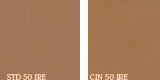
Pretty close, yes? But this is what they look like, when you get to 80 IRE:
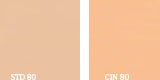
The one on the left is graying out, whereas the one on the right still has the same proportion of color and the same vibrancy.
However, if you push it further, the one on the left will continue to pastel out to white, whereas the one on the right is going to go yellowish.
Not saying which is right or wrong, but if you want the most accurate colors, you'd want cinema. If you want to have the camera change colors on you but by doing so minimize the appearance of yellow highlights in skin tones, you'd want standard.
First things first -- in most modes, the GH2 does perform differently. But, curiously enough, in the "Cinema" mode, it performs exactly the same way the AF100 does (and, presumably, the same way all the Panasonic AG-series cameras do). Perhaps that's why so many folks like the "Cinema" gamma on the GH2?
In any case -- in CINEMA mode, it maintains a ratio of approximately 1.33x red as compared to green, and approximately 1.30x green as compared to blue, and it maintains that all the way up until the red clips at 82 IRE. Any higher than that and the red stays clipped, and the green and blue march up linearly and in proportion, and the highlights start going yellow. At 90 IRE, the red is totally clipped, the green is at 90, and the blue is at 68. The sampled RGB is 254/228/173, and that yields a ratio of red at 1.03x green, and green at 1.32x blue. And yes, it's yellow.
So, what does it do in the other gammas? It compresses the range of the ratio, across the whole exposure curve. For example, here's what Standard gamma does. When you start out, at a reasonably low IRE, it has a ratio of red = 1.42x green, and green is 1.59x blue. When you raise the exposure to 70 IRE, the ratios have shrunk - dramatically. Red is now only 1.25x as much as green, and green is 1.26x as much as blue(!) Take it further, to 80 IRE, and now the ratio of red to green has shrunk to 1.21x, and green to blue is down to 1.19x. At 88 IRE the red clips completely, at a ratio of 1.19x green, and green is 1.18x blue. So as the exposure goes up, it compresses the difference between the color channels, and that inherently changes the color. It isn't going yellow though because the red hasn't clipped yet, but the balance of red to green, and of green to blue, has changed dramatically. The colors lose their saturation and start to go pasty.
Here's what STANDARD vs CINEMA looks like, when at 50 IRE:
Pretty close, yes? But this is what they look like, when you get to 80 IRE:
The one on the left is graying out, whereas the one on the right still has the same proportion of color and the same vibrancy.
However, if you push it further, the one on the left will continue to pastel out to white, whereas the one on the right is going to go yellowish.
Not saying which is right or wrong, but if you want the most accurate colors, you'd want cinema. If you want to have the camera change colors on you but by doing so minimize the appearance of yellow highlights in skin tones, you'd want standard.
Barry_Green
Moderator
Agreed. And in those situations you may have to go to CINE-D and drop the chroma level some if you want to even out the colors.I understand what you are saying on a perfectly controlled set but sadly there are many situations where on doesn't have the control they would like.
Okay, tested the GH2 in a few different gamma modes.
First things first -- in most modes, the GH2 does perform differently. But, curiously enough, in the "Cinema" mode, it performs exactly the same way the AF100 does (and, presumably, the same way all the Panasonic AG-series cameras do). Perhaps that's why so many folks like the "Cinema" gamma on the GH2?
Not saying which is right or wrong, but if you want the most accurate colors, you'd want cinema. If you want to have the camera change colors on you but by doing so minimize the appearance of yellow highlights in skin tones, you'd want standard.
Wow, my experience shooting with the GH2 now makes sense. I did a test between "Cinema" and "Smooth" film modes shooting clouds that in real life were yellow. In "Smooth" mode the sky was blue but the clouds were white (but not overexposed). In "Cinema" mode the sky was blue and the clouds were yellow just like they appeared in reality.
On another note about chroma clipping, I had a JVC HM700 for awhile. When I first tweaked it, I naively set the color matrix to "Cinema" and boosted the chroma a bit. On many shots that looked great, but I noticed red lights like stoplights and taillights did the exact same bizarre thing as Art Adams mentioned in his AF100 review. My solution was to set the color matrix to normal and leave the saturation at default level. After that, I never had a skin tone or chroma clipping problem again. It sounds like the AF100 will benefit from a similar practice (i.e. stay away from the Cinelike color matrix unless you are in a very controlled lighting environment.)
Thanks for this, Barry. I've been trying (and failing) to explain this issue in previous posts- your tests, with the numbers, make it all plain. (Data trumps vague waffling explanation- who'd a thunk it? :shocked:  rogar-Happy(DBG): :shocked
My concern with AF100 footage is that I really want to get skin tones up at 80% or even higher, because that gives actresses the gorgeous glow that is my trademark for stills photos, and I want my movies to look kinda like my stills.
On the HVX200, I shot "correct for the scene but underexposed for the look" and pulled up in post (making sure I did so in a high-bit environment).
On the AF100 I am finding that shooting correct for the scene but underexposed for the look is a much dicier proposition. I don't know what combination of settings, codec, post production and my inexperience with the camera are doing it but I'm finding posterisation rears its ugly head if I start pulling the footage around too much. I really want to get my skin tones at 80% or even 85%, but when I do that, the darker mids start posterising... and if I've shot the skin tones higher, they clip in red in camera so the colour rendition is off. As I also want an S-shaped curve, I've been trying B-Press instead of CINE_D (which is all I ever used on the HVX200) just because the AF100 footage falls apart so much more rapidly than the HVX200's did under fairly extreme grading.
Next step is to pull down the chroma level and see if it brings me any more benefit, many thanks for that tip... and I might try CINE_D again and see if I can fix the posterisation issues in post, because skin tones on actresses is my bread and butter and that needs to be right.
I'm going to see if I can beg, borrow or hire a nanoflash, I think, and see if I'm one of the people who would benefit from a higher bit rate codec to work from so I can have more freedom in post. Could Barry or anyone with a Nanoflash or other high bit rate external recorder try an experiment to quantify how much more latitude it gives one in the grade??
Cheers, Hywel.
rogar-Happy(DBG): :shockedMy concern with AF100 footage is that I really want to get skin tones up at 80% or even higher, because that gives actresses the gorgeous glow that is my trademark for stills photos, and I want my movies to look kinda like my stills.
On the HVX200, I shot "correct for the scene but underexposed for the look" and pulled up in post (making sure I did so in a high-bit environment).
On the AF100 I am finding that shooting correct for the scene but underexposed for the look is a much dicier proposition. I don't know what combination of settings, codec, post production and my inexperience with the camera are doing it but I'm finding posterisation rears its ugly head if I start pulling the footage around too much. I really want to get my skin tones at 80% or even 85%, but when I do that, the darker mids start posterising... and if I've shot the skin tones higher, they clip in red in camera so the colour rendition is off. As I also want an S-shaped curve, I've been trying B-Press instead of CINE_D (which is all I ever used on the HVX200) just because the AF100 footage falls apart so much more rapidly than the HVX200's did under fairly extreme grading.
Next step is to pull down the chroma level and see if it brings me any more benefit, many thanks for that tip... and I might try CINE_D again and see if I can fix the posterisation issues in post, because skin tones on actresses is my bread and butter and that needs to be right.
I'm going to see if I can beg, borrow or hire a nanoflash, I think, and see if I'm one of the people who would benefit from a higher bit rate codec to work from so I can have more freedom in post. Could Barry or anyone with a Nanoflash or other high bit rate external recorder try an experiment to quantify how much more latitude it gives one in the grade??
Cheers, Hywel.

Incredible Barry. This must have taken a good chunk of time.

Alpha Beta Omega
Veteran
Wow, the best thread this year! Great test Barry!
Matt Gottshalk
Resident Preditor
Thanks for this, Barry. I've been trying (and failing) to explain this issue in previous posts- your tests, with the numbers, make it all plain. (Data trumps vague waffling explanation- who'd a thunk it? :shocked:
My concern with AF100 footage is that I really want to get skin tones up at 80% or even higher, because that gives actresses the gorgeous glow that is my trademark for stills photos, and I want my movies to look kinda like my stills.
I would recommend you keep the skintones at 65-70 as suggested and do whatever "glow" in post.