Mike Lakefield
Member
Hey all!
I thought I could made it out with Premiere Elements with editing 7d:s footage. I have now tested it two months and my conclusions are:
1. Crashes, unstable editing, more crashes and unstable finishing
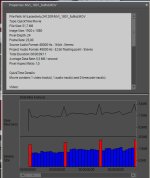
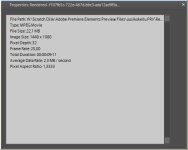
2. Native editing uses hdv codec (1440x1080 with 1.333 pixel aspect ratio)
3. No possibility to customize user settings
I made quite a lot of progress with issue number one with using mpegstreamclip and avids DNxHD codec and with Neoscene codec when I used my tryout time. Also getting latest drivers helped a bit as you know. But still there is lots of unexplained crashes and hard to find out what causes them. Sometimes it helps when I remove transition or some color correction. Now the stability of editing is somewhat in a reasonable level but I am happy I am not making my living from this (and somewhat sad from another reason ;-) .
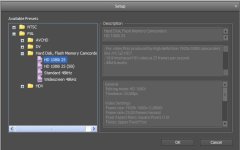
The second one is harder part for me to swallow: I just found out when I begin to suspect the format of rendering that everything wasnt right when editing full hd with fullhd setting. The result was that PrE8 uses hdv editing mode which is downscaling 1920x1080 with 1.0 pixel aspect ratio to 1440x1080 with 1.333 pixel aspect ratio. The finalizing is then rendered again to full hd with upscaling. Usually my finalizing isn´t finished.
And the last part. I just don´t know why there is no real full hd editing (as it claims in custom program settings). All editing happens in hdv mode instead of real full hd. But, there is real 720p editing.
So my choises seem look like this:
1. Start saving money for the Premiere Pro
2. Turn towards Mac and FCP (and start saving even more money)
3. Edit in 720p mode because it is real 720p
4. Edit in "FullHD" mode and try to convert it back to more real FullHD
So what would you say: is it really bad to convert from 1440x1080 1.333 to real full hd 1920x1080 1.0 or should I just use 720p. Do you have solution for editing 7d footage in windows? And Mac-users, do you have had a single FCP-crash during your editing time?
Free discussion opened!
-Mike
I thought I could made it out with Premiere Elements with editing 7d:s footage. I have now tested it two months and my conclusions are:
1. Crashes, unstable editing, more crashes and unstable finishing
2. Native editing uses hdv codec (1440x1080 with 1.333 pixel aspect ratio)
3. No possibility to customize user settings
I made quite a lot of progress with issue number one with using mpegstreamclip and avids DNxHD codec and with Neoscene codec when I used my tryout time. Also getting latest drivers helped a bit as you know. But still there is lots of unexplained crashes and hard to find out what causes them. Sometimes it helps when I remove transition or some color correction. Now the stability of editing is somewhat in a reasonable level but I am happy I am not making my living from this (and somewhat sad from another reason ;-) .
The second one is harder part for me to swallow: I just found out when I begin to suspect the format of rendering that everything wasnt right when editing full hd with fullhd setting. The result was that PrE8 uses hdv editing mode which is downscaling 1920x1080 with 1.0 pixel aspect ratio to 1440x1080 with 1.333 pixel aspect ratio. The finalizing is then rendered again to full hd with upscaling. Usually my finalizing isn´t finished.
And the last part. I just don´t know why there is no real full hd editing (as it claims in custom program settings). All editing happens in hdv mode instead of real full hd. But, there is real 720p editing.
So my choises seem look like this:
1. Start saving money for the Premiere Pro
2. Turn towards Mac and FCP (and start saving even more money)
3. Edit in 720p mode because it is real 720p
4. Edit in "FullHD" mode and try to convert it back to more real FullHD
So what would you say: is it really bad to convert from 1440x1080 1.333 to real full hd 1920x1080 1.0 or should I just use 720p. Do you have solution for editing 7d footage in windows? And Mac-users, do you have had a single FCP-crash during your editing time?
Free discussion opened!
-Mike