galangstar
Member
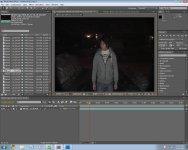
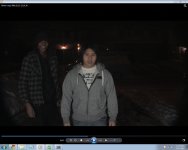
For two years now ive been having this problem, Ive just discovered forums and thought that its a great place to ask my question. I own a canon xh a1 and export using hdv split. Everytime i upload and edit using after effects, the image looks squished vertically.
I uploaded an image of the footage on after effects (left)
and an image of how it should look like(right).
When i export screen shot off after effects its squished and every time i export using 16:9 anamorphic 1.33 its still squished. Is this normal?
I use adobe premiere and it works perfectly fine for me with no problems. After effects is another story.
I uploaded an image of the footage on after effects (left)
and an image of how it should look like(right).
When i export screen shot off after effects its squished and every time i export using 16:9 anamorphic 1.33 its still squished. Is this normal?
I use adobe premiere and it works perfectly fine for me with no problems. After effects is another story.